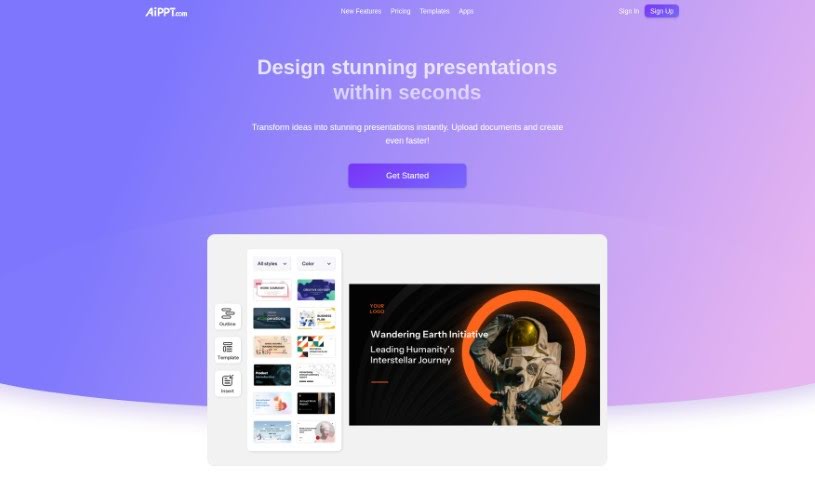
Screenshot of AiPPT

AiPPT

Discover what AiPPT is and how to use it effectively in 2025. We'll explore its features and see how it stacks up against other presentation makers.

Screenshot

What is AiPPT?

AiPPT is a handy toolkit that uses AI to make creating and improving your PowerPoint or Google Slides presentations much simpler. You can easily get presentation outlines, structure your documents, and even turn different file types into slides with just one click. Plus, AiPPT offers a bunch of presentation templates, so you can quickly give your slides a polished look. It also includes features like automatic text generation and easy online editing. This makes it a great tool for all sorts of people, from sales reps and students to entrepreneurs, helping them boost their presentation skills and get more done.

Who created AiPPT?

AiPPT was launched by an anonymous founder on October 27, 2023. The company behind it offers an AI-powered presentation toolkit designed to simplify the process of creating and enhancing professional PowerPoint and Google Slides. Users can take advantage of features like an AI assistant that helps generate presentation outlines, structure documents, and convert various file formats into presentations with a single click. The tool also provides a wide array of presentation templates. It’s built to help users in fields like sales, education, and entrepreneurship improve their presentation abilities and overall productivity.

What is AiPPT used for?

  • It helps you get better at making presentations.
  • It makes your work more efficient.
  • You can generate rich, attractive PowerPoint course materials based on your syllabus.
  • Creating presentations becomes simple with one-click generation.
  • Easily convert different document types into PowerPoint or Google Slides in a snap.
  • A wide variety of presentation templates are available to help you transition smoothly.
  • Boost your work efficiency so you can focus more on marketing strategy and creating professional PowerPoints.
  • Make your project presentations stand out to investors.
  • It helps organize your thoughts and saves you time when writing content.
  • Create professional courseware.
  • Achieve automatic generation of both text and PowerPoint slides.
  • Make your reports pop and look fantastic.
  • Enjoy the simplicity of automatically generating copy and PowerPoint slides.
  • Improve work efficiency and concentrate on marketing planning.
  • Create unique, high-quality presentations without much effort.
  • Get help generating presentation outlines and structuring your documents.
  • The presentation creation process is simplified with one-click generation.
  • Easily transform various document formats into PowerPoint or Google Slides.
  • A broad selection of presentation templates is available for smooth transitions.
  • Enhance presentation skills and productivity for various user needs.
  • Sales representatives can create effective PowerPoint presentations.
  • Generate beautiful and comprehensive PowerPoint courseware tailored to a syllabus.
  • Improve work efficiency and dedicate more time to marketing planning.
  • Entrepreneurs can get assistance making project presentations that impress investors.
  • Students can create reports for class that look visually appealing.
  • Organize your thoughts and save valuable time when composing content.
  • Create and enhance professional PowerPoint presentations or Google Slides.
  • Effortlessly craft and refine slide templates.
  • Generate presentation outlines and structure documents with AI assistance.
  • Transform various document formats into PowerPoint or Google Slides with a single click.
  • Generate rich and attractive PowerPoint courseware for your syllabus.
  • Improve work efficiency and focus on marketing planning.
  • Create professional PowerPoints for students in class.
  • Make project presentations that impress investors.
  • Offers convenience for those who create PowerPoints frequently.
  • Enhance professional PowerPoint or Google Slides presentations.
  • Effortlessly create and improve slide templates.
  • Transform various document formats into PowerPoint or Google Slides.
  • Craft presentations designed to impress investors.
  • Make reports for class.
  • Generate professional PowerPoint courseware according to the syllabus.
  • Automatically create both copy and PowerPoint slides.
  • Dress up your presentations with a variety of styles and themes.
  • Efficiently structure documents and outlines.
  • Focus more on marketing planning.
  • Improve communication with customers.

Who is AiPPT for?

  • Sales Representatives
  • Entrepreneurs
  • Students

How to use AiPPT?

Here’s how you can use AiPPT to create great presentations:

  1. Enter Your Title: Start by typing in the title for your presentation.
  2. One-Click Creation: Generate your entire presentation with just a single click.
  3. Get an Outline: Let the AI create a presentation outline for you.
  4. Structure & Copy: Use the smart features for structuring documents and writing copy.
  5. Convert Formats: Easily turn different document types into PowerPoint or Google Slides in seconds.
  6. Pick a Template: Choose from a wide selection of presentation templates to give your slides a professional look.
  7. Easy Editing: Make your presentation look its best effortlessly by switching between templates instantly.
  8. Explore Showcase Themes: Check out special themes like business growth, social responsibility, team building, and more.
  9. See What Users Say: Get insights from users who have boosted their efficiency, improved their presentation quality, and impressed their audiences using AiPPT.
  10. Features for Everyone: Whether you’re in sales, studying, or running a business, AiPPT has features like automatic copy generation and easy online editing to suit your needs.
  11. Final Touches: Make the most of this advanced AI toolkit that simplifies presentation creation, refines your slides, and saves you time with its efficiency-boosting features.

Follow these steps to use AiPPT’s AI capabilities and create professional, captivating presentations with ease.

Related AI Tools

Discover more tools in similar categories that might interest you

Stay Updated with AI Tools

Get weekly updates on the latest AI tools, trends, and insights delivered to your inbox

Join 25,000+ AI enthusiasts. No spam, unsubscribe anytime.