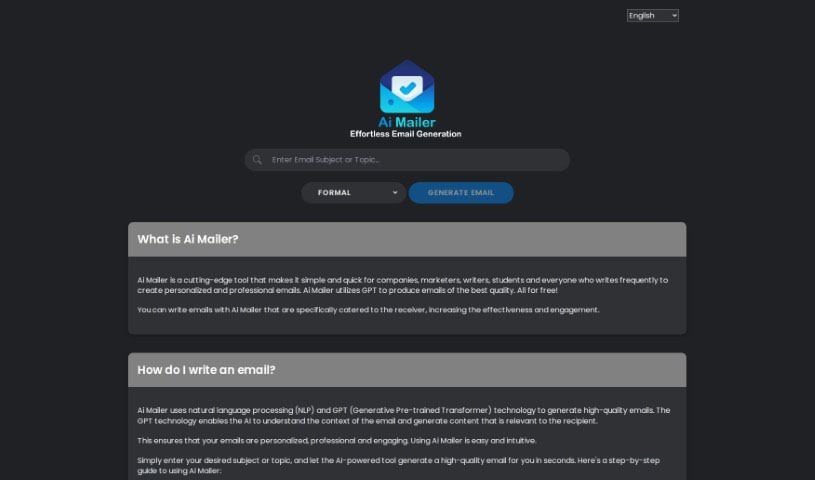
Screenshot of AI Mailer

AI Mailer

Discover what AI Mailer is and learn how to use it effectively in 2025. We'll explore its features and see how it stacks up against other Email Writing Tools.

Screenshot

What is AI Mailer?

AI Mailer is a smart platform that helps people, businesses, marketers, and writers create great emails – the kind that feel personal and engaging – really fast. It uses advanced AI, specifically GPT (Generative Pre-trained Transformer) and NLP (Natural Language Processing) technologies. It reads your email’s context and then crafts content that really connects with the person receiving it, making sure everything makes sense and fits the situation. Plus, they’re serious about your privacy; they don’t collect your personal info and use top-notch encryption to keep your data safe. The best part? AI Mailer is free to use and supports many languages, which is a huge help for communicating better and improving customer service.

It’s designed to be super easy to use, with an interface that lets you customize your emails just how you like them. And since it’s a responsive web design, you can generate emails smoothly from pretty much anywhere. This tool means you don’t have to spend hours writing emails yourself, saving you both time and money. AI Mailer can help with all sorts of email needs, from writing job applications to just general correspondence. It even offers a light or dark theme, so you can pick what’s comfortable for your eyes. Emails are generated in a flash, usually within seconds, and the AI ensures they’re always consistent and professional, thanks to that NLP and GPT power. You can access AI Mailer from any modern browser – no special software or browser needed, making it super accessible for everyone.

Who created AI Mailer?

AI Mailer first launched on March 7, 2023, and it was created by Chris Smith. The company behind it is all about building AI tools that make email communication easier, especially for folks like individuals, businesses, marketers, and writers who send a lot of emails. They use AI tech, including GPT (Generative Pre-trained Transformer) and NLP (Natural Language Processing), to whip up emails that are personalized, sound professional, and really engage the recipient. The goal is to make communication better and build stronger connections.

What is AI Mailer used for?

Here’s a quick rundown of what AI Mailer helps with:

  • Making customer service even better
  • Improving how you communicate overall
  • Boosting customer service quality (yes, it’s that important!)
  • Supporting all sorts of different email conversations
  • Helping you save precious time and money
  • Crafting those important job application emails
  • Offering a choice between a light or dark theme for your screen
  • Assisting you in creating emails that feel truly personal
  • Not needing a specific browser to work its magic
  • Providing support for multiple users at once

Who is AI Mailer for?

AI Mailer is a great tool for:

  • Individuals
  • Businesses of all sizes
  • Marketers looking to connect with their audience
  • Writers who need to communicate effectively

How to use AI Mailer?

Using AI Mailer is pretty straightforward. Here’s how you can get the most out of it:

  1. First, just open up the AI Mailer web app in your favorite browser. It’s designed to work anywhere.
  2. Next, you’ll see a spot to enter the subject or topic for the email you want to write. Just type it in there.
  3. Once you’ve got your topic, hit that ‘Generate Email’ button.
  4. AI Mailer will then quickly create a natural-sounding email for you, usually in just a few seconds.
  5. You have two options: either click the ‘Copy to Clipboard’ button to grab the email and paste it where you need it, or if you want to start fresh with a new email, just press ‘Reset’.

AI Mailer really makes sure your emails are consistent and sound professional. It uses NLP and GPT technologies to grasp the context and then creates personalized, accurate content. It’s also great because it supports multiple languages and lets you customize things to make your emails just right. Plus, they really care about user privacy, it’s free to use, and it helps save businesses time and money, making communication much more efficient. You can even use it to generate different kinds of emails, like those job application ones, and it has a light/dark mode. While there isn’t a dedicated mobile app, the web app is responsive, so it should give you a good experience on your phone too.

Related AI Tools

Discover more tools in similar categories that might interest you

Stay Updated with AI Tools

Get weekly updates on the latest AI tools, trends, and insights delivered to your inbox

Join 25,000+ AI enthusiasts. No spam, unsubscribe anytime.