What is AI Excel Bot?
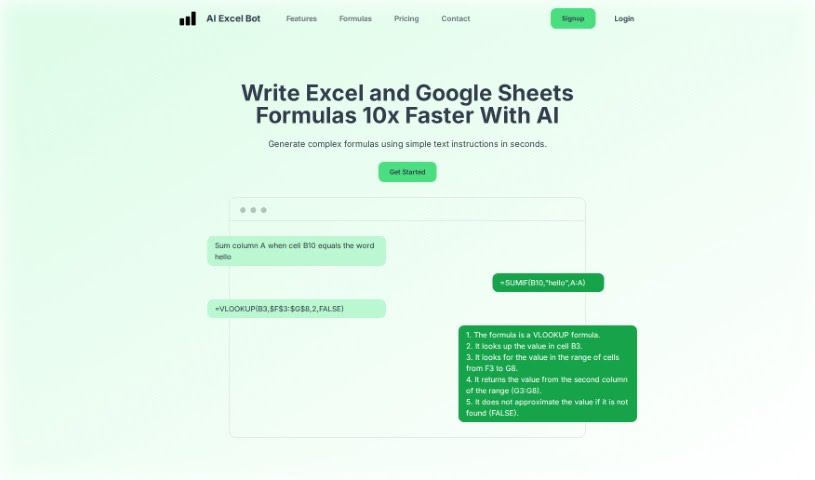
AI Excel Bot is a really handy tool that helps you create and understand complicated Excel formulas super fast, right within your spreadsheets. This smart AI-powered bot makes managing Excel files, VBA scripts, and even Google Sheets much simpler. You can try it out for free, or go for the advanced AI tools if you need to tackle really complex formulas. It lets you create custom Excel formulas just by typing what you need. It’s super easy to use, whether you’re just starting out with Excel or you’re a seasoned pro. Plus, it’s a budget-friendly way to get those custom formulas without needing tons of experience. By using AI, AI Excel Bot totally changes how you handle spreadsheets, making it way easier to get a handle on tricky formulas, manage your data, and get tasks done efficiently.
Who created AI Excel Bot?
AI Excel Bot was developed by an innovative founder who’s created a complete solution to make managing Excel much easier. This bot uses AI technology to let users quickly create and understand complex formulas. The company behind AI Excel Bot offers both free and advanced AI tools, all designed for Excel users at any skill level. By embracing AI, AI Excel Bot really shakes up spreadsheet management, making it more efficient and helping to cut down on errors.
What is AI Excel Bot used for?
- Quickly create complex formulas using simple text instructions.
- Easily generate formulas for Excel or Google Sheets just by typing what you need.
- Understand complicated formulas without all the head-scratching.
- VBA code support: AI Excel Bot can write VBA code and explain it in seconds.
- Chrome Addon: Use the power of AI without ever leaving Google Sheets or Excel.
- Simple Pricing: Get free limited access, or a Pro option for full access.
- Analyze spreadsheets and generate data reports with the help of this AI-powered Excel Formula Bot.
- It’s a complete solution for handling complex formulas, providing tailored responses.
- Uses AI technology to turn your text into Excel formulas, perfect for beginners and experienced users alike.
- Offers Excel AI tools that are changing spreadsheet management, helping automate tasks, and develop VBA scripts.
- Understand complex formulas with AI assistance.
- Get support for VBA code.
- Use the Excel Addon without leaving Google Sheets or Excel.
- Features simple pricing with different access levels.
- It’s revolutionizing spreadsheet management with Excel AI tools.
- Simplify spreadsheet management and make sense of complex formulas using AI.
- Automate tasks and understand complex formulas with AI Excel Bot.
- Develop VBA scripts to streamline your workflow with AI Excel Bot.
- Understand complex formulas with help from AI.
- VBA Code Support: Write VBA and get explanations in seconds.
- Access the power of AI without leaving Google Sheets or Excel.
- AI Excel Bot offers a comprehensive solution for handling complex formulas.
- Transform text into Excel formulas using AI technology.
- Automate tasks and develop VBA scripts to streamline your workflow.
- Simplify spreadsheet management and make sense of complex formulas.
Who is AI Excel Bot for?
- Anyone who uses Excel
- Data Analysts
- Business professionals
- VBA developers
- Google Sheets users
- Business analysts
- Financial Analysts
How to use AI Excel Bot?
Using AI Excel Bot is pretty straightforward. Just follow these steps:
- Install the Chrome Addon: Add the AI Excel Bot Chrome extension to your browser. This lets you access it easily without leaving Google Sheets or Excel.
- Choose Your Plan: Pick the plan that works best for you. There’s a free version with limited access, or the Pro version for full capabilities.
- Generate Formulas: Type in what you need, and the bot will quickly generate complex formulas. For instance, you could type something like “Sum column A when cell B10 equals the word hello” and get the formula you need.
- Understand Complex Formulas: Let the AI help you figure out and understand complicated Excel or Google Sheets formulas right away.
- VBA Code Support: Save yourself time by letting AI Excel Bot write VBA code for you and explain what it does.
- Access More Features: Depending on your plan, you might get unlimited formula generation, explanations for VBA code and tasks, and priority support.
- Contact Support: If you run into any technical issues or have feedback, don’t hesitate to reach out to the founder for help.
By following these steps, you can really use AI Excel Bot to make generating formulas easier, understand complex formulas better, and boost your productivity when you’re working with Excel files and Google Sheets.