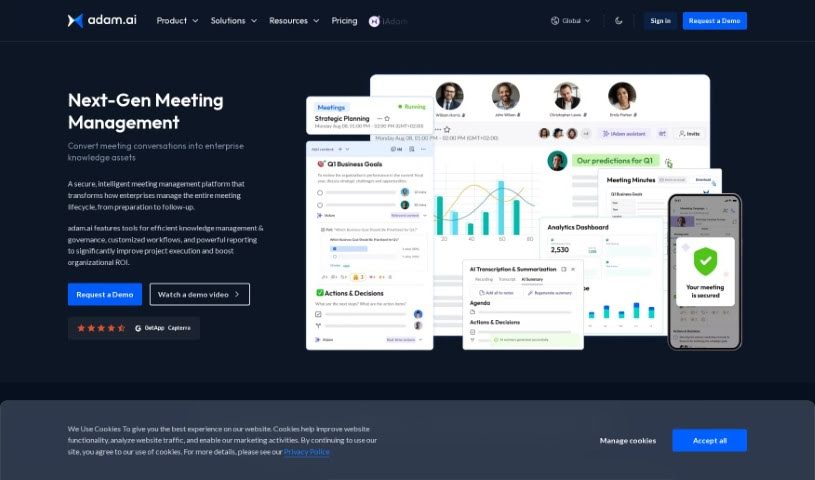
What is Adam.ai?
Adam.ai is a really comprehensive platform for managing projects, designed to make teamwork and communication much smoother for your team. It’s packed with features that help you assign and keep track of tasks, manage your documents, create meeting minutes, and even connect with popular tools like Google Drive and Slack. The whole idea behind Adam.ai is to boost productivity by keeping all your project-related information in one central spot and making it easy for everyone on the team to collaborate in real-time. It’s got a user-friendly interface and really focuses on efficiency, helping teams stay organized, be more transparent, and ultimately nail their project goals through great communication and task management.
Who created Adam.ai?
Adam.ai was actually started by a group of tech enthusiasts, with Wael M. Taleb leading the charge as the CEO and Founder. This company really specializes in solutions for meetings and project management. They offer handy features like managing agendas, taking minutes, and assigning tasks. Essentially, Adam.ai aims to make collaboration and decision-making within organizations much simpler and more effective, all thanks to their innovative platform.
What is Adam.ai used for?
Adam.ai is incredibly versatile and can be used for a whole range of things:
- Getting insights through analytics and reporting.
- Managing your projects from start to finish.
- Keeping a clear record of everything discussed in meetings.
- Connecting with the tools you already use.
- Making meeting management easy, even on your phone.
- Using an AI meeting assistant to capture and document everything that happens in meetings.
- Getting suggestions and insights in real-time while you’re in a meeting.
- Handling follow-ups and reminders after meetings.
- Creating smart meeting minutes that are easy to approve.
- Managing and delegating action items that come out of meetings.
- Building agendas and managing them effectively.
- Simply taking notes during discussions.
- Uploading files and presentations right into your meeting context.
- Taking notes that are either public for everyone or private for your eyes only.
- Letting attendees chat with each other during the meeting.
- Keeping all your document content in one place for easy future reference.
- Integrating the tools you already use into your meeting workflow.
- Capturing and managing all the knowledge related to your meetings.
- Centralizing everything you do before, during, and after meetings into a single platform.
- Turning your meeting content into valuable business assets.
- Ensuring your business achieves successful outcomes by managing meetings effectively.
- Creating new meetings with ease.
- Editing the details of your meetings.
- Joining calls directly from the platform.
- Managing action items that arise from discussions.
- Handling committee management tasks.
- Managing meetings specifically for Boards of Directors.
- Capturing and documenting all meeting content thoroughly.
- Getting AI-powered transcriptions and summaries for your meetings.
- It captures and documents absolutely all meeting content.
- It helps link different content items together, making connections clear.
- It generates useful meeting insights for reporting purposes.
- It sends proactive suggestions to you before, during, and after meetings.
- It really streamlines those post-meeting follow-ups and reminders.
- It makes sure that discussions actually lead to clear, actionable outcomes.
- It connects decisions made in the boardroom directly with the organization’s long-term goals.
- It empowers committee managers with the tools they need for effective and organized meetings.
- It tracks progress and keeps members accountable through meeting minutes and follow-up actions.
- It integrates with your existing tools, creating a smooth meeting workflow.
Who is Adam.ai for?
Adam.ai is a great tool for a variety of professionals, including:
- Project Managers
- Team Leaders
- Software Developers
- Marketing Specialists
- Product Managers
- Business Analysts
- Human Resources Managers
- Graphic Designers
- Consultants
- Remote Team Members
How to use Adam.ai?
To get the most out of Adam.ai, here’s a simple step-by-step guide:
- Create an Account: First things first, sign up on the Adam.ai platform. You can use your email or your Google account to get started.
- Start a Project: Once you’re in, click on “Start a Project.” This is where you’ll set up a new space to manage all your tasks, documents, and how your team collaborates.
- Add Tasks: Inside your project, adding tasks is easy. Just click the ”+” button, then fill in the details like the task name, a description, when it’s due, and who’s responsible for it.
- Upload Documents: You can upload any relevant documents directly to your project. Click the document icon and then just select the files from your computer.
- Collaborate with Team: To bring your team in, invite them by entering their email addresses. They’ll get an invitation to join the project and start contributing.
- Track Progress: Keep an eye on how tasks are moving along. You can see what’s done, what’s still pending, and what deadlines are coming up.
- Schedule Meetings: Use the built-in calendar feature to plan your meetings. You can set reminders and make sure everyone’s coordinated effectively.
- Integrate with Other Tools: Don’t forget to check out the option to connect Adam.ai with other tools you use, like Google Drive, Slack, or Trello. This really helps create a seamless workflow.
- Generate Reports: Take advantage of the reporting feature to get valuable insights into how your project is performing, how tasks are being completed, and your overall productivity.
- Stay Organized: Make it a habit to update and maintain your project dashboard regularly. Keep all your information current, and encourage your team to use Adam.ai consistently. This is key for streamlined communication and better collaboration.