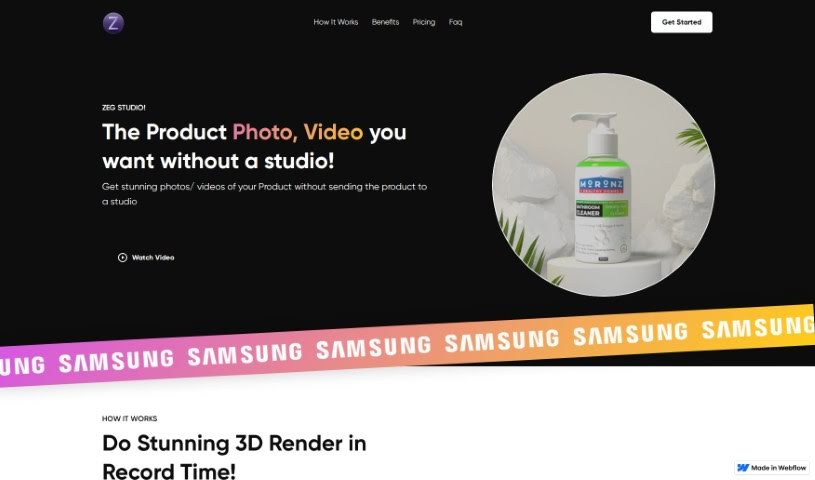
Screenshot of Zeg Ai

Zeg Ai

Discover what Zeg Ai is and how to use it effectively in 2025. We'll explore its features and see how it stacks up against other Product Design Tools.

Screenshot

What is Zeg Ai?

ZEG Ai is a really neat platform that lets you create product photos and 3D models without needing to learn any complicated 3D modeling software. It’s actually billed as the world’s first 3D app designed for everyone. You can build a 3D model using just 1 to 3 images of your product. Once you’ve got that 3D model, you can then place your products virtually in all sorts of cool scenes – think beaches, mountains, or whatever fits your brand – to create some truly stunning imagery. ZEG was built using AI technologies like MESHCODEX, opencv, and webgl, among others. The platform offers some great features, including virtual photography that has a zero carbon footprint, really high-quality 3D renderings, a wide variety of templates to choose from, plenty of customization options, and a super efficient way to visualize products without needing to make any physical prototypes. Essentially, ZEG Studio is all about providing a sustainable and innovative way to create product visuals quickly and effectively.

Who created Zeg Ai?

Zeg Ai was developed using AI-generated technology, specifically mentioning MESHCODEX, opencv, and webgl. The company behind it was founded with the goal of creating a platform where people can build product photos and 3D models without needing any special 3D modeling skills. The process is pretty straightforward: users can create 3D models from just 1 to 3 images and then place their products virtually in different scenes to get amazing visuals. Zeg Ai really aims to change how we do product visualization, making it possible without the hassle of physical prototypes, and offering a solution that’s both sustainable and innovative.

What is Zeg Ai used for?

  • You can build product photos and 3D models without needing to learn 3D modeling.
  • It lets you generate 3D models really fast, using just 1 to 3 images.
  • You can place your products virtually in any scene you like for stunning imagery.
  • It helps you produce high-quality product photos and videos without needing a physical studio.
  • You can easily customize your images by adding your company logo or text.
  • It’s great for efficiently testing new ideas and visualizing products without making physical prototypes.
  • Zero Carbon Footprint: You can embrace sustainability with ZEG studio’s desktop-based solution, which means no physical studio is needed.
  • High-Quality 3D Renderings: Get stunning 3D photos ready for any platform, all from your desktop.
  • Extensive Template Selection: Access a growing library of templates to create images that really match your brand.
  • Customization Options: It’s easy to add your company logo or text to personalize your product visuals.
  • Efficient Process: You can test new ideas and visualize products without needing a physical prototype.
  • You can create virtual product scenes for stunning imagery, cutting out the need to ship products or props.
  • It helps you generate high-quality 3D renderings of your products.
  • You can easily customize product visuals with your logo or text.
  • It’s a sustainable way to create product photos and videos with a zero carbon footprint.
  • You get access to a variety of templates for brand-specific images.
  • You can add your company logo or text to personalize product visuals.
  • It encourages innovative and sustainable production processes.
  • You can produce impactful visuals for your marketing efforts.
  • It allows you to create 3D models using just 1-3 images.
  • You can place products virtually in different scenes for stunning imagery.
  • It helps generate high-quality product photos and videos without a physical studio.
  • You can get 3D renderings of products in a fraction of the time.
  • You can customize product visuals with your company logo or text.
  • It’s useful for testing new ideas and visualizing products without physical prototypes.
  • You can embrace sustainability with zero carbon footprint virtual photography.
  • It helps enhance your marketing with impactful visuals.
  • It offers fast generation of 3D models using 1-3 images.

Who is Zeg Ai for?

  • Product photographers
  • 3D designers
  • Marketing professionals
  • E-commerce businesses
  • 3D modelers
  • Brand managers

How to use Zeg Ai?

Using Zeg Ai is pretty straightforward. Here’s a simple breakdown of the steps:

  1. Access Zeg Ai Studio: First, head over to the Zeg Ai website and find your way to Zeg Ai Studio.
  2. Upload Images: You’ll start by uploading 1 to 3 images of your product. This is what Zeg Ai uses to create a 3D model.
  3. Build 3D Model: Zeg Ai’s AI technology quickly generates a 3D model of your product. The best part? You don’t need any prior 3D modeling knowledge at all.
  4. Virtual Placement: Once your 3D model is ready, you can virtually place your product in all sorts of different scenes – like a beach or a mountain – to create stunning imagery.
  5. Customization: Want to add your own touch? You can enhance your images by adding your company logo or text to personalize them.
  6. Download and Share: Finally, you can download the finished high-quality 4K photos effortlessly and share them across all your media channels.
  7. Explore Features: Take some time to explore Zeg Ai’s other features, such as its zero carbon footprint approach, the extensive template selection, and the various customization options that can really enhance your experience.
  8. Consider Pricing: It’s also a good idea to check out the pricing plans Zeg Ai offers. These plans can give you access to additional features like 3D models for NFTs, 30-second videos, and even more customization options if you’re looking for enterprise-level solutions.

By following these steps, you can easily use Zeg Ai to create professional product photos and videos in a way that’s both efficient and sustainable.

Related AI Tools

Discover more tools in similar categories that might interest you

123RF AI Image Generator

Creative Image Generation
Learn More

Stay Updated with AI Tools

Get weekly updates on the latest AI tools, trends, and insights delivered to your inbox

Join 25,000+ AI enthusiasts. No spam, unsubscribe anytime.