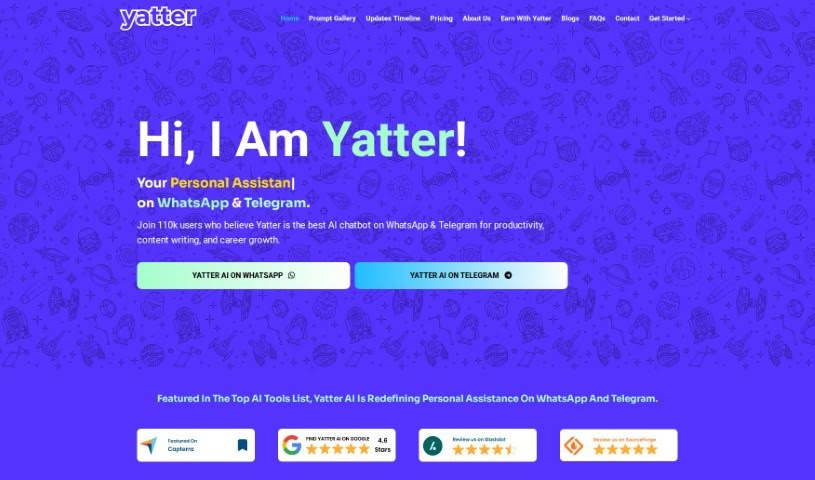
Screenshot of Yatter AI

Yatter AI

Discover Yatter AI in 2025! Learn what this ChatGPT-4 powered assistant is, how to use its features like voice chat and image text detection on WhatsApp and Telegram, and how it compares to other AI assistants.

Screenshot

What is Yatter AI?

Yatter AI is a really neat AI assistant that uses ChatGPT-4. It lets you have some pretty amazing conversations right through WhatsApp and Telegram. It is your go-to helper for instant support, information, and just making things more convenient. You can chat with it using your voice, have it read text from images, get live weather updates, enjoy chats tailored just for you, and even communicate in different languages. You get 15 free interactions to start, and if you like it, you can upgrade to Yatter Plus for unlimited access, plus some extra cool features and priority help. The company behind Yatter AI is Infokey Technology Private Limited. They’re all about making digital interactions simpler and improving how we use technology with smart, new solutions.

Who created Yatter AI?

Yatter AI was actually developed by Infokey Technology Private Limited. They’re a software company that really focuses on innovation and doing great work. Infokey created Yatter because they wanted to make AI something everyone could use, no matter where they are or when they need it. The idea was to take the power of ChatGPT and turn it into a helpful chat companion for people all over the world. Infokey, as Yatter’s parent company, is dedicated to giving both businesses and individuals the tools they need through transformative software and services, always pushing the envelope in technology.

What is Yatter AI used for?

Yatter AI is incredibly versatile! Here’s a look at what you can do with it:

  • Advanced Features: Get access to a range of powerful tools.
  • Personalized Chat Experiences: Enjoy conversations that feel tailored to you.
  • Enhanced Productivity: Streamline your tasks and get more done.
  • Multilingual Support: Communicate easily in many different languages.
  • Real-Time Weather Updates: Stay informed about the weather wherever you are.
  • Voice Chat Messaging: Send voice notes and have them converted to text.
  • Image Text Detection: Turn images into editable text.
  • Personalized Learning: Yatter AI helps you learn and communicate more effectively.
  • Quick Menu Options: Navigate through features easily with a simple menu.
  • Contextual Understanding: It remembers the conversation flow for natural chats.
  • Seamless Communication: Enjoy smooth interactions across the board.
  • Accessible AI-Powered Chat Assistance: Get help from AI without needing a separate app.
  • Global Accessibility: Its multilingual support makes it easy for everyone to use.

Let’s break down some of those key uses:

  • Voice Chat Messaging: You can send voice notes, and Yatter will transcribe them into text, making hands-free communication super easy.
  • Image Text Detection: Need to get text out of a picture? Yatter can do that right within WhatsApp.
  • Real-Time Weather Updates: Get instant weather reports to help you plan your day.
  • Multilingual Support: Chatting with people who speak different languages? Yatter can help bridge that gap.
  • Quick Menu Options: Want a guided experience? Yatter’s menu makes it simple to explore its features.
  • Ask from Short PDFs: Need info from a PDF? Yatter can extract text from them.
  • Contextual Mindful Chats: Have natural conversations; Yatter understands the context and responds accordingly.
  • Personalized Learning: Yatter AI is built for smooth communication and boosting your productivity.
  • Enhanced Productivity: With advanced features and priority support, your communication becomes much smoother.
  • Global Accessibility: Its multilingual support ensures everyone worldwide can have an inclusive conversation experience.

Essentially, Yatter AI enhances your messaging with the smarts of ChatGPT-4. It gives you real-time help, info, and convenience. It turns your voice messages into text for easier interaction, detects text in images for quick translation or data grabbing, provides weather updates, and offers personalized chats via a quick menu. It supports many languages for global reach and lets you start with 15 free AI interactions, with an option to upgrade to Yatter Plus for unlimited use. It really harnesses GPT-4 to make your WhatsApp and Telegram messaging smarter and faster. It’s all about converting voice notes to text for hands-free chats, offering real-time assistance, and making sure your user experience is great without needing to install another app.

Who is Yatter AI for?

Yatter AI is a fantastic tool for a wide range of people and professions:

  • Customer service representatives
  • Sales Representatives
  • Marketing professionals
  • Students
  • Teachers
  • Anyone needing document management help
  • Customer Support Agents
  • Educators
  • Medical professionals
  • Business professionals
  • Travel agents
  • Marketers and advertisers
  • Academics
  • Healthcare professionals
  • Researchers
  • Journalists
  • And really, anyone who needs quick information or assistance!

How to use Yatter AI?

Using Yatter AI is pretty straightforward. Here’s how you can get the most out of it:

  1. Find Yatter AI: You can access Yatter AI directly on WhatsApp and Telegram. Just start a chat within those apps.
  2. Start Chatting: Begin a conversation with Yatter AI to explore its features, like voice chat, reading text from images, or getting weather updates.
  3. Use Voice Chat Messaging: Send a voice note to Yatter. It’ll quickly convert it to text, which is perfect for when you can’t type.
  4. Try Image Text Detection: Got an image with text you need? Yatter can extract it for you, and you can even ask questions about the image content.
  5. Get Weather Updates: Yatter provides real-time weather reports, including details like cloud cover, humidity, visibility, and UV index, helping you plan your day.
  6. Navigate with Quick Menus: Yatter offers menu-based interactions that make your chat experience personalized and easy to navigate.
  7. Chat in Different Languages: Yatter supports multiple languages, so you can communicate smoothly with people worldwide.
  8. Experience Contextual Chats: Yatter understands the flow of your conversation, giving you relevant and personalized responses.
  9. Explore More Features: You can also check out features like partial streaming for messages that arrive in real-time and PDF text extraction for managing documents.
  10. Consider Upgrading to Yatter Plus: If you find Yatter really helpful, upgrading to Yatter Plus gives you unlimited access to all the advanced features and priority support, really boosting your productivity and communication.

By following these steps, you’ll be able to use Yatter AI’s smart capabilities effectively for better communication and assistance on WhatsApp and Telegram.

Related AI Tools

Discover more tools in similar categories that might interest you

Stay Updated with AI Tools

Get weekly updates on the latest AI tools, trends, and insights delivered to your inbox

Join 25,000+ AI enthusiasts. No spam, unsubscribe anytime.