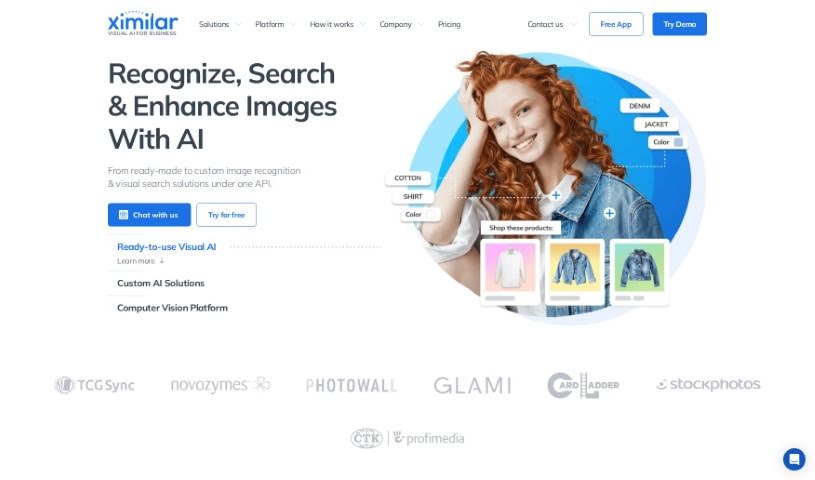
What is Ximilar?
Ximilar is a Visual AI platform built to automate image processing for businesses. It is a smart assistant for your images. It offers a range of services, including recognizing what’s in an image, enabling visual searches, removing backgrounds, and even making images sharper with upscaling. You can use their solutions right out of the box, or they can build custom developments specifically for your business needs. Essentially, Ximilar aims to make image processing much smoother and more efficient using advanced artificial intelligence. This not only saves time but also opens up new possibilities for businesses. The company is also actively involved in research projects, which helps them stay on the cutting edge of AI technology.
Who created Ximilar?
Ximilar was brought to life by a team with deep experience in computer vision and the visual data business. The core group includes Michal Lukáč, who’s a machine learning expert; David Novák, a computer vision expert; VĂĹĄa Válka, who handles web and UX design; Martin Novák, a software engineer and developer; Dan Keder, another software engineer and system administrator; Amos Struck, an expert in the image industry; Václav Novák, who’s both a machine learning specialist and developer; ZdenÄ›k Lapeš, a developer and ML specialist; Gabriela Paceltová, a fashion expert; Michael Schneider, who knows collectibles inside and out; Nessi Voinova, a project manager and product owner; and Alexandra Gracheva, a specialist in content management. It’s a pretty diverse and skilled team!
What is Ximilar used for?
Ximilar is incredibly versatile and can be used for a wide array of tasks:
- Object Detection: Spotting and identifying specific objects within images.
- Custom AI Solutions: Developing AI tailored precisely to your unique needs.
- Build Computer Vision Models Without Coding: Making advanced AI accessible to everyone, even without programming skills.
- Ready-to-use Visual AI Demos: Quickly try out various AI capabilities.
- Machine Learning for Everyone: Democratizing AI so anyone can use it.
- Sports & Trading Cards Identification: Automatically recognizing and categorizing sports and trading cards.
- Fashion Detection, Tagging & Description: Analyzing fashion items, tagging them, and providing descriptions.
- Stock Photo Tagging & Similarity Search: Making stock photos easier to find and group by visual likeness.
- Real Estate Classifier: Categorizing real estate images, like rooms or interiors.
- Image Classification & Regression: Sorting images into categories or predicting values based on image content.
- Person Detection & Recognition: Identifying and recognizing people in photos.
- Recognize, Search & Enhance Images With AI: A broad capability covering identification, searching, and improving image quality.
- Get Custom AI Tailored to Your Images: Creating AI specifically trained on your own image data.
- From pattern recognition to Image similarity: Covering everything from basic pattern spotting to finding visually similar images.
- Machine learning for everyone - No-Code Computer Vision Platform: Reaffirming that powerful AI tools are now accessible without coding.
- Automate & streamline all image processing with one API: A single point of access for all your image needs.
- Efficient & quick bulk annotation of images in a team: Streamlining the process of labeling images when working with others.
- Identify photos, people, faces & objects accurately: Ensuring precise recognition across various elements.
- Automate the processing of photos of real estate, rooms, interior design, homeware, and pieces of furniture: Specifically helpful for businesses in the home and decor sectors.
- Spot, analyze, and grade collectible sports cards and trading card games (TCGs) automatically: A specialized tool for collectors and businesses in the trading card market.
- Home Decor Search: Finding specific home decor items visually.
- Dominant Colors: Identifying the main colors in an image.
- Fashion Search: Locating fashion items based on visual characteristics.
- AI Product Description: Automatically generating descriptions for products based on their images.
- AI Recognition of Collectibles: Identifying various collectible items.
- Visual Search of Collectibles: Searching for collectibles using images.
- Photo Tagging: Automatically adding relevant tags to photos.
- Text to Image Search: Finding images based on a text description.
- Reverse Image Search: Finding similar images or the source of an image.
- Auto Description: Automatically generating descriptions for images.
- Outdoor/Indoor Classifier: Determining if an image depicts an outdoor or indoor scene.
- Room Classifier: Identifying the type of room shown in a photo.
- Furniture Detection: Spotting and identifying furniture within images.
- Home Decor Tagging: Tagging home decor items.
- Collectibles Recognition: Identifying various collectible items.
- Sports Card Identifier: Specifically identifying sports trading cards.
- TCG Card Identifier: Specifically identifying trading card game cards.
- Fashion Apparel Detection: Identifying clothing items in fashion photos.
- Fashion Tagging: Tagging fashion apparel.
Who is Ximilar for?
Ximilar is designed for a wide range of professionals and enthusiasts who work with visual data:
- Computer Vision Expert: To leverage advanced AI tools and build sophisticated models.
- UX designer: For creating intuitive visual search and recognition interfaces.
- Software Engineer: To integrate AI capabilities into applications and systems.
- DevOps Specialist: For managing and deploying AI models efficiently.
- Stock Photo Expert: To improve tagging, search, and organization of image libraries.
- Machine Learning Specialist: To develop and refine custom AI models.
- Fashion Expert: For analyzing, tagging, and searching fashion imagery.
- Collectibles Expert: To identify, grade, and manage collections of sports cards and TCGs.
- Project Manager: To oversee AI-driven image processing projects.
- Stylist: For visual inspiration and product discovery.
- Journalist: To find and verify images, or analyze visual content.
- Data Annotation Specialist: To efficiently label images for AI training.
- Marketing Specialist: To enhance product imagery and visual campaigns.
- UI Developer: To build user interfaces that incorporate visual AI features.
- Content editor: To manage and optimize visual content.
- Image industry expert: For a broad range of applications in image processing and analysis.
- Data annotation magician: For those who excel at labeling data with precision.
- Biologist: Potentially for analyzing biological imagery.
- Illustrator: For organizing and searching visual portfolios.
- Designer: For inspiration, asset management, and visual analysis.
- DevOps: (Repeated, but emphasizes infrastructure management for AI).
- Content Management: For organizing and processing large volumes of visual content.
- Web & UX Designer: (Repeated, highlighting user experience focus).
- Content Management Expert: For specialized knowledge in managing digital content.
How to use Ximilar?
Getting started with Ximilar is straightforward. Here’s a simple guide to help you make the most of its capabilities:
- Sign Up: First, you’ll need to create a free account. Just head over to https://app.ximilar.com/login to get access to all the AI image processing tools.
- Explore Features: Once you’re in, take some time to look around at what Ximilar offers:
- Ready-to-Use Solutions: You can pick from existing tools like fashion recognition, stock photo tagging, or collectibles recognition, among others. These are great for immediate use.
- Custom AI Solutions: If you have very specific needs, you can tailor AI models by adding your own labels, categories, or specific attributes. This makes the AI work exactly how you need it to.
- Machine Learning Models: Ximilar lets you build and deploy your own machine learning models directly through the app, and the best part is, you don’t need to write any code!
- Annotate Images: Ximilar provides tools that make image annotation efficient, especially when working in a team. This is crucial for improving the accuracy of your machine learning models.
- Combine Models: You can create flexible workflows by mixing and matching the ready-to-use models with your custom ones. This allows you to build solutions that perfectly fit your unique requirements.
- Connect via API: For seamless integration, you can use the REST API. This lets you set up and connect Ximilar directly into your applications, websites, or existing infrastructure.
- Subscription Plans: Ximilar offers monthly subscription plans. You can choose one that best suits your traffic volume and needs, ensuring you have the right amount of credits.
- Continuous Support: You’re not on your own! Ximilar provides helpful step-by-step guides, articles, FAQs, and is involved in ongoing research projects. This helps you stay up-to-date with the latest AI advancements.
Remember, Ximilar is packed with features like image classification, visual search, background removal, and image upscaling, all designed to make your image processing more efficient and accurate, no matter your industry.