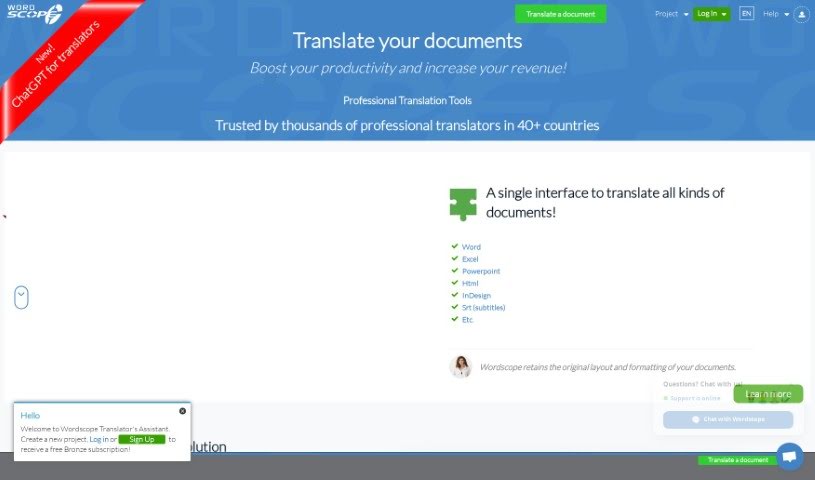
Screenshot of Wordscope

Wordscope

Discover what Wordscope is and how to use its powerful features effectively in 2025. We'll explore its capabilities, compare it to other AI assistants, and show you how to boost your translation productivity.

Screenshot

What is Wordscope?

Wordscope’s “ChatGPT for Translators” feature is your ultimate AI sidekick. It’s built to help translators with all sorts of tasks. Need to quickly define a word, get your head around a tricky scientific concept, or just gather some background info on a topic? This tool can do that. It’s also great for rephrasing sentences to sound more natural, asking specific questions, performing translations, and polishing your work by correcting grammar and spelling. Plus, it can suggest the right terminology, find synonyms, and even help you compose full sentences from just a few keywords. Essentially, it’s designed to make the whole translation process smoother and help you get more done.

Who created Wordscope?

A Look at ChatGPT For Translators:

ChatGPT For Translators is a key feature within Wordscope, which is a comprehensive AI platform specifically for document translation. It first launched on June 17, 2024. This tool is a real game-changer for translators, assisting with a wide range of tasks. You can use it to define terms, understand complex scientific ideas, gather information on any subject, rephrase sentences for clarity, and of course, perform translations. Because it’s powered by ChatGPT, it excels at correcting grammar and spelling, providing precise terminology, finding just the right synonyms, and even composing complete sentences from minimal input. Wordscope itself leverages AI, particularly Neural Machine Translation, to significantly boost translation productivity. Beyond the AI features, the platform also includes essential quality control tools, both private and public translation memories, dedicated terminology databases, and robust comparative proofreading functionalities. What’s also great is that Wordscope is accessible remotely, works seamlessly on both Mac and PC, and you don’t need to install any software to use it. The whole goal is to help professional translators achieve better accuracy, maintain consistency, and improve their overall efficiency.

What is Wordscope used for?

Wordscope is incredibly versatile for translators. You can:

  • Ask it questions to get quick answers.
  • Look up definitions for unfamiliar words.
  • Understand complex scientific concepts.
  • Gather information on any topic you’re working with.
  • Rephrase sentences to improve clarity or flow.
  • Perform translations directly within the tool.
  • Correct grammar and spelling mistakes.
  • Get suggestions for the right terminology.
  • Find synonyms to add variety to your text.
  • Compose complete sentences just by providing a few words.
  • Rephrase sentences for better impact.
  • Compose full sentences from just a few keywords.
  • Help translators look up definitions more easily.
  • Enhance translation consistency across your projects.

How to use Wordscope?

Using the ChatGPT for Translators feature within Wordscope is pretty straightforward. Here’s a breakdown of how you can make the most of it:

  1. Leverage ChatGPT for Translators: Start by using this feature for tasks like looking up definitions, understanding concepts, gathering information, rephrasing sentences, or asking questions. It’s also your go-to for translations, grammar and spelling checks, terminology suggestions, finding synonyms, and composing sentences from just a few words.
  2. Explore Cloud Search: Need to check online dictionaries or glossaries? Use Cloud Search to search various online engines for definitions, translations, and terminologies. Just select words in your source or target sentence, and it’ll pull up relevant results.
  3. Customize Preferences: Make the tool work for you by adjusting the screen layout, choosing whether to display translation suggestions, resizing different areas of the interface, and setting up keyboard shortcuts for faster navigation.
  4. Collaborate with Team Work: If you’re working with others, this feature lets you split projects, share Translation Memories, see team translations in real-time, and exchange messages easily.
  5. Utilize Proofreading Tools: Ensure your translations are perfect with comparative proofreading. This helps you check for fidelity, maintain consistency, catch errors, and generally improve your writing quality.
  6. Enhance Writing with Synonyms: Make your text more engaging and avoid repetition by using Wordscope Synonyms. It helps make your writing captivating and improves overall readability.
  7. Ensure Security: You can securely share private resources within projects without worrying about your Translation Memories being downloaded.
  8. Analyze Project Workload: Get a clear picture of your project with Volume Analysis. It helps estimate the words you need to translate, potential savings, the time required, and even provides a price estimate.

By following these steps, translators can really make the most of ChatGPT within Wordscope. It’s a powerful way to ensure accurate and consistent translations, boost your productivity, and improve how you collaborate with others.

Related AI Tools

Discover more tools in similar categories that might interest you

Stay Updated with AI Tools

Get weekly updates on the latest AI tools, trends, and insights delivered to your inbox

Join 25,000+ AI enthusiasts. No spam, unsubscribe anytime.