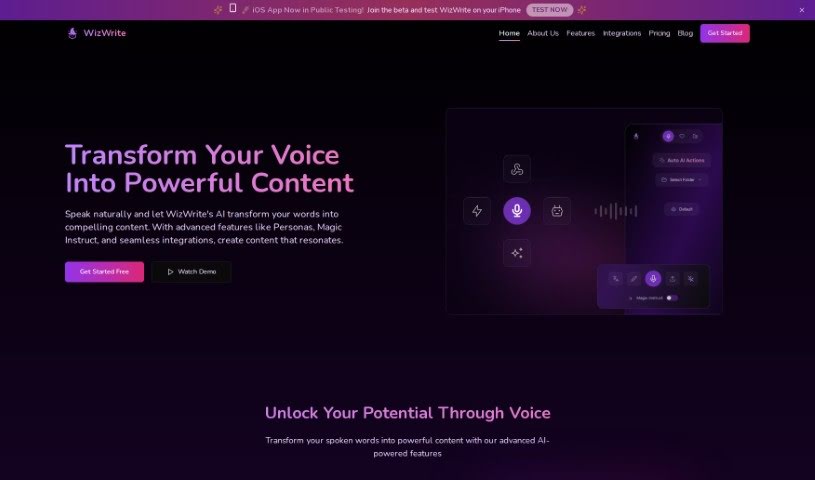
Screenshot of Wiz Write

Wiz Write

Discover Wiz Write in 2025! Learn what it is, how to use its features effectively, and how it stacks up against other transcription tools.

Screenshot

What is Wiz Write?

Wiz Write is an AI assistant designed to make content creation a breeze. It quickly and accurately turns your spoken ideas into written content. It is your personal writing partner! It features a conversational interface, helpful AI actions to polish your text, and connects with tools you already use, like Chrome and Zapier. You can pick a pricing plan that suits you best, with options for custom AI actions, translation, and different transcription limits. Essentially, Wiz Write harnesses the power of AI voice technology to help you work smarter, not harder, by making content creation much more efficient, especially if you prefer speaking your thoughts rather than typing them.

Who created Wiz Write?

Wiz Write was born from a vision to create the most complete conversational AI platform out there. It officially launched on September 24, 2023. The main goal? To simplify content creation by using AI to turn spoken words into written text. The folks behind Wiz Write are really focused on using AI voice technology to boost productivity and make content creation more efficient. They offer tools for transcription, AI actions, and handy integrations to help you get more done.

What is Wiz Write used for?

  • It helps teams collaborate more smoothly.
  • It turns spoken ideas into written content quickly and accurately.
  • It enhances content creation by transcribing spoken words into text.
  • You can use it to perform various AI actions that improve your content.
  • It can send your content anywhere you need it via webhook integration.
  • It offers a handy Chrome extension and integrates with Zapier.
  • It simplifies the whole content creation process by using AI technology.
  • It helps boost your productivity and keep things organized.
  • They’re planning to develop apps for iOS and Android for even easier access in the future.
  • You can choose customization options based on different pricing plans.
  • It converts spoken ideas into written content with speed and accuracy.
  • It transcribes spoken words into written text.
  • You can perform various AI actions to enhance your content.
  • It integrates into your workflow for faster writing, better organization, and seamless collaboration.
  • It sends content anywhere through webhook integration.
  • It uses state-of-the-art AI technology to accurately transcribe spoken words.
  • You can run AI actions on your transcripts to save time.
  • It’s great for enhancing content for customer support, office productivity, and sales tasks.
  • They’re developing apps for both iOS and Android, expected to launch in 2024.
  • It helps improve productivity and acts like a productivity “cheat code” for users.
  • It enhances content creation by converting spoken ideas into written content with speed and accuracy.
  • It simplifies the content creation process by transcribing spoken words into written text.
  • You can perform various AI actions to make content creation more efficient.
  • It integrates into workflows for faster writing, improved organization, and seamless collaboration.
  • It offers a Chrome extension and Zapier integration for more functionality.
  • You can get custom AI actions, translation services, and choose transcription limits.
  • It improves efficiency for customer support, office productivity, and sales-related tasks.
  • They’re developing apps for both iOS and Android to make it more accessible.
  • It uses AI voice technology to unlock productivity and provide a productivity ‘cheat code’.
  • It lets users send content anywhere through webhook integration.

Who is Wiz Write for?

  • Content creators
  • Customer support teams
  • Anyone focused on office productivity
  • Professionals handling sales-related tasks
  • Customer support staff
  • Office productivity professionals
  • Sales-related task professionals
  • Sales professionals
  • Office workers
  • Customer Support Representatives
  • Customer Support Agents
  • Customer support professionals

How to use Wiz Write?

Using Wiz Write is pretty straightforward. Just follow these simple steps:

  1. Create an Account:
    • First, sign up for an account on the Wiz Write platform. It’s a quick and easy process, so you’ll be ready to go in no time.
  2. Start Transcribing:
    • You can either record your voice directly into the platform or type your content. The AI technology will accurately transcribe whatever you say.
  3. Customize with AI Actions:
    • Once you have your transcript, use the custom AI Actions. These let you effortlessly transform your text into different formats, like emails, scripts, or summaries.
  4. Explore Pricing Plans:
    • Take a look at the different pricing plans available. You can choose the one that best fits your needs, whether you just need the basic features or want more advanced options like custom AI Actions and translation services.
  5. Utilize Additional Tools:
    • Make sure to take advantage of the Chrome extension, Zapier integration, and webhook functionality that Wiz Write offers. These tools can really enhance your content creation process.
  6. Stay Connected:
    • Keep an eye out for the upcoming iOS and Android apps. They’re set to launch in 2024 and will offer even more convenience and accessibility.
  7. Experience Productivity Boost:
    • See for yourself how Wiz Write can boost your efficiency and productivity. By using its cutting-edge AI technology for transcription and content enhancement, you’ll get more done.

Basically, incorporating Wiz Write into your daily workflow can really streamline content creation, boost your productivity, and help you effortlessly turn spoken ideas into written content.

Related AI Tools

Discover more tools in similar categories that might interest you

Stay Updated with AI Tools

Get weekly updates on the latest AI tools, trends, and insights delivered to your inbox

Join 25,000+ AI enthusiasts. No spam, unsubscribe anytime.