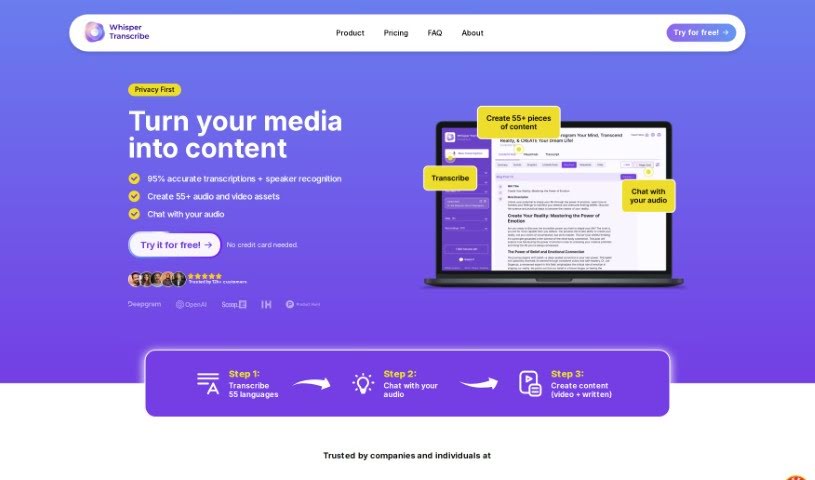
Screenshot of WhisperTranscribe

WhisperTranscribe

Discover WhisperTranscribe in 2025! Learn what it is, how to use its features effectively, and how it stacks up against other transcription tools.

Screenshot

What is WhisperTranscribe?

WhisperTranscribe is a handy app that turns your audio into written text with impressive accuracy. It can transcribe audio in over 54 languages, hitting more than 95% accuracy. But it’s not just about transcription; this tool lets you create summaries, show notes, titles, social media posts, and even blog posts from your audio files. If you’re a podcaster, marketer, or work in media, it’s a real game-changer for repurposing your audio content and reaching more people. The process is straightforward: upload your audio, get a super accurate transcript, and then create whatever content you need. Plus, WhisperTranscribe offers a free trial, and hundreds of users already trust it.

Some of its best features include highly accurate audio transcription, generating all sorts of content for different platforms, letting you tweak that content, and helping you create engaging newsletters, catchy episode titles, and summaries to keep your audience hooked.

Who created WhisperTranscribe?

WhisperTranscribe was brought to life by a talented team: Anne Albert van der Galiën handled the engineering, Laurin Wirth focused on Product & Go-to-Market, and Tetiana Filatova led Product & Design. The company behind it is WhisperTranscribe B.V., based in Rotterdam. They’re all about providing smart ways to turn audio into written content across many languages. Their services include transcription, content creation, editing, and translation, all with high accuracy and support for over 55 languages.

What is WhisperTranscribe used for?

  • Content generation for podcasters: Easily create written content from your podcast episodes.
  • Generating show notes: Quickly get summaries and key points for your audio content.
  • Creating social media posts: Turn your transcriptions into engaging social media updates.
  • Generating blog posts: Repurpose your audio into written blog articles.
  • Creating newsletters: Compile audio insights into email newsletters.
  • Generating episode titles and summaries: Craft compelling titles and concise summaries for your episodes.
  • Creating subtitles for videos: Add accurate subtitles to your video content.
  • Translating audio content: Convert audio into written text in different languages.
  • Custom content creation: Tailor content to your specific personal or brand style.
  • Automating content creation: Streamline content production for various industries.

Who is WhisperTranscribe for?

  • Podcasters
  • YouTubers
  • Influencers
  • Coaches
  • Researchers
  • Marketing Managers
  • Journalists
  • HR Professionals
  • Translators

How to use WhisperTranscribe?

Using WhisperTranscribe is pretty simple. Just follow these steps:

  1. Upload Audio: First, upload your audio file to the WhisperTranscribe app. You’ve got a few options here: pick a podcast from the app’s library, link an RSS feed, use a YouTube link, upload an audio file directly, or even record right inside the app.
  2. Transcription: The app then transcribes your audio. It’s super accurate, boasting over 95% accuracy in more than 54 languages. This precise transcript is the foundation for all the content you’ll create.
  3. Content Generation: WhisperTranscribe lets you generate various content types – think summaries, show notes, titles, social media posts, and blog posts – all based on your transcript. You can also customize this content to fit exactly what you need.
  4. Editing and Customization: You can then fine-tune the generated content with great precision and flexibility, making sure it perfectly matches your personal or brand style. Want to train the AI to write in your specific tone? You can do that too!
  5. Export and Share: Once you’re happy with the content, you can export it in different formats like SRT, VTT, and TXT, which are great for subtitles. You can also share it directly on social media to connect with your audience.
  6. Free Trial and Support: If you’re curious, WhisperTranscribe offers a free trial so you can explore its capabilities. Plus, if you need help, their support team usually responds within a day via email.

By following these steps, you can really make the most of WhisperTranscribe. It’s a fantastic tool for turning audio into engaging content across many platforms and languages, especially for podcasters, marketers, and media pros who want to get more out of their audio and grow their audience.

Related AI Tools

Discover more tools in similar categories that might interest you

Stay Updated with AI Tools

Get weekly updates on the latest AI tools, trends, and insights delivered to your inbox

Join 25,000+ AI enthusiasts. No spam, unsubscribe anytime.