What is WhatLetter?
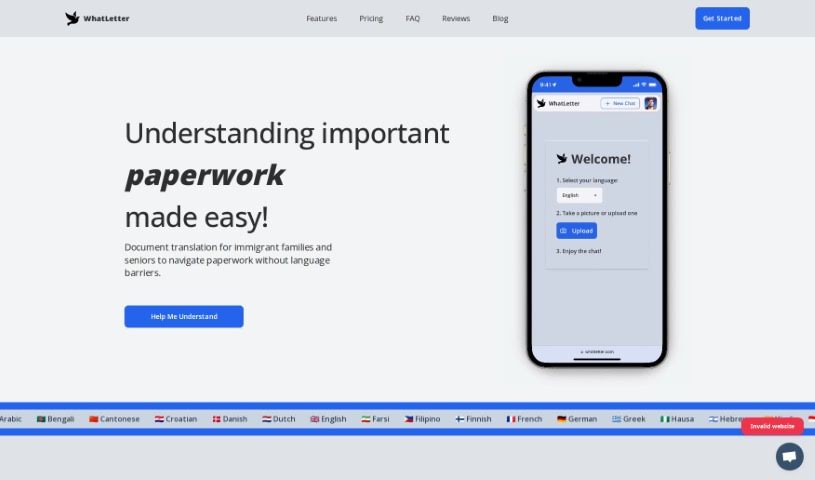
WhatLetter is a handy app designed to help immigrant families and seniors get through paperwork without language getting in the way. It’s pretty neat because it supports over 30 languages! You can use it to translate documents, chat with people in the language they prefer, and feel good knowing your privacy is protected – it doesn’t save images or chat histories on its servers.
Basically, you can snap a picture of a document, and WhatLetter translates it right away. It also gives you explanations and replies in the language you’ve chosen. This is a real game-changer for immigrant families who want to understand important papers on their own. Plus, the company really cares about your privacy, so no images or chats are stored anywhere.
Who created WhatLetter?
Sepehr Fard is the person behind WhatLetter. He launched it on November 1, 2023, with a clear goal: to make life easier and give immigrants and older adults more independence. He did this by creating a document translation app powered by AI. The company supports more than 30 languages, makes sure user privacy is top-notch by not saving images or chat histories, and focuses on features that are super easy for immigrant families and seniors to use.
What is WhatLetter used for?
WhatLetter is incredibly versatile and can be used for all sorts of things:
- Business Communication: Keep international business conversations clear.
- Regular Updates: Stay informed with translated updates.
- Pricing: Understand pricing details from different regions.
- Personal Documents: Easily translate things like letters, forms, or personal notes.
- Travel Abroad: Get guidance and communicate effectively when you’re traveling internationally.
- Complex and Boring Documents: Makes understanding tricky or dull paperwork much simpler.
- Document translation: Its core function, making any document accessible.
- Travel guidance and international communication: Helps you navigate new places and connect with people.
- Works on desktop and mobile browsers: Use it on any device you have handy.
- Assists in navigating paperwork: Takes the stress out of dealing with official documents.
- Useful for document comprehension: Makes sure you understand what you’re reading.
- Elderly Friendly: Designed with seniors in mind, making it easy to use.
- Privacy Assurance: You can trust that your information is kept private.
- International Communication: Connect with people across the globe.
Who is WhatLetter for?
WhatLetter is especially helpful for:
- Immigrant families: Helping them understand important documents and communicate more easily.
- Seniors: Providing a simple way to manage paperwork and stay connected.
How to use WhatLetter?
Using WhatLetter is straightforward. Just follow these simple steps to get the most out of it:
- Capture Documents: When you have a document you need translated, just use the WhatLetter tool to take a clear snapshot of it.
- Translation Process: WhatLetter uses its AI smarts to translate the document instantly. It doesn’t just translate; it also gives you helpful insights, explanations, and responses, all perfectly tailored to the language you’ve chosen.
- Language Support: You’ll be happy to know WhatLetter supports over 30 languages! This includes popular ones like Arabic, English, French, German, and Spanish, plus many others.
- User Privacy: Your privacy is a big deal with WhatLetter. They make sure no images or chat histories are saved on their servers, so everything you do stays confidential.
- Accessibility: WhatLetter is designed to be used anywhere. It works on both desktop and mobile browsers, meaning you can access it from any device as long as you have an internet connection.
- Special Features: WhatLetter is great for translating all sorts of documents – personal, medical, legal, and business. It’s particularly ideal for immigrant families and seniors, and it handles many different types of documents really well.
- Regular Updates: The team keeps improving WhatLetter with regular updates. These updates often bring new features and better integrations with popular apps like WhatsApp and Telegram, making it even more useful.
By following these steps, you can easily translate documents and navigate information using WhatLetter. It’s designed to give you a smooth and secure experience every time.