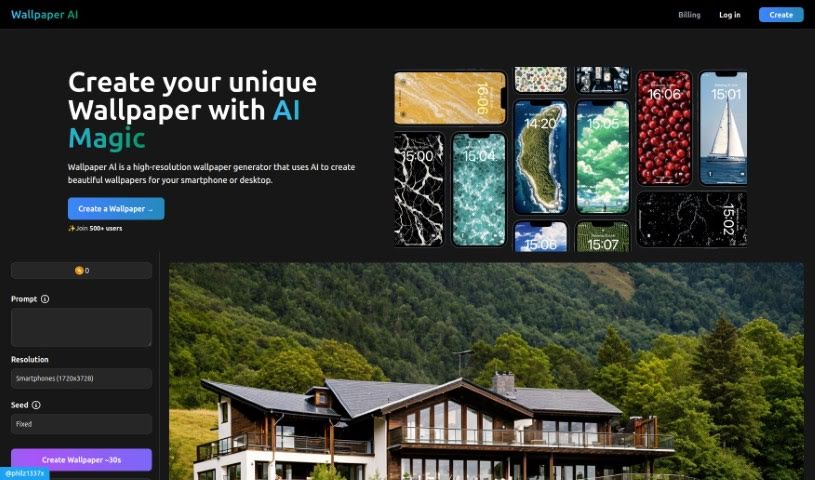
Screenshot of Wallpaperai

Wallpaperai

Discover WallpaperAI in 2025! Learn what this AI tool does, how to use its features effectively, and how it stacks up against other image generators.

Screenshot

What is WallpaperAI?

WallpaperAI.io is a neat tool that uses AI to create high-resolution wallpapers. It works by taking your image prompts, upscaling them, and making them look even better. You can get wallpapers in all sorts of resolutions – think Full HD, WQHD, 4K UHD, and even 5K. This means they’ll look fantastic on pretty much any device, whether it’s your laptop, a fancy gaming monitor, your smartphone, or your MacBook. You get to personalize your wallpapers just by typing in what you want, and the platform uses internal credits for each wallpaper you create. It also works best when JavaScript is enabled in your browser.

So, if you’re after high-quality, custom wallpapers for your devices and want to use an AI-powered tool, WallpaperAI.io is definitely worth checking out.

Who created WallpaperAI?

WallpaperAI was actually launched on March 21, 2024, by an entity that hasn’t been publicly disclosed. This AI tool is specifically designed for creating high-resolution wallpapers. It’s got some cool features, like the ability to upscale images and let you personalize them with your own prompts. It supports a wide range of resolutions, making it perfect for everything from laptops and gaming monitors to smartphones and MacBooks. Essentially, it enhances your images and offers a really user-friendly way to get creative with your backgrounds. Just keep in mind that it uses internal credits, and you’ll need JavaScript enabled for it to run smoothly.

What is WallpaperAI used for?

Here’s a breakdown of what you can do with WallpaperAI:

  • Personalize your wallpapers: Use your own prompts to describe exactly what you want.
  • Create wallpapers for all your devices: Whether it’s a MacBook, a gaming monitor, or your smartphone, it’s got you covered.
  • Get wallpapers in various resolutions: Choose from Full HD, WQHD, 4K UHD, and 5K.
  • Enhance and upscale images with AI: Let the AI work its magic to improve your pictures.
  • Add your personal touch: It’s all about supporting your creativity.
  • Manage credits: Each wallpaper you create uses up some of your internal credits.
  • Perfect for most devices: Works great on average laptops, gaming monitors, and even premium smartphones.
  • Quick creation: You can usually get a new wallpaper in about 30 seconds.
  • Easy resolution selection: Pick the resolution you need right when you’re creating the wallpaper.
  • Dynamic interactivity: JavaScript is used to make the site interactive and handle processing on your end.
  • High-resolution backgrounds: Create stunning wallpapers for both smartphones and desktops.
  • Prompt-based personalization: Tailor your wallpapers using descriptive prompts.
  • Wide resolution support: Includes Full HD, WQHD, 4K UHD, 5K, and resolutions specifically for average and premium smartphones.
  • Device compatibility: Ideal for devices like MacBooks, gaming monitors, and smartphones.
  • AI image enhancement: The tool enhances and upscales images using artificial intelligence.
  • Fast generation: Wallpapers are typically ready in around 30 seconds.
  • Credit system: Be aware that creating wallpapers involves costs.
  • Internal credit consumption: Each wallpaper creation uses your platform credits.
  • JavaScript requirement: For the best experience, ensure JavaScript is enabled.
  • Creative personalization: The tool really lets you get creative with your prompts.

Who is WallpaperAI for?

WallpaperAI is a great tool for a variety of creative individuals and device users, including:

  • Graphic designers
  • Photographers
  • Artists
  • Creative professionals
  • Gamers
  • Smartphone users
  • Laptop Users

How to use WallpaperAI?

Ready to create some awesome high-resolution wallpapers with WallpaperAI.io? It’s pretty straightforward:

  1. First, head over to the WallpaperAI.io website and log in to your account. If you don’t have one yet, you’ll need to sign up.
  2. Next, you’ll need to pick the resolution you want for your wallpaper. You can choose from options like Full HD, WQHD, 4K UHD, or 5K, depending on your needs.
  3. Now for the fun part: provide a prompt or a description! This is how you tell the AI what kind of wallpaper you want to create, making it totally personalized.
  4. Just hang tight for about 30 seconds. That’s usually how long it takes for the AI to generate your custom wallpaper based on your prompt.
  5. Make sure JavaScript is enabled in your browser. WallpaperAI.io really relies on it to handle all the processing and make things work smoothly.
  6. And remember, each time you create a wallpaper, it will use up some of your internal credits on the platform.

By following these simple steps, you can easily use WallpaperAI.io to create personalized, high-resolution wallpapers that look fantastic on all sorts of devices, from your laptop and gaming monitor to your smartphone and even your MacBook.

Related AI Tools

Discover more tools in similar categories that might interest you

123RF AI Image Generator

Creative Image Generation
Learn More

Stay Updated with AI Tools

Get weekly updates on the latest AI tools, trends, and insights delivered to your inbox

Join 25,000+ AI enthusiasts. No spam, unsubscribe anytime.