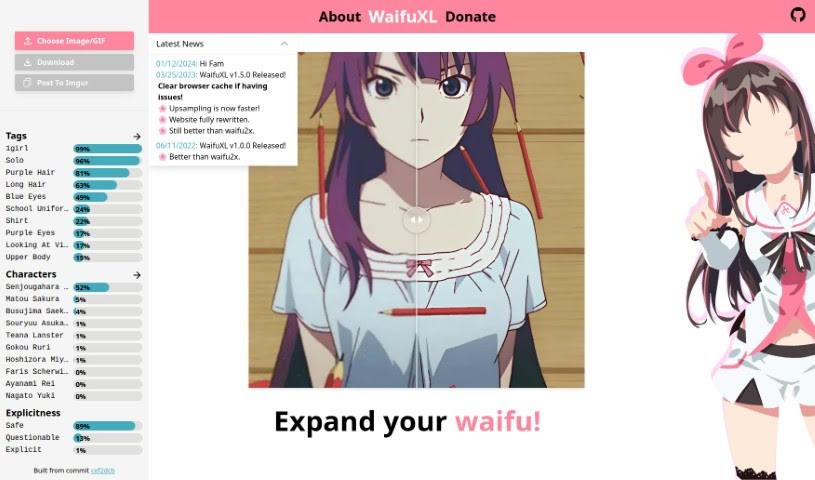
Screenshot of WaifuXL

WaifuXL

Discover WaifuXL in 2025! Learn what this anime art upscaler is, how to use its features, and how it stacks up against other image enhancers.

Screenshot

What is WaifuXL?

WaifuXL is a really neat platform designed specifically for boosting the quality of anime-style art. It uses advanced neural networks, and the best part? You can access all of this right from your web browser. It’s super convenient – you just pick the image or GIF you want to improve, and then you can either download the upscaled version or share it straight to Imgur. The platform also has a bunch of tags for different anime characters and styles, like “Senjougahara” or “Matou Sakura,” making it easier to find what you’re looking for. Plus, WaifuXL categorizes explicit content, which is a thoughtful touch to keep users informed and ensure everything stays above board. Basically, WaifuXL shows how far AI and neural networks have come in making digital art look even better.

Who created WaifuXL?

WaifuXL comes from the folks at Future Gadgets Lab. They’ve developed quite a few interesting projects and tools. This lab is known for using neural networks that can run directly in your browser, thanks to ONNX Runtime. For WaifuXL, they’re using the top-notch Real-ESRGAN model for upscaling and MobileNetV3 to handle the tagging. On the web development side, they’ve built it using React, Next.js, and TailwindCSS.

What is WaifuXL used for?

WaifuXL is incredibly versatile and can be used for a wide range of image enhancement tasks, especially those involving detailed or stylized visuals:

  • Gaming: Making game graphics sharper and more immersive.
  • Enhancing anime-style art: Bringing out the best in your favorite anime illustrations.
  • Photography improvement: Giving your photos a crisp, clear look.
  • Film restoration: Helping old footage look its best.
  • Medical imaging enhancement: Improving the clarity of scans and X-rays.
  • Surveillance image enhancement: Making details in security footage more visible.
  • Gaming graphics improvement: A specific focus on boosting visual fidelity in games.
  • Geospatial analysis enhancement: Sharpening satellite imagery or maps.
  • Art restoration: Helping to bring out details in damaged or aged artwork.
  • Visuals for e-commerce enhancement: Making product images more appealing.
  • Improving large-format printing: Ensuring high resolution for big prints.
  • Surveillance: A general term for improving visual data from security systems.
  • Enhancing photography: A broader category for general photo quality boosts.
  • Medical imaging: Another mention of its use in healthcare visuals.
  • Geospatial analysis: General use for map and satellite data.
  • VR/AR experiences: Making virtual and augmented reality visuals more realistic.
  • E-commerce visuals: Specifically for online shopping product images.
  • Large-format printing: Ensuring clarity for posters, banners, and more.

Who is WaifuXL for?

WaifuXL is a fantastic tool for anyone who works with or appreciates detailed visual art, particularly in the anime style. It’s ideal for:

  • Digital artists: To refine their creations.
  • Graphic designers: For polishing client work.
  • Animators: To enhance character designs and scenes.
  • Content creators: To make their visuals stand out.
  • Social media managers: To ensure posts look professional.
  • Game developers: For improving in-game assets.
  • Illustrators: To bring their artwork to life with greater detail.
  • Art teachers: To demonstrate image enhancement techniques.
  • Art curators: To prepare digital versions of artworks.
  • Print Designers: To ensure high-quality output for physical media.

How to use WaifuXL?

Ready to give your anime art a quality boost with WaifuXL? It’s pretty straightforward. Just follow these simple steps:

  1. Head over to WaifuXL: Open up your preferred web browser and navigate to the WaifuXL platform. It’s all online, so no downloads are needed to get started.
  2. Upload your art: Once you’re there, you’ll see an option to select the image or GIF you’re excited to upscale. Just click and choose your file.
  3. Tweak the settings: WaifuXL offers various options to fine-tune the enhancement. You can play around with settings, like choosing how much of an improvement you’re looking for, to get the exact look you want.
  4. Let WaifuXL work its magic: Hit the upsample button! The platform will then use its advanced neural networks to work on your image, making it sharper and more detailed.
  5. Save or share your masterpiece: After the process is done, you’ll have a beautifully upscaled image. You can then download it for your own use or, if you’re feeling generous, share it directly to Imgur with just a click.
  6. Explore the tagging system: While you’re using the platform, take a moment to check out the tagging feature. It’s a great way to discover and identify specific anime characters and styles, which can be really helpful for organizing or finding inspiration.
  7. Stay informed about content: WaifuXL also helps by categorizing content, including flagging explicit material. This way, you’re always aware of what you’re viewing.

By following these steps, you can easily tap into WaifuXL’s powerful capabilities to enhance your anime-style art through high-quality upsampling.

Related AI Tools

Discover more tools in similar categories that might interest you

123RF AI Image Generator

Creative Image Generation
Learn More

Stay Updated with AI Tools

Get weekly updates on the latest AI tools, trends, and insights delivered to your inbox

Join 25,000+ AI enthusiasts. No spam, unsubscribe anytime.