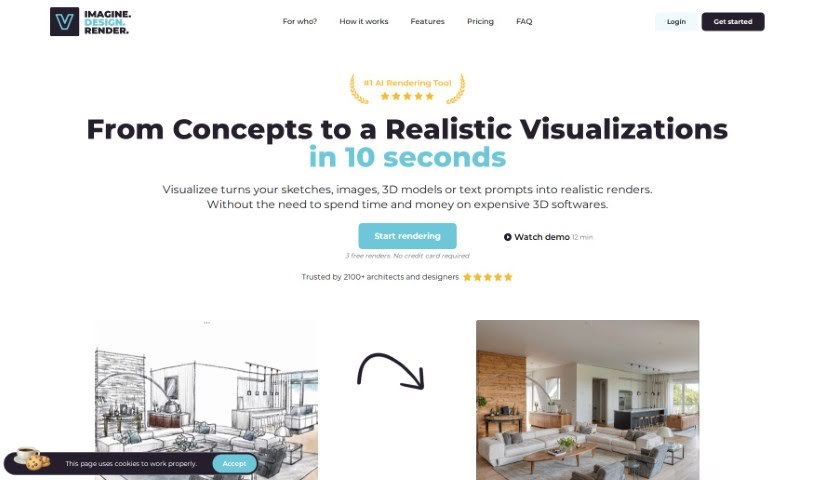
Screenshot of Visualizee.ai

Visualizee.ai

Discover Visualizee.ai in 2025: learn what this AI tool does, how to use its features for 3D model generation, and how it stacks up against other options.

Screenshot

What is Visualizee.ai?

Visualizee.ai is a really powerful tool that makes it super easy to turn your initial sketches into stunning, photorealistic images. It can also take low-detail models and transform them into high-resolution, detailed renders without any fuss. Plus, it’s great at seamlessly filling in any missing parts of your images using advanced inpainting technology. You can even take your 3D models and create breathtaking renders with dynamic lighting and realistic textures. And if you need to boost image resolution, it does that too, all while keeping the detail sharp thanks to its advanced upscaling technology. The whole idea behind the tool is to be user-friendly, so you can generate renders quickly and without a hassle. People who’ve used it often mention how effective and simple it is, making it a must-have for architects and designers.

Visualizee.ai uses AI technology to really shake things up in the architectural world. It lets architects visualize their concepts in mere seconds, cutting out those long waits for renders. It’s all about instant transformation, turning your ideas into lifelike images almost immediately. Folks have been raving about how it’s changed the game for architectural and design work, giving professionals the power to bring their visions to life fast and efficiently.

Who created Visualizee.ai?

Prema Toppo is the person behind Visualizee.ai. The company itself is being called a real game-changer for architects and designers, offering tools that are revolutionizing architectural work. Think features like turning sketches into photorealistic renders and improving image resolution. Users like Farjana A and Rohan Pathak have given it high praise, specifically mentioning how easy it is to use and how quickly it produces renders.

How to use Visualizee.ai?

Using Visualizee.ai is pretty straightforward. Here’s a quick rundown:

  1. First, head over to the Visualizee.ai website and sign up for an account. It’s a simple process.
  2. Next, upload your design or sketch directly onto the platform. Just drag and drop or select your file.
  3. You’ll get to pick a pre-made style that fits your needs, or you can even create your own custom style for the rendering. This gives you a lot of creative control.
  4. Then, choose the specific rendering options you want. This could be transforming sketches, upscaling images, filling in missing parts with inpainting, or turning 3D models into realistic renders.
  5. Depending on the pricing plan you choose, you can then generate your render. They have a few options: $9 gets you up to 200 renders, $19 offers up to 600 renders with some extra features, and $29 provides up to 2000 renders, including advanced functions like working with 3D models.
  6. Visualizee.ai will then quickly process your request. You’ll see your render generated in just seconds.
  7. Finally, download the rendered image. It’s ready for you to use in your architectural or design projects.

Designers and architects really appreciate how easy Visualizee.ai is to use. People love that it can quickly turn their designs into lifelike renders, cutting out those frustratingly long wait times and really streamlining the whole concept visualization process.

Related AI Tools

Discover more tools in similar categories that might interest you

123RF AI Image Generator

Creative Image Generation
Learn More

Stay Updated with AI Tools

Get weekly updates on the latest AI tools, trends, and insights delivered to your inbox

Join 25,000+ AI enthusiasts. No spam, unsubscribe anytime.