What is Viso.ai?
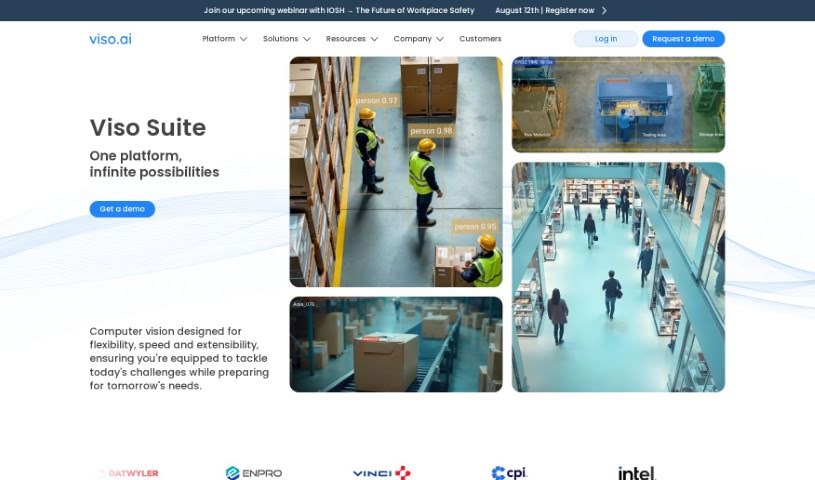
Viso.ai is a really flexible platform that makes computer vision tasks much simpler for businesses. It offers top-notch features for recognizing images, detecting people or objects using AI vision, segmenting images, identifying key points, estimating poses, recognizing faces, and performing detailed analysis. The platform is built to be adaptable, easy to expand, and ready for enterprise use. This means teams can connect camera feeds directly to powerful deep learning algorithms. Plus, they can pick from a bunch of pre-trained AI models. Viso.ai helps you create AI vision applications quickly and efficiently, fitting what your organization needs with its no-code automation tools. On top of that, Viso Suite has been recognized for its ability to build and deploy large custom vision systems into production, leading to significant cost savings. It also simplifies the whole ecosystem for developers thanks to its no-code interface, which really speeds up how fast computer vision applications can be delivered.
Who created Viso.ai?
Pascal Walther is the person behind Viso.ai; he’s also the Head of IT Solution Engineering there. The company officially got started on August 9, 2020. Viso.ai provides an AI vision application that respects privacy, perfect for counting people in public spaces in real-time. It’s a user-friendly solution that lets you connect cameras and web systems without needing any extra software.
What is Viso.ai used for?
Viso.ai has a wide range of applications:
- Automated Number Plate Recognition: It can identify vehicles as they pass by in real-time.
- AI-based Ergonomic Risk Analysis: Using cameras, it can analyze the posture of employees to assess ergonomic risks.
- Automated Object Counting: It uses cameras and deep learning to count objects automatically.
- Analog Dial Reading: It can read analog dials, digital displays, and even warning light colors directly from camera feeds.
- Product Detection: Deep learning is used to automatically identify different types of products.
- Eye Gaze Detection: This feature helps monitor how attentive someone is and their stress levels.
- Suspicious Object Detection: It can automatically spot things like abandoned luggage in public areas that might be dangerous.
- Deep Face Recognition: It matches human faces against a database using real-time video.
- Automated Pothole Detection: AI vision is used to find potholes automatically.
- Large-Scale Custom Vision System Deployment: Build and roll out a big custom vision system to production.
- Analog Instruments Reading: This involves reading analog dials, digital displays, and warning light colors using cameras.
- Product Detection: Automatically detect various product types with deep learning.
- Pothole Detection: Identify potholes using AI vision.
- Automatic Number Plate Recognition: Recognize vehicle license plates.
- Ergonomics Analysis: Analyze human posture from camera feeds for workplace safety.
- Object Counting: Count items automatically using deep learning.
- Eye Gaze Detection: Track attention and stress levels through eye movement.
- Abandoned Luggage Detection: Spot unattended bags in public spaces.
- Face Recognition: Match faces in real-time videos against a database.
- Emotion Analysis: Understand emotions from facial expressions.
- Analog Instruments Reading: Specifically, reading gauges, digital displays, and warning lights from cameras.
- Product Detection: Automatically identify different product types using deep learning.
- Eye Gaze Detection: Monitor attentiveness and stress levels with eye tracking.
- Abandoned Luggage Detection: Automatically identify suspicious or dangerous items in public places.
- Face Recognition: Match human faces against a database in real-time videos.
- Automatic Pothole Detection: Identify potholes using AI vision.
- Weapon Detection: Spot weapons automatically.
- Abandoned Luggage Identification: Recognize unattended luggage.
- AI-based Ergonomic Risk Analysis: Use cameras to detect employee posture and assess risks.
- Automated Object Counting: Count objects using deep learning.
- Analog Instruments Reading with Computer Vision: Read analog dials, displays, and lights using computer vision.
- Product Detection: Automatically detect product types with deep learning.
- Pothole Detection with AI Vision: Identify potholes using AI.
- Abandoned Luggage Identification: Automatically spot unattended luggage in public areas.
- Deep Face Recognition: Match faces in real-time videos against a database.
- Automatic Deployment and Management: Manage large fleets with IoT connectivity.
Who is Viso.ai for?
Viso.ai is designed for a variety of professionals, including:
- Senior Technology Managers
- Fleet Managers
- Data Scientists
- AI Lab Leads
- Global Sales Directors in Robotics
- Lead AI Developers
- Heads of IT Solution Engineering
- City Technology Specialists
- Technology Managers
- Fleet Managers
- Data Scientists
- AI Lab Leads
- Global Sales Directors
- City Technology Teams
- IT Solution Engineers
How to use Viso.ai?
Here’s a straightforward guide to using Viso.ai:
-
Data Collection:
- You can collect data for computer vision annotation using Viso Suite’s automated collection tools. It’s important to ensure you have high-quality training data and maintain control and security throughout this process.
-
Data Annotation:
- Within Viso Suite, you can annotate your image and video data using tools that are both automated and semi-automated. This allows teams to create high-quality datasets collaboratively while keeping the data secure and under control.
-
AI Model Training:
- Viso Suite lets you manage AI models from all different frameworks in one central location. You can either import models that have already been trained or train your own custom AI models in modular environments, which you can then continuously improve.
-
Application Development:
- You can build high-performance computer vision pipelines by connecting together modular building blocks. These blocks represent cameras, AI models, image processing functions, and hardware. This makes it easy to integrate your existing systems and ensures your computer vision applications are ready for the future.
-
Deploy to the Edge:
- Viso Suite has built-in device management, which helps you deploy computer vision applications at scale. You can enroll and manage multiple devices safely without needing manual installation, making sure your applications can scale up effectively.
-
Monitoring and Maintenance:
- You can monitor events and key metrics in the cloud using real-time analytics powered by time-series databases. This approach supports a fast and agile development strategy, helping you spot issues early and fix them with capable diagnostic tools and remote troubleshooting.
-
Security and Protection:
- Viso Suite provides enterprise-grade security throughout the entire computer vision lifecycle. It helps protect your AI models and applications from theft and loss through automated scans, encryption, and other security measures.
By following these steps, you can effectively build, deploy, and scale computer vision applications using Viso.ai’s user-friendly platform, all while keeping your data secure and ensuring your applications perform well.