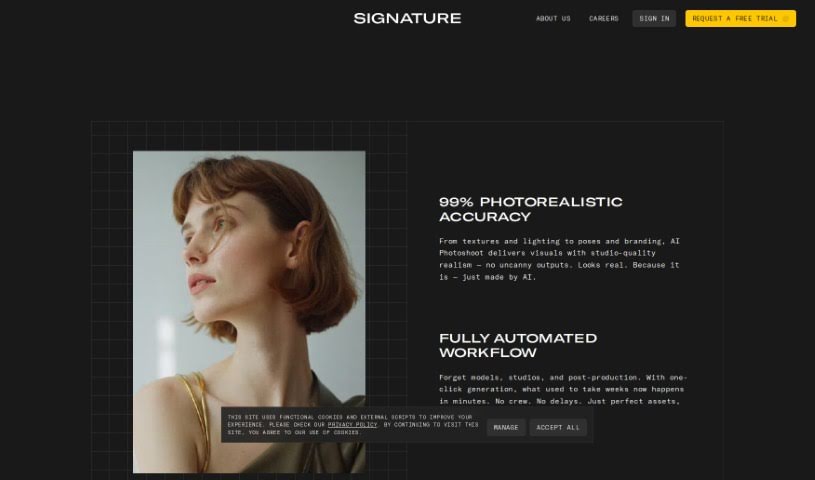
Screenshot of Visio Studio By Gaspard+Bruno

Visio Studio By Gaspard+Bruno

Discover Visio Studio by Gaspard+Bruno in 2025. Learn its features, how to use it for stunning image capture and editing, and how it stacks up against other photo editors.

Screenshot

What is Visio Studio By Gaspard+Bruno?

Visio Studio, brought to you by Gaspard+Bruno, is a sophisticated tool for capturing, removing backgrounds from, and editing images. It’s built for both pros and hobbyists alike. This tool really lets you create amazing images. You get precise control when you’re taking pictures, background removal is a breeze, and it comes packed with a full suite of editing tools to make your images shine. Plus, it handles batch processing, which is a huge time-saver and keeps your results consistent. The Gaspard+Bruno team, known for their dedication to quality and new ideas in image processing, keeps Visio Studio updated with the latest tech. No matter if you’re a visual arts pro or just love tweaking photos, Visio Studio has something valuable for all your creative work.

Who created Visio Studio By Gaspard+Bruno?

Gaspard+Bruno created Visio Studio. They’re a team that really focuses on quality and innovation when it comes to image processing. They’re always updating the tool with new features and improvements, making sure you always have access to the latest technology. For anyone working in visual arts, whether you’re a professional or just an enthusiast, Gaspard+Bruno’s Visio Studio is a must-have. It offers advanced capabilities for capturing images, removing backgrounds, and editing them.

What is Visio Studio By Gaspard+Bruno used for?

Visio Studio is incredibly versatile. You can use it for:

  • Batch processing: Handle multiple images at once.
  • Image editing: Transform and enhance your photos.
  • Background removal: Easily take out backgrounds from images.
  • Advanced image capturing: Get high-quality shots with fine-tuned control over settings like exposure, white balance, and focus.
  • Comprehensive editing tools: A full range of options to enhance and transform your images.
  • Streamlined workflow: It integrates the full spectrum of AI capabilities into a simple workflow solution, boosting speed, customization, and privacy.
  • Continuous improvement: Expect ongoing updates with new features and enhancements.
  • Quality and innovation: It’s backed by a team dedicated to these principles.
  • Empowering creativity: It helps users create stunning images effortlessly.
  • Professional support: It’s designed for professional photographers, graphic designers, and social media influencers, making creative projects easier.

Who is Visio Studio By Gaspard+Bruno for?

Visio Studio is a great fit for a wide range of creative professionals and enthusiasts, including:

  • Photographers
  • Graphic designers
  • Artists
  • Marketing professionals
  • Web designers
  • Social media managers
  • E-Commerce Specialists
  • Advertising Agencies
  • Content creators

How to use Visio Studio By Gaspard+Bruno?

Here’s a simple guide to getting the most out of Visio Studio by Gaspard+Bruno:

  1. Capture Your Images: Start by using the advanced image capturing feature. You’ll get high-quality shots because you can precisely control settings like exposure, white balance, and focus. This ensures every picture is as clear and detailed as possible.
  2. Remove Backgrounds: Need to get rid of a background? It’s super easy with just a few clicks. This feature gives you lots of flexibility for editing, letting you swap out backgrounds or create a transparent look without any fuss.
  3. Edit Your Photos: Dive into the comprehensive set of editing tools. You can make basic tweaks like adjusting brightness, contrast, and saturation, or get more detailed with curves, filters, and special effects. These tools are there to help you enhance and transform your images creatively.
  4. See Changes Instantly: The interface is really intuitive, and you get a real-time preview. This makes editing smooth and efficient because you can see exactly how your changes affect the image right away.
  5. Process in Batches: Save yourself time and keep everything consistent by using the batch processing feature. It’s perfect for handling multiple images at once, which really speeds up your workflow, whether you’re a pro photographer, a graphic designer, or a social media influencer.
  6. Stay Up-to-Date: The team at Gaspard+Bruno is always working to improve Visio Studio, adding new features and enhancements. This means you’ll always have access to the latest technology to meet your evolving needs.

By following these steps, you can really make the most of Visio Studio by Gaspard+Bruno and take your creative projects to the next level. It’s a powerful tool for anyone in the visual arts or anyone who just loves editing images.

Related AI Tools

Discover more tools in similar categories that might interest you

123RF AI Image Generator

Creative Image Generation
Learn More

Stay Updated with AI Tools

Get weekly updates on the latest AI tools, trends, and insights delivered to your inbox

Join 25,000+ AI enthusiasts. No spam, unsubscribe anytime.