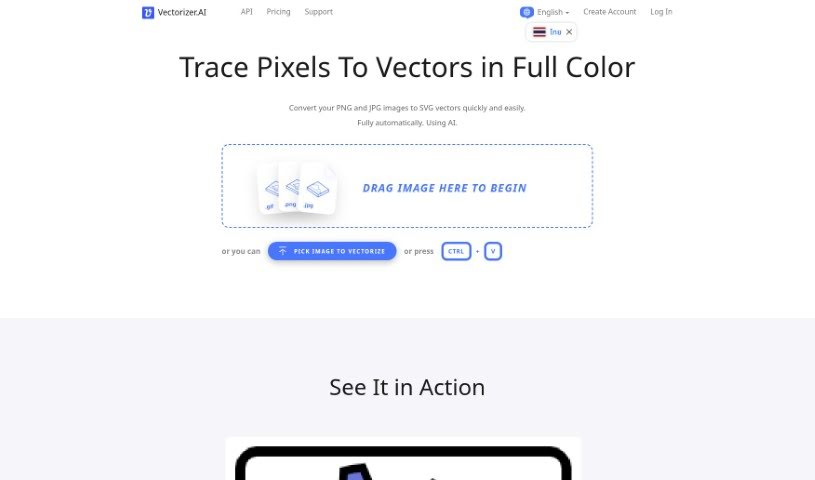
Screenshot of Vectorizer.ai

Vectorizer.ai

Discover what Vectorizer.ai is and how to use it effectively in 2025. We'll cover its features and compare it to other image generators.

Screenshot

What is Vectorizer.ai?

Vectorizer.AI is a really neat online tool that uses artificial intelligence to turn your regular pixel-based images, like JPEGs and PNGs, into high-quality vector graphics (SVGs). It is a smart converter that does all the work for you – no fiddling with manual adjustments needed. Right now, while it’s still in Beta, you can use it for free! It’s super easy to use, too, with a simple drag-and-drop interface for uploading your pictures. Because it uses AI for vectorization, the resulting graphics stay perfectly scalable without losing any sharpness or quality. This makes them ideal for all sorts of things, from printing and cutting to embroidery. Plus, Vectorizer.AI plays nicely with a bunch of different vector and bitmap formats, including PDF, EPS, and DXF, making it a versatile choice for designers, artists, and businesses alike.

Who created Vectorizer.ai?

Vectorizer.ai comes from Cedar Lake Ventures, Inc., a smaller company located near Minneapolis. The whole project actually started as a research endeavor by the founder, James Diebel, when he was studying at Stanford University. He was working on what would become Vector Magic, the company’s first website. Jacob Norda, who has a background in software engineering from working at various tech companies, teamed up with James on this project. Orna Kretchmer joined Cedar Lake Ventures in 2013, bringing her expertise from Biology and Molecular Biology. Jonathan Kretchmer, who studied Music Composition, is also part of the team. Together, they’ve developed Vectorizer.AI, a tool that really shines by using AI to automatically convert bitmap images into sharp, high-quality vector graphics, supporting many formats and delivering precise results.

What is Vectorizer.ai used for?

This tool is fantastic for a variety of tasks:

  • Turning pixel images (like JPEGs and PNGs) into sharp, full-color vector graphics (SVGs).
  • Making your vector graphics bigger or smaller without any loss in quality – they stay crisp no matter the size.
  • It’s perfect for things like printing, cutting designs (think vinyl cutters), and embroidery.
  • You can work with lots of different formats, including vector ones like PDF, EPS, and DXF, as well as bitmap formats.
  • It uses a smart mix of AI networks and traditional algorithms to convert images efficiently.
  • You get precise results with full shape fitting, going beyond just simple curves.
  • It’s built for speed, using GPUs for deep learning and multi-core CPUs for quick processing.
  • The vectorization is so accurate, it achieves sub-pixel precision, meaning details are finer than a single pixel.
  • You can export your work in formats like SVG, PDF, EPS, DXF, and PNG.
  • It helps create clean corners, matches tangents smoothly, and smooths curves for better overall results.

Basically, it’s great for:

  • Printing
  • Cutting materials
  • Embroidery projects
  • Creating web graphics
  • Displaying on high-resolution screens
  • Laser engraving
  • Vinyl cutting
  • Screen printing
  • Editing in your favorite vector software
  • Even for training artificial intelligence models (just check the commercial use terms!)

It’s especially useful for creating graphics that need to be scaled up or down without looking blurry, which is common for printed materials or web use. The tool can even handle AI-generated images and produce impressive vector outputs. It’s designed to be efficient, using powerful GPUs and CPUs for fast processing, and it offers that crucial sub-pixel precision for detailed work. Plus, they’re always working on adding new features!

Who is Vectorizer.ai for?

This tool is a great fit for:

  • Designers
  • Artists
  • Businesses

How to use Vectorizer.ai?

Using Vectorizer.ai is pretty straightforward. Here’s a simple guide to get you started:

  1. First off, just head over to the Vectorizer.ai website using your browser.
  2. You’ll want to sign up for an account. You can use your email or just log in with your social media account if that’s easier.
  3. Take a moment to look around the dashboard. Get a feel for where everything is and what features are available.
  4. When you’re ready, you can start a new project or open one you’ve already been working on.
  5. Next, upload your image files or input any data you need directly into the tool.
  6. Decide what kind of analysis you want to do. For example, you might want to classify something or group similar items together.
  7. Now, set up the parameters for your analysis. This includes things like choosing your target variable and any specific settings you need.
  8. Once everything’s set, just start the analysis. The tool will then generate insights based on the data you provided.
  9. After the analysis is done, take a look at the results. You’ll usually see visualizations and some statistical summaries.
  10. If you want to refine things, you can always go back and adjust the parameters or try out different models.
  11. Don’t forget to save your work as you go! This makes sure you don’t lose anything and can easily come back to it later.
  12. Finally, download your results, reports, or any visualizations you need for presentations or further work outside the platform.

Following these steps should help you get the most out of what Vectorizer.ai has to offer for your data analysis needs.

Related AI Tools

Discover more tools in similar categories that might interest you

123RF AI Image Generator

Creative Image Generation
Learn More

Stay Updated with AI Tools

Get weekly updates on the latest AI tools, trends, and insights delivered to your inbox

Join 25,000+ AI enthusiasts. No spam, unsubscribe anytime.