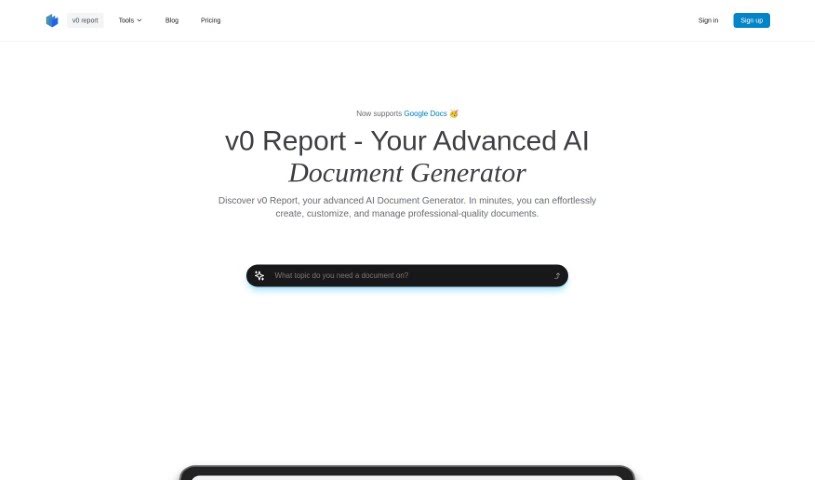
Screenshot of v0 report

v0 report

Curious about v0 Report? Dive into what this AI-powered document generator is, how it works, and how it stacks up against other PDF chat tools in 2025. Discover its features and benefits for your workflow.

Screenshot

What Exactly is v0 Report?

v0 Report is an AI tool designed to make creating reports much simpler. It is your smart assistant for putting together documents. It gathers information from different places and lets you upload your own files so it can analyze them specifically for you. What’s really neat is that it can automatically collect data, let you customize your reports, and generate them using AI. Plus, it has a user-friendly editor, kind of like Notion, which makes tweaking your reports a breeze. It’s built to help out in all sorts of fields, from tech and retail to many others. It’s also really good at reading and summarizing PDFs quickly, and you can rest assured your data is kept safe thanks to strong encryption.

Who’s Behind v0 Report?

An innovative company focused on making report generation easier created v0 Report. They’ve developed a platform that uses AI to help you create professional company reports efficiently. You can get a feel for the future of reporting right now by generating insightful reports. You can do this by simply providing a URL, letting the tool automatically gather data from various sources, or by compiling your own custom reports using that handy Notion-style editor. v0 Report is useful across many industries, especially for businesses that need to understand things like customer behavior, how technology is being adopted, or what’s happening with market trends.

What Can You Do with v0 Report?

v0 Report is incredibly versatile and can assist with a wide range of tasks:

  • Essay Writing: Get help crafting your essays.
  • Automated Data Collection: Let the tool gather information for you.
  • Customizable Reports: Tailor reports to your specific needs.
  • AI-Powered Generation: Leverage artificial intelligence to create content.
  • Notion-Style Editor: Easily edit and refine your documents.
  • Diverse Industry Application: Works for tech, retail, and many other sectors.
  • Thesis Writing Assistance: Support for your academic thesis.
  • AI Document Generation: Create various types of documents with AI.
  • AI PDF Summarization: Quickly get the gist of PDF documents.
  • AI Book Generation: Generate content for books.
  • Research Paper Assistance: Help with your research papers.
  • Literature Review Assistance: Streamline your literature reviews.
  • AI PDF Summarizer: An efficient tool for summarizing PDFs.
  • PDF Document Reading and Summarizing: Understand PDF content faster.
  • Document Security: Your data is processed securely.
  • Various Document Types Generation: Create a wide array of documents.
  • AI Book Summarization: Get summaries of books using AI.
  • Security of Data Processed by AI Document Generators: Focus on keeping your information safe.
  • Thesis Writing Support: Additional help for your thesis.
  • Literature Reviews Assistance: More support for reviewing literature.
  • Research Paper Refinement: Improve your research papers.
  • AI Essay Writing Assistance: Get AI help with essays.
  • AI Literature Review Assistance: AI support for literature reviews.
  • AI Research Paper Assistance: AI assistance for research papers.
  • Security of Data Processed: Ensuring the safety of your processed data.

Who Should Use v0 Report?

v0 Report is a great tool for a variety of users:

  • Individuals and Freelancers: If you need to create professional-looking documents, this tool can really help.
  • Consultants: You can use it to generate detailed, branded documents for your clients.
  • Large Organizations: It’s equipped to handle extensive collaboration and report generation needs.

So, whether you’re an individual, a consultant, or part of a large organization, v0 Report can be a valuable asset.

How Do I Use v0 Report?

Using the v0 Report tool to generate documents is pretty straightforward. Here’s a simple breakdown of the steps:

  1. Start with a URL: Begin by entering a company’s website address (like netflix.com) to kick off the report generation process.
  2. Automatic Data Collection: The tool automatically pulls data from various sources, ensuring your reports are built on the most current information available.
  3. Add Your Files: To make the report even more personalized and insightful, you can upload your own relevant documents and files for analysis.
  4. AI Compiles the Report: Once all the data is gathered, the AI-powered system puts together a comprehensive report that you can customize.
  5. Refine with the Editor: You can then fine-tune and edit the generated report using v0 Report’s built-in Notion-style editor, giving it that polished, professional finish.
  6. Industry Versatility: Remember, this tool is great for many industries, including tech and retail, and is especially helpful if your business focuses on things like consumer behavior, technology adoption, or market trends.

Essentially, the v0 Report platform makes creating reports much smoother. It simplifies how you collect data, lets you add your own files for a personal touch, and gives you an easy-to-use editor for making any necessary adjustments.

Related AI Tools

Discover more tools in similar categories that might interest you

Academic Help Free Essay Generator

Education Academic Writing
Learn More

Stay Updated with AI Tools

Get weekly updates on the latest AI tools, trends, and insights delivered to your inbox

Join 25,000+ AI enthusiasts. No spam, unsubscribe anytime.