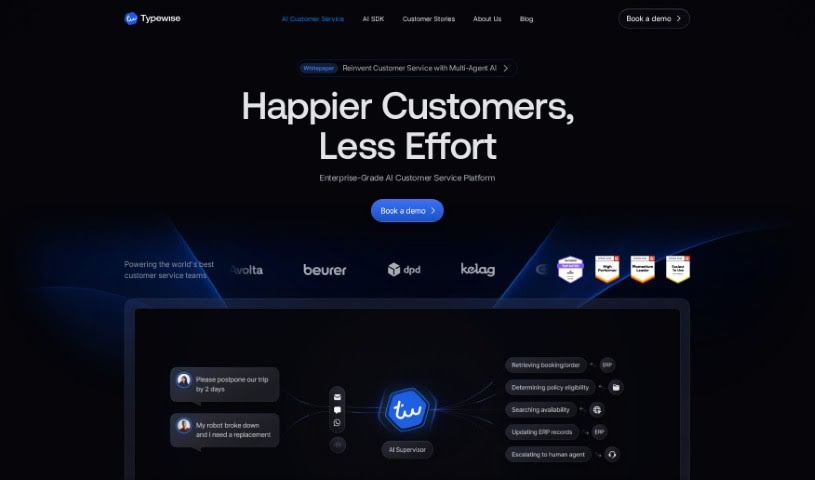
Screenshot of Typewise

Typewise

Discover what Typewise is and how to use it effectively in 2025. We'll explore its features and see how it stacks up against other CRM tools.

Screenshot

What is Typewise?

Typewise is an AI-powered assistant designed to make our daily lives easier by helping us express our thoughts more clearly. It comes from a company that specializes in generative AI and is focused on creating text prediction software to boost productivity for businesses. Janis and David founded Typewise back in 2019 because they noticed a big gap: our brains think much faster than we can type, and this speed difference leads to a lot of lost productivity. They actually started by creating an award-winning keyboard app before shifting their focus to serving businesses directly.

What can Typewise do for you? It offers a bunch of helpful features. You get text prediction, which helps you finish sentences automatically. There’s also a ‘magic reply’ feature that generates responses for you, plus built-in autocorrect and grammar checking. Need to communicate in another language? Typewise handles real-time translation across many languages. Plus, they can even build a custom AI language model that’s specifically trained on your company’s unique vocabulary and tone. Beyond that, you get quality control tools and analytics via a dashboard, support for over 40 languages, and it integrates smoothly with your existing CRM systems. Basically, with Typewise, your customer service and sales teams can communicate more quickly and effectively, leading to significant boosts in productivity and cost savings.

Who created Typewise?

Typewise was founded by Janis Berneker and David Eberle in 2019. Their goal was to tackle the inefficiencies in written communication by developing advanced text prediction technology. They first launched an award-winning keyboard app that saw 2 million downloads. Now, Typewise is dedicated to serving enterprise clients. They’ve got support from Y Combinator and work with ETH Zurich to keep improving their AI technology.

What is Typewise used for?

Typewise is designed to help businesses in several key ways:

  • Boost Customer Satisfaction: It helps teams provide better, faster service.
  • Improve Efficiency: Customer service and sales teams can work more effectively.
  • Save Time and Effort: Features like text prediction, auto-completion, magic reply, and autocorrect/grammar check streamline communication.
  • Global Communication: Real-time translation in multiple languages makes international communication easier.
  • Personalized AI: A custom AI language model can be tailored to your specific needs, matching your vocabulary and tone.
  • Performance Insights: Quality control and analytics are available through a dashboard.
  • Broad Language Support: It works with over 40 languages.
  • Seamless Integration: It easily connects with existing CRM systems.
  • Productivity Gains: Faster, more effective communication leads to significant productivity boosts and cost savings.
  • Handle High Volumes: Efficiently manage a large number of emails and tickets.
  • Instant Chat Replies: Deliver quick and accurate responses in live chat.
  • Reduce Response Times: Speed up how quickly you resolve customer issues.
  • Lower Administrative Load: Lessen the effort needed for documenting calls and meetings.
  • Enhance Accuracy: Improve the precision and personalization of your messages.

Essentially, Typewise helps improve efficiency, boost customer satisfaction, save time, reduce response times, and increase overall enterprise productivity by making communication smoother and smarter.

Who is Typewise for?

Typewise is particularly useful for:

  • Customer service teams
  • Sales teams
  • Customer service professionals

How to use Typewise?

To get the most out of Typewise, here’s a simple guide:

  1. Get to Know the Features:
    • First, take a look at what Typewise offers. This includes text prediction, magic reply for quick responses, autocorrect and grammar checking, real-time translation, a custom AI language model, and tools for quality control and analytics.
  2. Understand the Pricing:
    • Check out the pricing structure. This will help you see how Typewise can save your team money and time, ultimately improving both productivity and customer satisfaction.
  3. Set It Up Easily:
    • Typewise offers instant setup, making integration with your CRM system a breeze. It works as a browser-based plugin, so you won’t need any development work. It’s compatible with popular platforms like Salesforce, ServiceNow, and MS Dynamics.
  4. Make It Your Own:
    • Take advantage of Typewise’s customization options. You can tailor the AI language model to perfectly match your company’s vocabulary, tone of voice, and specific needs, ensuring greater accuracy and a more personal touch.
  5. Communicate Globally:
    • Typewise supports over 40 languages, which is great for communicating with people worldwide without needing native speakers. The real-time translation feature makes multilingual conversations smooth and efficient.
  6. Monitor and Improve:
    • Use the dashboard Typewise provides to keep an eye on quality control and performance metrics. This helps you track how things are going and make smart, data-driven decisions to further refine your communication processes.
  7. Enterprise-Level Solutions:
    • If you’re an enterprise, explore the solutions specifically designed for your needs. These cover handling emails and tickets, providing live chat support, and documenting calls. They’re all about streamlining your operations and boosting overall efficiency.

By following these steps, your customer service and sales teams can really make the most of Typewise to communicate better, save money, and keep customers happier.

Related AI Tools

Discover more tools in similar categories that might interest you

Stay Updated with AI Tools

Get weekly updates on the latest AI tools, trends, and insights delivered to your inbox

Join 25,000+ AI enthusiasts. No spam, unsubscribe anytime.