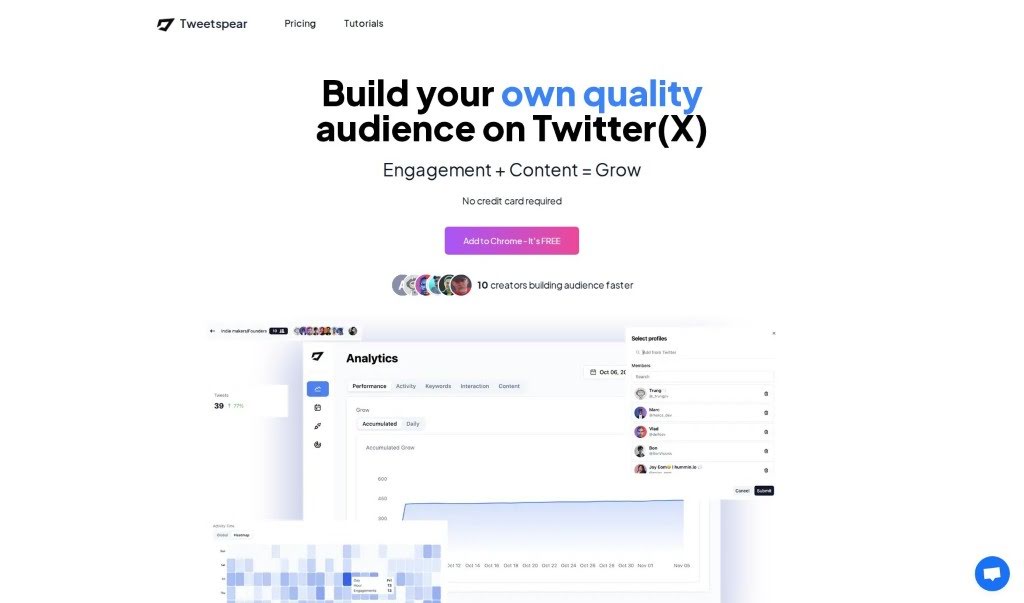
Tweetspear is a really handy Chrome extension designed to boost your Twitter engagement and help you build a quality audience on the platform. It’s packed with features like content scheduling, behavior analytics, custom feeds, and personalized replies, all aimed at helping you make the most of your online presence on Twitter. With Tweetspear, you can schedule posts, brainstorm ideas, upload media, analyze how your followers are interacting, and keep your unique voice consistent, even across different languages. Plus, it lets you filter your content based on specific user and tweet details, giving you a more focused Twitter experience tailored just for you. They even offer a free trial and a 14-day refund policy, showing they’re serious about helping you grow your Twitter presence.
Fernando Palacios is the founder of Tweetspear, as you can see on their website and Twitter profile. Essentially, Tweetspear is a tool built to help Twitter users grow a high-quality audience by making engagement and content creation on the platform much easier. It offers a range of useful features, such as scheduling your posts, coming up with content ideas, filtering your feed, and providing detailed analytics on your followers’ activity and how they interact with your content. You can also keep your unique voice consistent across different languages using customizable quick replies and tones, which really makes Tweetspear a valuable asset for anyone creating content or trying to build an audience on Twitter.
Tweetspear is great for a lot of things on Twitter:
- Creating Content: It helps you come up with ideas and get your posts ready.
- Scheduling Posts: Plan out your tweets in advance so you don’t have to post them manually.
- Boosting Twitter Engagement: It gives you tools to interact more effectively with your audience.
- Improving Content Creation: Make your tweets better and more engaging.
- Uploading Media: Easily add images or videos directly when you’re posting on Twitter.
- Building Relationships: Connect with people by organizing them into custom groups and profiles.
- Personalizing Replies: Respond to people in different languages while keeping your own style.
- Decluttering Your Feed: Filter out distractions so you can focus on what’s important.
- Getting Analytics: Track how your followers are growing and how they interact with your content.
- Maintaining Your Voice: Keep your unique tone consistent across all your tweets and languages.
- Quality Content Creation: Focus on making good, valuable content.
- Building Relationships: Foster stronger connections with your followers.
- Behavior Analytics: Understand your audience’s actions and engagement patterns.
- Customizable Quick Replies: Save time by having pre-written, personalized responses ready.
- Filtering Content: Tailor your Twitter experience by filtering tweets based on specific user or tweet details.
- Maximizing Online Presence: Overall, it helps you make a bigger impact on Twitter.
Tweetspear is a fantastic tool for:
- Twitter Content Creators: Anyone who regularly posts content on Twitter.
- Audience Builders: People focused on growing their follower base.
- Social Media Managers: Professionals managing social media accounts.
- Digital Marketers: Individuals using digital channels for marketing.
- Online Influencers: Those who have a significant following and influence online.
To really get the most out of Tweetspear on Twitter, just follow these simple steps:
- Get Set Up:
- First, add Tweetspear to your Chrome browser – it’s free, and you don’t even need a credit card.
- Then, head over to Twitter and log in to your account as usual.
- Boost Engagement & Create Better Content:
- Use Tweetspear’s features to help your audience grow faster by focusing on engagement and creating high-quality content.
- You can schedule your posts, get ideas for what to tweet, upload images or videos, and even tag posts right within Twitter.
- Build Stronger Relationships:
- Create custom groups and feeds to manage your interactions more easily and connect with specific profiles.
- Make sure your unique voice shines through in different languages by using the customizable quick replies and tone settings.
- Manage Your Feed:
- Clean up your Twitter feed by filtering out distractions. You can sort content based on user and tweet properties.
- This helps you stay focused on the important stuff and ignore what you don’t need to see.
- Get Insights with Analytics:
- Dive deep into what your followers are doing, how they interact with your content, and your own engagement patterns. The tool offers easy-to-understand visuals, like heatmaps.
- Keep an eye on how your follower count is growing, what they’re posting, and more, so you can fine-tune your Twitter strategy.
- Extra Features & Help:
- You’ll also find handy features like auto-liking, easy tweet scheduling, custom replies, and interaction analytics.
- If you run into any bugs, need a refund, or have questions, you can easily contact Tweetspear support through Twitter or email.
- Pricing & Subscriptions:
- Tweetspear offers flexible pricing plans for different needs. There are free trials with limited features, as well as premium subscriptions.
- When you buy, you get a 14-day money-back guarantee, no questions asked, and all future updates are included.
By following these steps, you can really use Tweetspear to improve your Twitter engagement, create better content, and build your audience more effectively, ultimately maximizing your presence on the platform. Enjoy using the tool’s solid features to grow your Twitter presence!