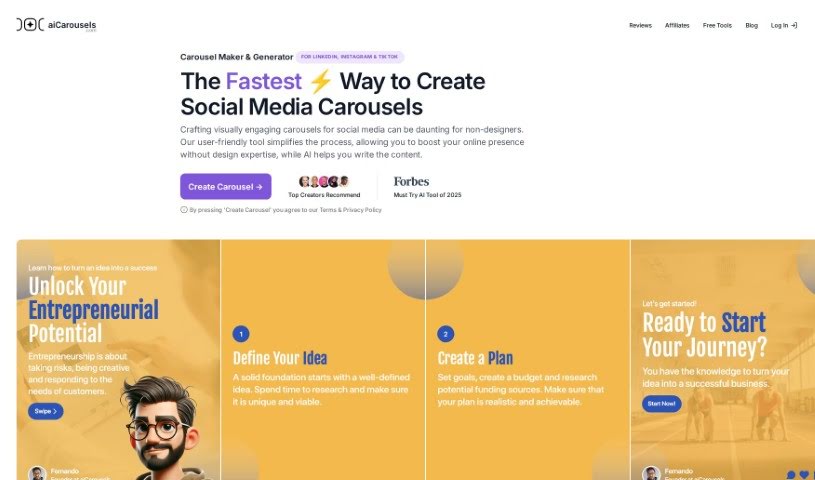
Screenshot of AI Carousels

AI Carousels

Discover what AI Carousels is and how to use it effectively in 2025. Explore its features and see how it stacks up against other Social Media Management Tools.

Screenshot

What is AI Carousels?

AI Carousels is a smart tool that uses artificial intelligence to help you create beautiful, cohesive color palettes. It’s designed to match your specific design needs. By applying established color theory principles, the AI can generate up to five harmonious colors that fit the overall tone you’re aiming for. This tool offers several great benefits. For starters, it makes sure your colors work well together, creating a sense of harmony in your designs. You also get customization options, letting you pick between vibrant or more muted tones. Plus, you can even lock in colors you really like, and the AI will generate the rest to complement them perfectly.

It really helps with design optimization, especially when it comes to color palettes. That’s because colors have a big impact on how people perceive things, how they feel, and what actions they take. What makes AI Carousels stand out is its ability to keep getting better. As it learns from more data and interactions, it refines its results, offering you increasingly polished color palettes over time. While the AI provides accurate suggestions based on solid color theory and design principles, it’s always a good idea to use your own judgment for any final tweaks. This tool is completely free, making it a must-have for any designer looking for visually appealing and well-matched color palettes that fit their unique project requirements.

Who created AI Carousels?

Shushant Lakhyani is the creator behind the AI Color Palette Generator. He founded this tool after his innovative AI carousel generator, developed during a 10-day challenge, received incredibly positive feedback. The tool officially launched on May 6, 2024. Shushant brings over 20 years of experience in the design and tech industries. He personally handles every aspect of the tool, from customer support to product development, which really adds a direct and personal touch for users.

What is AI Carousels used for?

Here’s a look at what you can do with AI Carousels:

  • Create harmonious color palettes: Generate beautiful color combinations that work well together for any design project.
  • Customize your look: Tailor palettes to a specific mood, choosing between vibrant, muted, or other tones.
  • Ensure design harmony: Make sure your colors create a cohesive and pleasing visual experience.
  • Fine-tune your colors: Lock in colors you love and let the AI generate the rest to match, giving you full control.
  • Influence perception: Use color strategically to impact how users see your designs, their emotions, and their actions.
  • Boost aesthetics and usability: Make your designs look better and function more smoothly.
  • Convey brand identity: Use color to clearly communicate your brand’s message.
  • Improve usability: Differentiate design elements effectively using color.
  • Evoke emotions: Choose colors that create the specific feelings you want your audience to experience.
  • Tailor to specific needs: Generate palettes that are perfectly suited for your unique design requirements.
  • Get refined results: Benefit from the AI’s continuous learning, which leads to better, more precise palettes over time.
  • Use it for free: Designers can access this tool without charge to create up to five custom color palettes.
  • Create professional carousels: Design eye-catching carousels for business or personal use without needing design expertise.
  • Generate carousel content: Use the AI writing assistant to create engaging text for your carousels.
  • Auto-resize elements: Ensure perfect positioning and readable font sizes automatically.
  • Use predefined styles: Utilize ready-made colors and fonts for harmonious designs.
  • Save custom presets: Streamline future creations by saving and loading your own settings.
  • Design for multiple platforms: Create carousels for LinkedIn, Instagram feeds, Instagram Stories, and TikTok.
  • Export in high-res: Get your carousels in PDF or JPG sequence formats for flexible use.

Who is AI Carousels for?

This tool is perfect for:

  • Designers
  • Graphic designers
  • Content creators
  • Social media managers
  • Artists
  • Brand managers
  • Visual artists
  • Creatives of all kinds

How to use AI Carousels?

Using the AI Color Palette Generator is straightforward. Here’s how you can get started:

  1. Access the tool: Head over to the AI Color Palette Generator. It uses artificial intelligence to create harmonious color palettes based on the tones and design needs you specify.
  2. Customize the mood: Decide on the feel of your palette. You can choose between vibrant, muted, or intermediate color options.
  3. Lock and generate: Pick any colors you really like and lock them in. Then, let the AI generate the rest of the colors to match, giving you control and allowing adjustments until you achieve that perfect palette.
  4. Ensure harmony: The tool helps ensure your colors work well together, generating up to five cohesive colors that complement each other beautifully.
  5. Enhance your projects: Use the tool for free to create palettes tailored to your specific design requirements, boosting the aesthetics and usability of your work.
  6. Benefit from continuous improvement: The AI Color Palette Generator gets better over time as it learns from new data and interactions, refining its results.

By following these simple steps, you can effectively use the AI Color Palette Generator to create stunning and harmonious color palettes for all your design projects.

Related AI Tools

Discover more tools in similar categories that might interest you

Stay Updated with AI Tools

Get weekly updates on the latest AI tools, trends, and insights delivered to your inbox

Join 25,000+ AI enthusiasts. No spam, unsubscribe anytime.