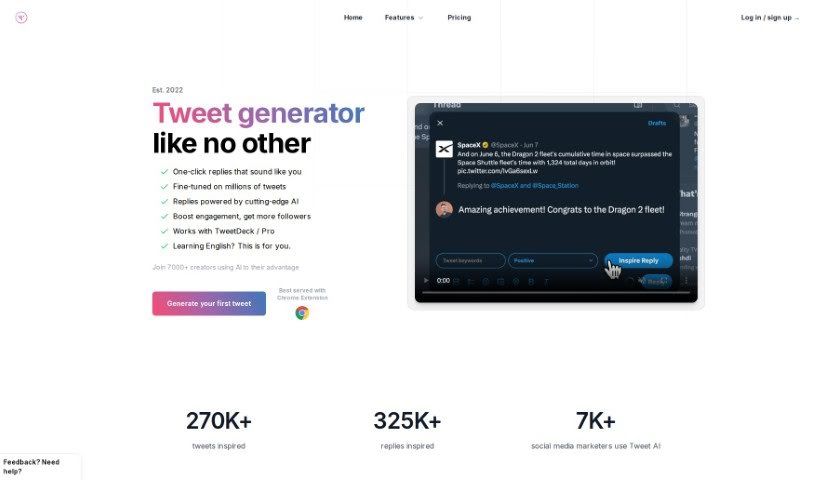
Screenshot of Tweet Ai

Tweet Ai

Discover what Tweet AI is and how to use it effectively in 2025. We'll explore its features and see how it stacks up against other social media management tools.

Screenshot

What is Tweet AI?

Tweet AI is a smart tool that helps you write tweets. It uses GPT-4 AI technology to make your Twitter engagement much better. You can quickly create inspired tweets and replies that sound just like you. It works right within Twitter thanks to a Chrome Extension, letting you reply and generate tweets with just one click. Marketing agencies, digital creators, and ghostwriters trust Tweet AI to help them get more engagement, grow their follower count, and come up with creative content ideas without a struggle.

Who created Tweet Ai?

Sergey from the AI Marketing team created Tweet AI. This tool uses GPT-4 AI technology to help people easily generate great tweets and engaging replies. It fits right into Twitter with a Chrome Extension, offering features like one-click engagement, AI-powered creativity, ways to customize your content, and even a free starter plan. Tweet AI is super helpful for social media managers, influencers, and digital marketers who want to improve their Twitter presence.

What is Tweet Ai used for?

  • Quickly creating creative tweets
  • Instantly generating engaging replies
  • Boosting your Twitter engagement
  • Keeping your replies sounding like your own voice
  • Personalizing the tone of your tweets and replies
  • Seamlessly integrating with Twitter via a Chrome Extension
  • Being ideal for social media managers, influencers, and digital marketers
  • Gaining growth and better engagement on Twitter accounts
  • Generating tweets and replies using AI technology
  • Offering a free plan with 30 tweet credits each month
  • Keeping your individual voice in replies
  • Being perfect for social media managers, influencers, and digital marketers
  • Having a free plan to get started
  • A one-click engagement feature
  • AI-powered creativity
  • User customization to keep your brand consistent
  • Easily integrating with Twitter through a Chrome Extension
  • Boosting engagement on Twitter
  • Generating ideas for tweets
  • Maintaining consistency in your tweets
  • Inspiring tweet threads
  • Generating engaging replies
  • Driving engagement by replying quickly
  • Helping you grow your follower count
  • One-click replies
  • Fine-tuning tweets to match your brand’s tone
  • Personalizing the tone of tweets and replies
  • Boosting engagement and growing followers
  • Generating tweets with just one click
  • Generating tweet replies in a single click
  • Creating threads with up to 14 tweets
  • Rewriting old content to give it a fresh spin
  • Tweeting consistently for better engagement
  • Customizing tones to match your brand’s identity
  • Replying faster to conversations
  • Driving engagement with helpful replies
  • Creating engaging threads that grab attention with strong hooks

Who is Tweet Ai for?

  • Social media managers
  • Influencers
  • Digital marketers
  • Digital creators
  • Ghostwriters
  • Content creators

How to use Tweet Ai?

To get the most out of Tweet AI, just follow these simple steps:

  1. Get Tweet AI: First, install the Tweet AI Chrome Extension. It’s featured by Google and works smoothly with Twitter. You can easily find it in the Chrome Web Store by searching for “Tweet AI.”
  2. Use the AI Features: Once the extension is installed, you can start using Tweet AI’s AI-powered tools. You’ll be able to generate great tweets, engaging replies, and even full threads with just one click.
  3. Make It Yours: Tweet AI lets you customize things, so you can personalize the tone of your tweets and replies. This helps keep your brand consistent and authentic.
  4. Boost Engagement: Take advantage of the AI’s creativity, which has been trained on millions of tweets. This will improve your content quality and help you connect better with your audience.
  5. Choose a Plan: Tweet AI offers different subscription plans. There are options for individuals, growing teams, and even large enterprise teams. Pick the plan that best fits your needs and gives you the AI tweet generation tools and support you’re looking for.
  6. See the Results: By consistently using Tweet AI to create tweets, replies, and threads, you’ll increase your visibility on Twitter, attract more followers, and significantly boost your engagement on the platform.
  7. Keep Improving: Play around with Tweet AI’s different features. Try rewriting old content, generating threads, or replying to conversations quickly. This will help you refine your Twitter strategy and grow your account effectively.

By following these steps, you can really use Tweet AI’s abilities to make your Twitter engagement smoother, improve your content creation, and ultimately grow your presence on the platform.

Related AI Tools

Discover more tools in similar categories that might interest you

Stay Updated with AI Tools

Get weekly updates on the latest AI tools, trends, and insights delivered to your inbox

Join 25,000+ AI enthusiasts. No spam, unsubscribe anytime.