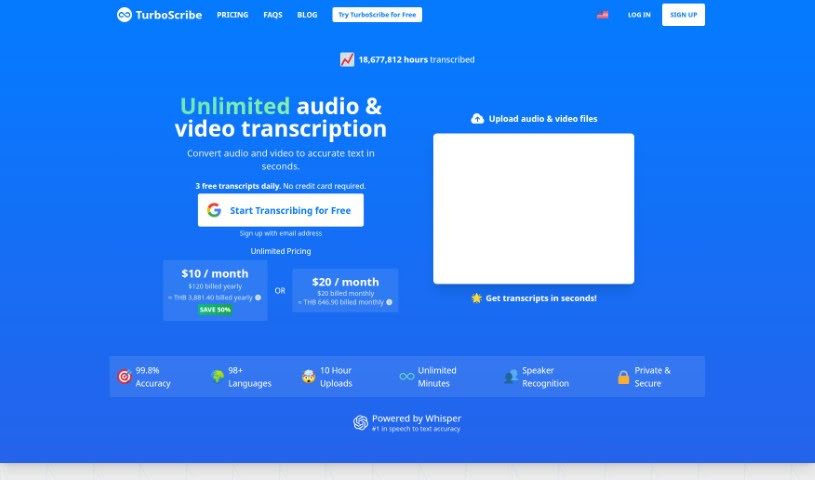
Screenshot of TurboScribe

TurboScribe

Discover TurboScribe in 2025! Learn what this AI transcription service is, how to use its features effectively, and how it stacks up against other transcription tools.

Screenshot

What is TurboScribe?

TurboScribe is an AI-powered transcription service that’s really good at turning your audio and video files into text. It handles over 98 languages with impressive accuracy, often hitting over 98%! What’s great is that it includes features like speaker recognition, so you know who’s saying what, and it keeps your data super secure. Plus, there are no limits – you can transcribe as much as you need without worrying about caps or quotas. You can easily download your finished transcripts in common formats like DOCX, PDF, TXT, or even as subtitles.

If you’re looking at the pricing, TurboScribe Unlimited is available for $10 per month when you pay yearly, or $20 per month if you prefer to pay monthly. The service supports a wide variety of audio and video file types, and you have plenty of options for exporting your transcripts. You can get them as PDFs, DOCX files, or in subtitle formats like captions. Need to share your transcript in another language? TurboScribe can translate them into over 130 languages. It’s also built to handle common issues like different accents, background noise, and generally poor audio quality, thanks to its audio restoration tools. Your privacy and security are a priority; all transcripts and files are encrypted, and you can delete them whenever you wish. You can also turn on speaker recognition to easily identify different voices, and translating your transcripts is a breeze. TurboScribe is designed to handle a massive amount of audio or video each month – think at least 720 hours! And if you ever need to stop, you can cancel your subscription anytime. The service is managed by Leif, who has a background in AI systems from places like Meta.

Who created TurboScribe?

Leif is the person behind TurboScribe. He previously worked on AI systems at companies like Meta, and he built TurboScribe to offer a highly accurate audio and video transcription service that supports over 98 languages. It’s designed for professionals across many industries, providing unlimited transcriptions, speaker recognition, and secure data processing.

What is TurboScribe used for?

TurboScribe is incredibly versatile and can be used for a variety of tasks:

  • Transcribing interviews: Get accurate text versions of your interviews.
  • Transcribing podcasts: Easily create written content from your podcast episodes.
  • Creating subtitles for videos: Make your videos more accessible and engaging.
  • Turning audio and video into text: Get fast, accurate transcriptions of all your files.
  • Supporting many languages: Transcribe in over 98 different languages.
  • Unlimited transcription: No caps or quotas mean you can transcribe as much as you need.
  • Multiple export formats: Download your transcripts as DOCX, PDF, TXT, or subtitles.
  • Speaker recognition: Easily identify who’s speaking in meetings, interviews, and more.
  • Handling large files: It can manage big uploads, with files up to 10 hours long and 5GB in size.
  • Secure and private: Your transcripts, uploaded files, and account information are kept private and secure.
  • Translation: Translate your transcripts and subtitles into over 130 languages.
  • Audio cleanup: Use the audio restoration tool to fix files with poor audio quality.
  • High-volume transcription: It’s built to handle over 720 hours of transcription per month efficiently.
  • Business meetings: Transcribe your important business meetings.
  • Transcribing files in multiple languages: Works with various languages.
  • Bulk Actions: Export multiple files at once.
  • Direct English transcription: Transcribe audio or video files straight into English.
  • Audio quality enhancement: Use the built-in AI restoration tool to improve audio quality.

Who is TurboScribe for?

TurboScribe is a great tool for:

  • Business professionals: Streamline workflows and document important discussions.
  • Interviewers: Get accurate records of interviews for research or content.
  • Podcasters: Easily create show notes, transcripts, or subtitles for your episodes.
  • Anyone dealing with business meetings, interviews, or podcasts: If you work with these formats, TurboScribe can save you a lot of time.

How to use TurboScribe?

Using TurboScribe is straightforward. Just follow these simple steps:

  1. Create an account: First, sign up to get access to the service.
  2. Upload your files: You can upload your audio or video files in many common formats, like MP3, MP4, or WAV.
  3. Select language and settings: Choose the language your audio or video is in. You can also adjust settings like speaker recognition or audio restoration if you need them.
  4. Start the transcription: Once you’re ready, begin the transcription process. You’ll get text outputs with accuracy rates up to 99.8%!
  5. Download your transcripts: You can then download your finished transcripts in formats like DOCX, PDF, TXT, or as subtitles.
  6. Use extra features: Take advantage of speaker recognition to easily identify who’s speaking, and translate your transcripts into over 130 languages if needed.
  7. Manage your subscription: If you ever need to stop, you can cancel your subscription easily through your account settings.
  8. Get help if you need it: For more guidance, check out the Help and Support Center, or reach out to [email protected] with any specific questions.

TurboScribe really is a versatile tool for professionals in many fields, offering unlimited transcription, support for over 98 languages, secure data handling, and plenty of export options. Give TurboScribe a try today to make your transcription tasks much more efficient!

Related AI Tools

Discover more tools in similar categories that might interest you

Stay Updated with AI Tools

Get weekly updates on the latest AI tools, trends, and insights delivered to your inbox

Join 25,000+ AI enthusiasts. No spam, unsubscribe anytime.