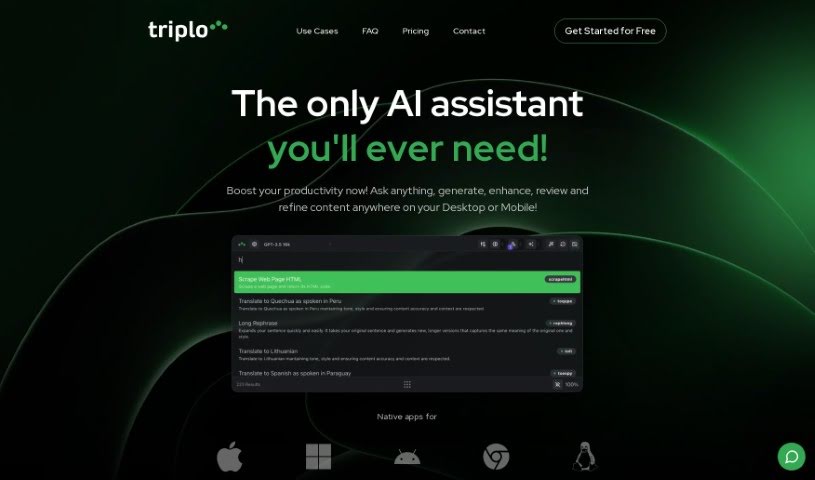
Screenshot of Triplo AI

Triplo AI

Discover what Triplo AI is and how to use it effectively in 2025. We'll explore its features and compare it to other automation tools.

Screenshot

What is Triplo AI?

Triplo AI is an all-in-one productivity tool that uses artificial intelligence to help you work more efficiently. It is your personal AI assistant, ready to help with real-time assistance and content generation right from any window on your computer. It’s designed to make organizing your tasks, getting quick insights, and making decisions much faster and more convenient.

How does that real-time help work? Well, Triplo AI gives you AI-powered insights, answers, or content whenever you need them, no matter what you’re doing on your operating system. This means you can get help generating blog posts, pulling data from external APIs, sending content out to different platforms, or even translating text into other languages – all without switching applications.

Plus, Triplo AI offers handy automation features, lets you connect with external APIs, distribute your content easily, and supports many languages and dialects. It works smoothly across Windows, Mac, Linux, iOS, Android, and Chromebooks. It’s a great tool for students, researchers, writers, and business professionals alike, helping with everything from creating content and making decisions to gathering insights and keeping your workflow organized.

Who created Triplo AI?

Hamish MacDonald is the person behind Triplo AI. He launched the company on November 7, 2023. Triplo Ai offers a really versatile AI assistant. It integrates seamlessly across different programs and devices, has automation capabilities, can scrape information from the web, and even lets you create custom SmartPrompts. They offer various subscription plans, and people have been giving it positive feedback for how efficient and easy it is to use, plus they’re always developing it further.

What is Triplo AI used for?

Triplo AI is incredibly versatile! Here’s a breakdown of what you can do with it:

  • Language Support: It helps with multiple languages and offers multilingual support for translation.
  • Content Creation: Generate blog posts, articles, emails, and social media posts.
  • Workflow Improvement: Boost your overall workflow efficiency and keep your tasks organized.
  • Insights & Decisions: Quickly generate insights and make faster decisions.
  • Data & Distribution: Collect data from external APIs and distribute your content to third-party platforms.
  • Specialized Tasks: Train it with specific user information for tailored results.
  • User Assistance: It’s great for students, researchers, and writers, helping with academic tasks, research insights, and content development.
  • Business Needs: Translate content for global business, organize workflows, and speed up decision-making.

Who is Triplo AI for?

Triplo AI is a fantastic tool for:

  • Students
  • Researchers
  • Writers
  • Business professionals

Essentially, anyone looking to boost their productivity and streamline their tasks can benefit from it.

How to use Triplo AI?

Triplo AI is a powerful productivity tool that brings artificial intelligence right into your daily workflow. Here’s a simple, step-by-step guide to using it effectively:

  1. Access Triplo AI Easily:
    • Just press a few specific keys on your device (like CTRL/OPT + SPACE on your computer) to bring up the AI input bar right on your screen.
  2. Generate Content:
    • Need a blog post, article, email, or social media update? Simply tell Triplo AI what you need, and it’ll generate it for you.
  3. Customize Your Content:
    • Want more accurate or specific results? You can train Triplo AI with your own information, ensuring the content it generates is perfectly tailored to your needs.
  4. Seamless Integration:
    • Triplo AI integrates deeply with your operating system, meaning you can access it from any window, making it super convenient.
  5. Global Language Support:
    • It supports many languages and dialects, so you can translate content and communicate globally with ease.
  6. Get Real-Time Help:
    • Activate the real-time assistance feature anytime you need quick insights, answers, or content. It’s always there when you need it.
  7. For Business Professionals:
    • Organize your workflow, gather insights, make decisions faster, create content, and translate for global business needs.
  8. For Students and Researchers:
    • Students can use it for academic tasks, while researchers can get quick insights, develop content, and aid their decision-making processes.
  9. Improve Your Writing:
    • Writers can really enhance their content creation, getting contextually accurate and creative results with Triplo AI.
  10. Boost Your Workflow:
    • Triplo AI speeds things up by giving you rapid access to AI capabilities, helping you get insights, generate content, and make decisions more efficiently.
  11. Quick Keyboard Access:
    • Remember those keyboard shortcuts like “CTRL/OPT + SPACE”? They’re your fast track to bringing up the AI input bar.
  12. Explore All the Features:
    • Don’t hesitate to try out its automation features, content distribution tools, translations, and insights generation. They’re all there to boost your productivity across various tasks.

By following these simple steps, you can really make the most of Triplo AI. It’s designed to help you streamline your work, create great content, and make smarter decisions, all more efficiently.

Related AI Tools

Discover more tools in similar categories that might interest you

Stay Updated with AI Tools

Get weekly updates on the latest AI tools, trends, and insights delivered to your inbox

Join 25,000+ AI enthusiasts. No spam, unsubscribe anytime.