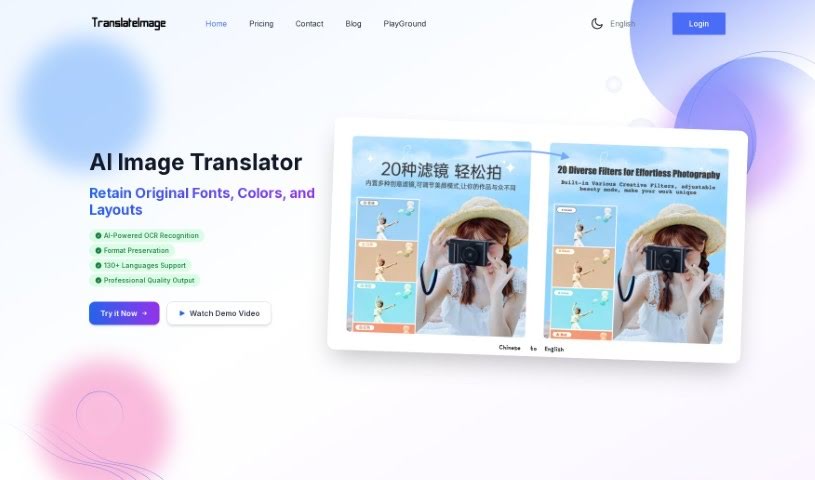
Screenshot of Translateimage

Translateimage

Discover Translateimage, an AI-powered image translator. Learn its features, how it works, and how it compares to other translation tools in 2025. Perfect for designers and marketers!

Screenshot

What is Translateimage?

TranslateImage is a really neat AI tool that translates images. It uses advanced OCR (Optical Character Recognition) technology, which is basically a smart way for computers to ‘read’ text in pictures. It also works with the Google Translation API, so it can translate your images into over 130 languages! What’s cool is that it does a fantastic job of keeping the original text formats intact. The whole process is about 99% AI-driven, with just a tiny bit of manual tweaking to make sure everything is perfect, leading to high-quality translated images. You just upload your image, pick the language you want, and the AI automatically recognizes and translates the text. Plus, there’s a powerful editor that lets you tweak the text formatting if needed, all while keeping the original layout. People love TranslateImage because it’s so easy to use and really helps localize content for different markets. It’s super handy for things like translating design architecture diagrams, product photos, instruction manuals, ads, and technical drawings.

On top of that, TranslateImage is quite affordable. You can choose between paying once or opting for a monthly subscription if you need to translate and edit a lot of images. Over 200 companies worldwide already trust it for their translation needs. Users from various fields, like software solution architects, graphic designers, and marketing pros, have given it great feedback.

Who created Translateimage?

Brilex is the company behind Translateimage, as mentioned in their “translateimage.pdf” document. They launched the service on May 26, 2023. Their AI image translation service is designed to recognize text, translate it, and crucially, keep the original text format. Translateimage supports more than 130 languages and is already being used by over 200 companies globally for their translation requirements.

What is Translateimage used for?

Here’s a quick rundown of what Translateimage is great for:

  • Translating design architecture diagrams.
  • Adjusting text within an image while keeping the original layout exactly the same.
  • Making changes to image text formatting using its powerful editor.
  • It’s really beneficial for graphic design tasks.
  • It makes sure the original text format stays the same during translation.
  • You can even do some manual fine-tuning of the translated text.
  • It’s excellent for localizing content for different markets.
  • It preserves the original format of both the text and the image.
  • It’s a user-friendly tool for translating images.
  • Over 200 companies trust it for their translation needs.

Who is Translateimage for?

This tool is particularly useful for:

  • Graphic designers
  • Software Solution Architects
  • Marketing professionals

How to use Translateimage?

Using Translateimage is pretty straightforward. Just follow these steps:

  1. Upload Your Image and Pick a Language: First, upload your image. It accepts common formats like JPG, JPEG, PNG, or GIF. Then, simply choose the language you want to translate into from the extensive list of over 130 supported languages.
  2. Let the AI Do Its Thing (Recognition & Translation): Once you’ve uploaded your image, the system kicks in. It uses advanced AI algorithms to recognize all the text in the image and then translates it. This usually takes about 1 to 3 minutes.
  3. Fine-tune the Text Formatting: After the translation is done, you can jump into the image text editor. This handy feature lets you make any necessary adjustments or improvements to the translated text’s formatting.
  4. Keep the Original Text Format: Translateimage really shines here – it makes sure that the original text’s font, color, size, weight, and alignment are all preserved during the translation process.
  5. Download Your Translated Image: Once you’re happy with everything, the translated text is seamlessly written back into the image. You can then download the final translated image, keeping its original size and format.

Translateimage offers some fantastic benefits, like a state-of-the-art AI OCR algorithm, support for over 130 languages, and a clever way of filling in backgrounds (seamless background inpainting) so the translated text looks natural. It provides accurate translations and, as we mentioned, preserves the original text format really well. It’s a versatile tool that’s useful for all sorts of things, like translating product images, manuals, advertisements, technical diagrams, and those complex design architecture diagrams. Plus, with its affordable pricing and user-friendly design, it’s a really valuable tool for getting images translated efficiently and accurately.

Related AI Tools

Discover more tools in similar categories that might interest you

Stay Updated with AI Tools

Get weekly updates on the latest AI tools, trends, and insights delivered to your inbox

Join 25,000+ AI enthusiasts. No spam, unsubscribe anytime.