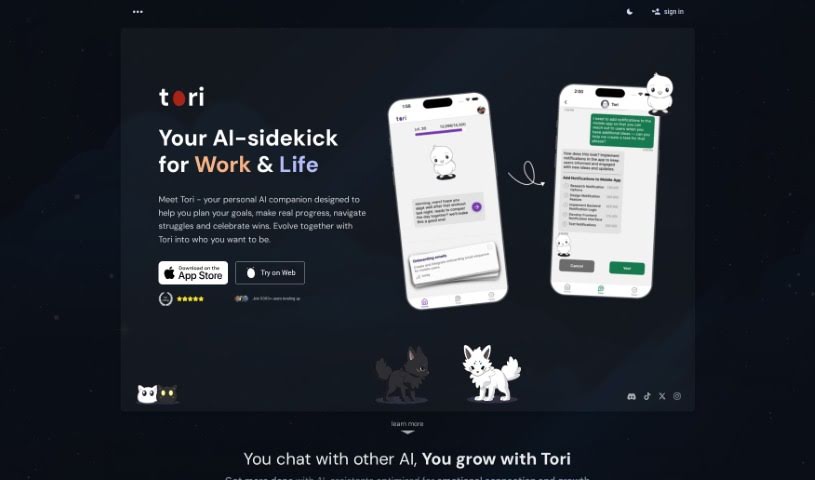
Screenshot of Tori

Tori

Discover what Tori is and how to use this AI-powered Chrome extension effectively in 2025. Explore its features, compare it to other project management tools, and learn how it can boost your focus and productivity.

Screenshot

What is Tori?

Tori is a really neat AI-powered Chrome extension that lets you create your own virtual companion. It is a personalized sidekick designed to help you focus and get more done. You can chat with Tori, and it’ll kick off special focus sessions, block those pesky distracting websites, and even offer advice based on what you’re looking at on your screen. The more you interact with Tori, the more XP it earns, leveling up from 1 all the way to 32. As it levels up, its personality grows and it unlocks new abilities, all aimed at helping you tackle your tasks more effectively.

Who created Tori?

Adam is the creator behind Tori. It’s an AI-powered Chrome extension built to help people stay focused and productive by offering personalized support and guidance. You get to interact with your very own virtual companion, Tori, to start focus sessions, block distracting websites, and get help that’s just right for you. As you spend more time with Tori, it levels up from 1 to 32, its personality develops, and it unlocks new skills to really boost your productivity.

What is Tori used for?

Tori helps you in a bunch of ways:

  • It helps you beat procrastination, whether you’re on your phone, browsing the web, or using your browser.
  • It motivates you to get started on tasks and helps you prioritize with its AI smarts.
  • During focus sessions, it blocks distractions using phone and web blocklists.
  • It tracks your growth with stats and insights, and even offers emotional support to keep you going.
  • It makes being productive fun with XP, rewards, and gamification.
  • You can personalize your virtual partner to perfectly match your unique needs.
  • It motivates you to kickstart your tasks.
  • It offers focus sessions complete with phone and web blocklists.
  • It measures your progress with stats and insights.
  • It provides emotional support to help you stay on track.
  • You gain XP and rewards as you chat and focus more.
  • Tori’s personality evolves and it unlocks new skills.
  • It improves your productivity by blocking distracting websites.
  • It offers guidance based on what’s currently on your screen.
  • You can create a custom virtual companion to help you stay focused.
  • It helps you start focus sessions that are tailored just for you.
  • It blocks distracting websites.
  • It offers guidance and generally improves your productivity.
  • You gain XP to level up and let its personality evolve.
  • It unlocks new skills to assist you better.
  • It helps you defeat procrastination on your phone, the web, and in your browser.
  • It motivates and coaches you to start tasks.

Who is Tori for?

  • Anyone who tends to overthink and strive for perfection.
  • Specialists in AI Chrome Extensions.
  • Experts in Productivity Tools.
  • Specialists in AI Tools.

How to use Tori?

Ready to boost your productivity with Tori, the Chrome extension? Here’s how to get started:

  1. Installation: First, just add Tori to your browser from the Chrome Web Store. It’s a simple step!

  2. Setup: Next, you’ll want to customize Tori. Pick its personality traits and preferences so it feels like your own unique companion.

  3. Interact: Start chatting with Tori! You can use it to begin focus sessions, block distracting websites, and get helpful guidance to really improve your productivity.

  4. Level Up: The more you chat and focus with Tori, the more XP it earns. This helps it evolve its personality and unlock new skills, making it an even better assistant for you.

  5. Utilize Features:

    • Focus Sessions: Easily start focus sessions. You can set up web and phone blocklists to completely cut out distractions.
    • Screen Monitoring: Let Tori see your screen. This allows it to offer guidance and support that’s specifically tailored to what you’re working on.
    • Task Prioritization: Plan your tasks and prioritize them effectively with help from Tori’s AI.
  6. Monitor Progress: Keep an eye on your growth! Tori provides stats and insights so you can see your progress and stay motivated.

  7. Enjoy Rewards: You’ll earn rewards, engage with gamification elements, and get emotional support. It all adds up to make improving your productivity a fun experience.

  8. Testimonials: You can also check out what other users are saying. Many have found Tori really effective for improving their focus and productivity.

By following these steps, you can really make the most of Tori’s AI features. It’s a great way to boost your productivity and stay focused on your tasks efficiently.

This guide covers everything from setting up Tori and interacting with its features to leveling it up through engagement and enjoying all the benefits of enhanced productivity.

Related AI Tools

Discover more tools in similar categories that might interest you

Stay Updated with AI Tools

Get weekly updates on the latest AI tools, trends, and insights delivered to your inbox

Join 25,000+ AI enthusiasts. No spam, unsubscribe anytime.