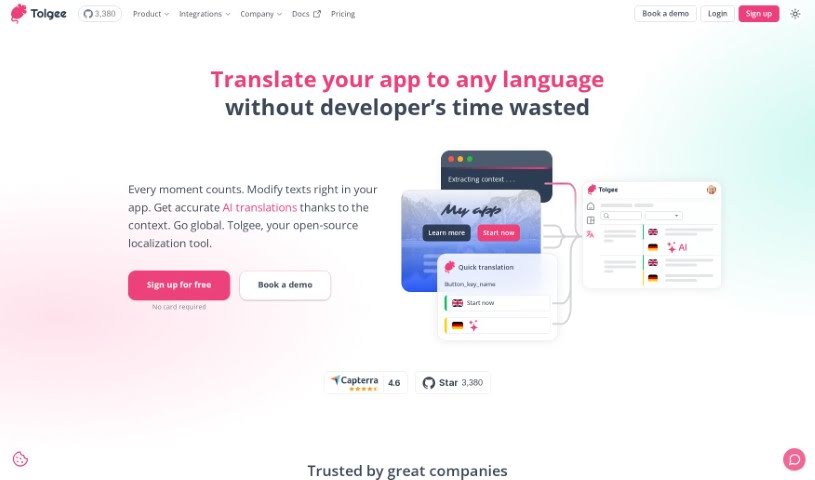
Screenshot of Tolgee

Tolgee

Discover Tolgee in 2025! Learn what it is, how to use its features effectively, and how it stacks up against other translation tools.

Screenshot

What is Tolgee?

Tolgee is a really smart, AI-powered platform built to make translating things much easier and faster for developers. It’s packed with features, like being able to connect with popular frameworks such as React, Angular, Vue.js, Svelte, and plain JavaScript. Plus, it can even translate things on its own, which saves a ton of time and makes the translations more accurate. Developers seem to love how user-friendly it is, that it’s open-source, and how simple it is to get set up and running without needing a lot of technical help. It also has tools for teams working on projects together, better ways to handle localization, and you can even pick whether you want to use formal or casual language. Basically, Tolgee wants to simplify how you handle translations and give developers everything they need to make their projects speak many languages smoothly.

Who created Tolgee?

Armen D., who’s part of the company behind Tolgee.AI Translator, created Tolgee Translator. The main goal of the platform is to help developers with app localization and translation in a way that’s both efficient and effective. Tolgee provides an open-source localization platform that includes features like automatic translation, ways to connect with different frameworks, help with translations, and tools for teamwork. The company really wants to make the translation process simpler for developers, offering a user-friendly experience with easy setup and lots of integration options.

What is Tolgee used for?

  • You can start translating your apps into different languages, getting translations that make sense in context.
  • It helps automate the translation process, saving you time and effort.
  • You can easily integrate it with popular web frameworks like React, Angular, Vue.js, and many others.
  • It’s great for collaborating with your team on translation projects.
  • It offers advanced localization features specifically for developers.
  • You get developer tools to improve your workflow.
  • There are tools to assist with the entire translation and localization process.
  • You can even customize the AI for better translation results.
  • It can deliver your content automatically, exporting it to cloud storage.
  • You have custom options for storing your localization files.
  • There’s a free plan, though it has limits on strings and machine translation credits.
  • It integrates with various frameworks and libraries to make your workflow smoother.
  • It provides tools specifically designed to help with translation and localization.
  • The Autonomous Translation feature automatically translates content to save you time.
  • It offers ways for teams to work together effectively on translation projects.
  • You get a full set of localization tools built with developers’ needs in mind.
  • The in-context translating feature makes it easy to translate right where you see the text.
  • You can collaborate with team members on translation projects.
  • It helps you translate websites and applications into many different languages.
  • You can automate translations using API integrations.
  • The tags feature lets you link related content for translations.
  • It offers translation assistance to help with the translation and localization process.
  • The autonomous translation feature allows for automatic translation to save time.
  • There are collaboration tools for effective teamwork on translation projects.
  • It provides enhanced localization capabilities with a full suite of tools crafted for developer needs.
  • The in-context translating feature helps speed up the translation process.
  • You can use machine translations and auto-translation for efficiency.
  • An activity log helps you track translation progress.
  • One-click screenshots make capturing content for translation easy.
  • AI Customization can lead to better results from the Tolgee AI Translator.
  • It offers ways for teams to work together effectively on translation projects.
  • You can do in-context translating for easy translation directly from the front-end.
  • There’s an automatic translation feature.
  • You can choose to self-host the platform if you prefer.
  • It makes collaboration with others in the translation process straightforward.
  • It’s designed to make it easy to collaborate with people worldwide on translations.

Who is Tolgee for?

  • Developers
  • Translators
  • Localization professionals
  • Website Builders
  • Localization managers
  • API translators
  • Website translators

How to use Tolgee?

Here’s how you can get started with Tolgee Translator:

  1. Sign Up: First, register for free on the Tolgee platform. You won’t need a credit card for this.
  2. Integration: You can easily integrate it with popular frameworks like React, Angular, Vue.js, Svelte, or even plain JavaScript. This really helps streamline your translation workflows.
  3. Translation Assistance: Make use of the tools provided to help with translation and localization processes effectively.
  4. Autonomous Translation: Take advantage of the autonomous translation features. They save you time by automating the translation workflow.
  5. Collaboration: If you’re working on projects with a team, Tolgee’s collaboration tools make it easy to work together.
  6. Custom Content Storage: You can set up custom content storage, like using AWS S3 buckets or Azure blob storage, to efficiently deploy your localization files.
  7. Manage Limits: Keep an eye on your seat and string limits. Just remember that if you go over these limits, extra charges will apply. Pricing can change based on how much you use it.
  8. Explore Pricing Plans: Tolgee offers different plans depending on your team size and project needs. You can choose from Free, Business, and Enterprise options.
  9. Advanced Features: Depending on the plan you select, you can access advanced features like detailed permissions, content delivery options, webhooks, AI customization, and much more.

Tolgee Translator really focuses on being developer-friendly. It offers features like easy integration with various frameworks, helpful translation assistance tools, options for autonomous translation, and great collaboration capabilities. Plus, its enhanced localization tools are all designed to make the translation workflow significantly simpler and faster. The platform really emphasizes how easy it is to use, its flexibility as an open-source option, and a smooth translation process for developers everywhere.

Related AI Tools

Discover more tools in similar categories that might interest you

Stay Updated with AI Tools

Get weekly updates on the latest AI tools, trends, and insights delivered to your inbox

Join 25,000+ AI enthusiasts. No spam, unsubscribe anytime.