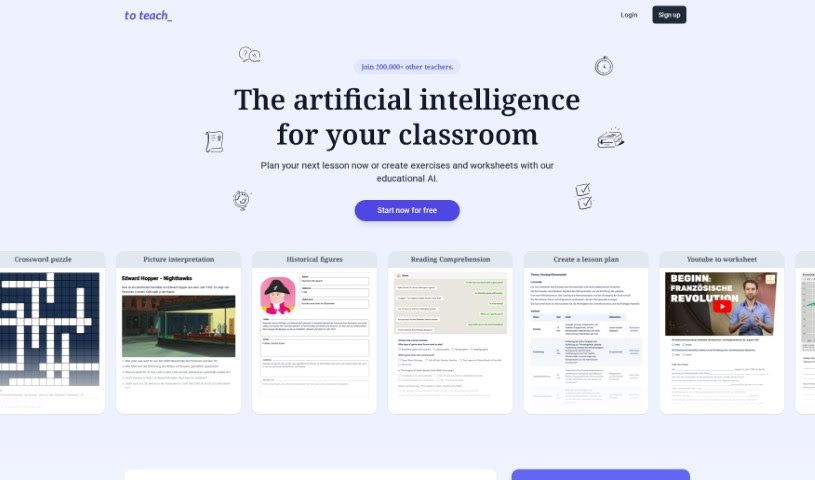
What is To Teach AI?
To Teach AI is a really neat educational tool that uses artificial intelligence to help you create personalized teaching materials and exercises. It’s designed to match what students are interested in and what they need to learn. The folks behind it use a human-made framework, focusing on a Human-Centered AI approach. This means they’re using AI to boost and support what teachers do, not to take over. People who’ve used it say it cuts down planning time and effort a lot, while still letting them make top-notch, varied teaching materials. This frees them up to focus more on individual students and creating lessons that really grab attention. The platform has lots of handy features, like planning lessons, creating subject-specific materials, and tools for making engaging exercises and worksheets. They also offer different subscription plans with varying access and prices, so there’s something for most educators.
Who created To Teach AI?
From what users have shared, Andrea founded To Teach AI. This platform uses AI to help generate great teaching materials, which really cuts down on prep time for teachers. Users like Kathrin Oertel and Raphael Schlotter have mentioned how much it helps with lesson planning and creating engaging content. The platform’s core idea is a Human-Centered AI approach, aiming to enhance and support human capabilities in education.
What is To Teach AI used for?
- You can tailor materials to fit each student’s language skill level and interests.
- It helps keep students engaged with unique exercise formats, like simulated WhatsApp chats or emails.
- Materials are H5P-compatible, making them easy to integrate into your favorite Learning Management Systems (LMS) and content authoring tools.
- It uses artificial intelligence to create practice exercises and personalize educational content.
- You can create engaging content for students, with different subscription plans available.
- There are discounts for students and trainee teachers on subscriptions.
- It amplifies human abilities through its Human-Centered AI approach.
- You can adapt and modify existing content by adding various types of media.
- It offers subject-specific teaching materials, including over 500 pre-made exercises and worksheets.
- The AI lesson planner helps you create engaging lessons quickly.
- It significantly reduces the time and effort needed for lesson planning.
- It helps generate high-quality, differentiated teaching materials.
- You can personalize educational content.
- It’s great for creating practice exercises.
- It amplifies and augments human abilities.
- You can create lesson plans with AI.
- It helps craft innovative and engaging lessons.
- It supports addressing the individual needs of students.
- You can create interactive H5P applications.
- It saves time in lesson preparation.
- It helps create personalized teaching materials.
- You can generate lesson plans with AI.
- It reduces preparation time for teachers.
- It amplifies and augments human abilities with AI.
- It helps create differentiated teaching materials.
- It supports teachers in lesson planning.
Who is To Teach AI for?
- Teachers
- Educators
- Students
- Trainee Teachers
- Language instructors
How to use To Teach AI?
To get the most out of To Teach AI, just follow these simple steps:
- Sign Up and Pick a Plan: First, register on the platform and choose a subscription plan that fits what you need. You can pick from the Free, Starter, or Pro plan.
- Browse Subject-Specific Materials: You’ll find over 500 pre-made exercises and worksheets for different school subjects. It’s easy to customize these for your lessons and students.
- Use the AI Lesson Planner: Make good use of the AI lesson planner to quickly create engaging lessons. Just make sure your lessons line up with the curriculum and include the right teaching materials.
- Boost Language Skills: Use the reading and listening comprehension worksheets to help students get better at languages. You can customize materials based on each student’s language level and what they’re interested in, all thanks to AI technology.
- Engage Students with Different Formats: Keep students interested by presenting exercises in fun ways, like through WhatsApp chats or emails. You can also explore different themes to really capture their attention.
- Connect with Your LMS: The materials are H5P-compatible, so you can easily integrate them into your Learning Management Systems (LMS) and other content authoring tools. This means you can smoothly add the content you create into the platforms you already use.
- Get Support and Resources: If you have questions or need help, reach out to the platform’s support team. Plus, check out the tutorials and FAQs available – they’re great for improving how you use the tool.
- Keep Learning and Improving: Stay in the loop with new features and updates on the platform. Connect with other users to share what you’ve learned and find new ways to make your teaching even better with To Teach AI.
By following these steps, you can really make To Teach AI work for you, improving your teaching and helping you create awesome educational materials for your students.