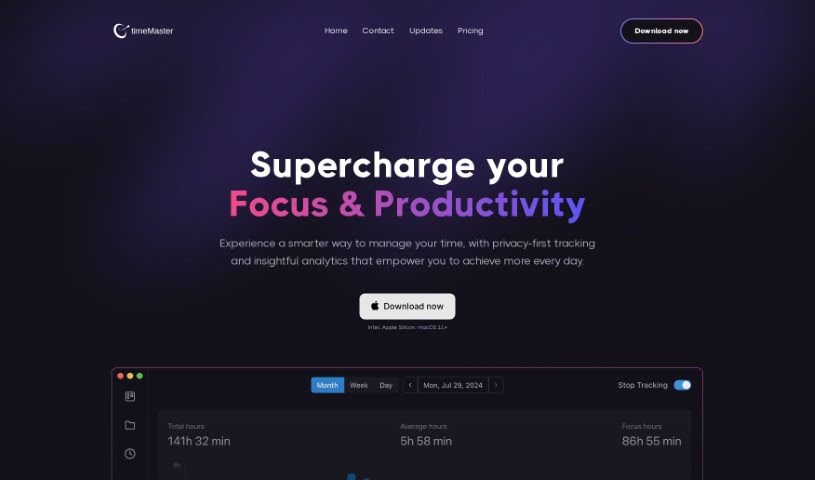
What is Timemaster?
Timemaster is your personal productivity assistant. It’s an app designed to help you get a real handle on your time by tracking what you’re doing and giving you insights to help you focus better and get more done. What’s really great is that it’s built with privacy in mind – your data stays right on your computer, encrypted and secure. You can grab Timemaster for macOS 11 or newer, and it works smoothly whether you have an Intel Mac or one with Apple Silicon. It comes packed with features like automatic time tracking, which can even figure out which project you’re working on. Plus, you get detailed analytics to see exactly when you’re most productive, customizable reminders to take breaks or hit your goals, and a 14-day money-back guarantee if it’s not quite right for you. You can choose between monthly or annual subscriptions. Essentially, Timemaster is all about helping you make the most of your day, boosting your productivity, all while keeping your personal information safe.
Who created Timemaster?
Timemaster was actually created by Aaron Lopez, who’s the founder of a company called Stealth Startup. He designed the app with a clear goal: to help people like us manage our time better. It does this by tracking our activities and then offering insights that help us focus more and be more efficient. One of the best things about Timemaster is its privacy-first approach. All your data is stored locally and encrypted, so it’s really secure. It gives you analytics to pinpoint your most productive hours and helps you optimize your schedule for better efficiency. Honestly, it’s a really valuable tool if you’re looking to improve your time management and overall productivity.
What is Timemaster used for?
Timemaster is a pretty versatile tool that can help you with a lot of things:
- Deep Dive Analysis: Get a thorough understanding of where your time goes.
- Effortless Time Tracking: It tracks your time automatically, so you don’t have to remember to start and stop timers.
- Smart Project Detection: The app can often figure out which project you’re working on without you telling it.
- Focus on Work: Easily exclude non-work activities so your reports accurately reflect your productive hours.
- Detailed Time Logging: Keep precise records of your work.
- Progress Reports: Receive clear weekly and monthly reports to see how you’re doing.
- Boost Your Productivity: Use the insights to make your work time more effective.
- Automatic Project Overviews: Get a quick look at your project progress.
- Key Productivity Insights: Understand your focus score, identify your most productive hours, and see which apps you use most often.
- Pomodoro Tracking: Keep detailed track of your Pomodoro sessions and get analytics on them.
- Insight Generation: The app provides helpful insights to guide your productivity.
- Exclude Non-Work Activities: Ensure your work time is accurately captured.
- Weekly & Monthly Reports: Track your progress over time.
- Optimize Productivity: Use the tools to work smarter.
- Detailed Tracking: Get granular data on your activities.
- In-depth Analysis: Refine your productivity with detailed breakdowns.
- Focus Score & Productive Hours: Understand your concentration levels and peak performance times.
- Pomodoro Session Tracking: Monitor your focused work intervals.
- Optimize Your Productivity: Make the most of your work hours.
- Auto Time Logs: Let the app handle the logging automatically.
- Custom Workweeks: Set up your workweek, including days with no activity if needed.
- Time Logging with Summaries: Get detailed logs, complete with AI-generated summaries.
- Progress Tracking Reports: Use weekly and monthly reports to see your development.
- Productivity Refinement: Benefit from in-depth analysis to improve how you work.
- Pomodoro Session Analysis: Get insights into your focus intervals.
- Focus and Distraction Analytics: Understand what helps and hinders your concentration.
- Goal Setting & Tracking: Set and monitor daily, weekly, and monthly goals.
- Automatic Tracking & Categorization: Enjoy fully automatic time tracking with smart categorization and project detection.
- Accurate Work Time: Exclude non-work activities for precise work time data.
- AI-Generated Summaries: Receive detailed time logs enhanced with AI summaries.
- Progress Tracking: Get weekly and monthly reports to monitor your advancement.
- Minimize Distractions: Optimize productivity with tools designed to help you focus.
- Pomodoro Optimization: Track Pomodoro sessions and gain insights for improvement.
- Goal Achievement: Set and meet your daily, weekly, and monthly targets.
- Focused Work Timelines: Customize your app usage for periods of concentrated work.
- Productivity Enhancement: Improve your workflow with detailed focus and distraction analytics.
- Efficient Tracking: Automatically switch between projects for seamless tracking.
Who is Timemaster for?
Timemaster is a great tool for a variety of professionals and students who need to manage their time effectively:
- Software developers
- Freelancers
- Project managers
- Students
- Consultants
- Designers
- Content creators
- Sales professionals
- Researchers
- Marketers
How to use Timemaster?
To really make Timemaster work for you, here’s a simple step-by-step guide:
- Get Started: First, download and install Timemaster from their official website. Once it’s installed, just launch the app on your Mac.
- Create a New Project: When you open it up, you’ll want to create a new project. Look for a “New Project” button or something similar in the app’s interface.
- Add Your Tasks: Inside your project, start adding the tasks you need to get done. Give each task a clear title, a brief description, and a due date so you can easily keep track of your progress.
- Set Deadlines: Make sure to set deadlines for each task. Timemaster lets you specify both start and end dates, which really helps in managing your schedule effectively.
- Prioritize What Matters: Organize your tasks by priority. This way, you can focus on the most important things first. Timemaster lets you mark tasks as high, medium, or low priority.
- Track Your Time: Use the built-in time tracking feature to record how long you spend on each task. This is super helpful for analyzing your productivity and making any necessary adjustments.
- Generate Reports: Dive into the reporting section to create insightful reports. You can see your project progress, how you’re using your time, and how many tasks you’ve completed.
- Work Together: If you’re part of a team, Timemaster can help you collaborate. You can assign tasks, monitor progress, and communicate with your team members right within the platform.
- Connect with Other Tools: See if Timemaster can integrate with other tools you use. Syncing calendars or sharing data can make your workflows even smoother.
- Stay Updated: Make it a habit to regularly update your tasks, progress, and timelines in Timemaster. This keeps your tracking accurate and ensures your project management stays efficient.
By following these steps, you’ll be well on your way to mastering your time, boosting your productivity, and successfully completing all your projects with Timemaster.