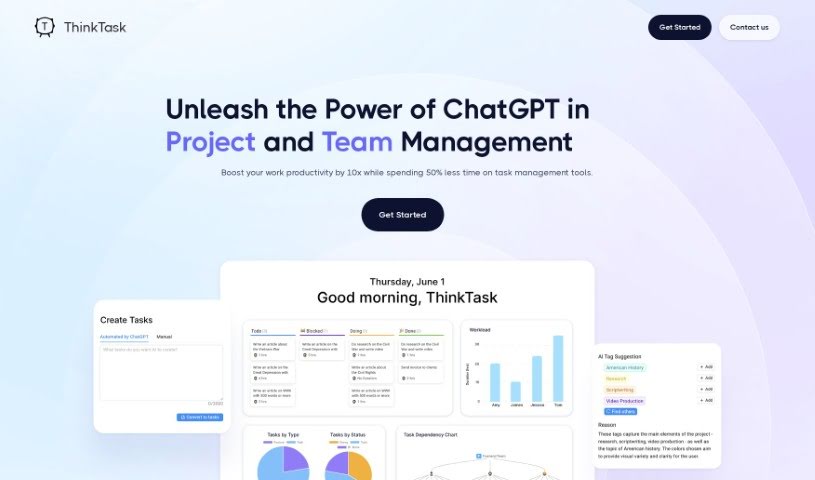
Screenshot of ThinkTask

ThinkTask

Discover ThinkTask in 2025! Learn how this project management tool, powered by ChatGPT, boosts productivity. We'll cover its features, compare it to other tools, and show you exactly how to get the most out of it.

Screenshot

What is ThinkTask?

ThinkTask is a really smart tool designed to completely change how teams and projects are managed. It does this by bringing ChatGPT right into the mix, which seriously boosts productivity and makes everything run more smoothly. This dynamic tool automatically generates performance reports by looking at past data, helps you make better decisions, and keeps an eye on how AI is being used to make your workflows as efficient as possible. You can easily see how engaged your team is and where projects stand thanks to visual tools like the AI usage chart and Team Pulse. The Project Progress Table gives you the nitty-gritty on how projects are advancing, including hours spent and costs, while Task Insights uses tree diagrams to help you plan tasks like a pro. Need to create a task quickly? Just type a note, and ThinkTask can generate the task for you with pre-filled details. Plus, AI-generated tags make categorizing and assigning tasks a breeze. ThinkTask’s Workpage is your all-in-one spot for notes, tasks, databases, and team collaboration, all aimed at making your team more productive and your projects run like clockwork.

Who created ThinkTask?

ThinkTask was founded by CEO and Founder John Carter, alongside CTO & Co-Founder Sophie Moore. Their company is all about transforming team and project management by integrating ChatGPT to really ramp up productivity. ThinkTask offers automated performance reporting, tracks AI usage, provides detailed project progress tables, gives you task insights for smarter planning, and even helps create tasks using AI. The whole platform is built to optimize workflows and make project execution smoother for businesses.

What is ThinkTask used for?

  • Automated Performance Reporting: Get reports automatically by letting ChatGPT analyze your historical data.
  • AI Usage Tracking: See how your team is using AI over time with clear, visual charts.
  • Project Progress Overview: Get a detailed look at how projects are moving forward, including hours and costs.
  • Task Insights and Sequencing: Plan tasks more effectively by using tree diagrams that show how tasks connect.
  • AI-Enhanced Task Creation: Create tasks super fast from your notes, with AI filling in titles and assignees automatically.
  • Visual charts showing how AI is used by your teams over time.
  • Visuals that break down task types and their status within a specific period.
  • Detailed tables that show project progress in terms of hours and costs.
  • Tree diagrams that illustrate how tasks depend on each other, making planning easier.
  • Quick task generation from notes, automatically filling in details like titles and who’s assigned.
  • Visual representations of AI engagement and task statuses.
  • Tree diagrams that show how tasks are linked.
  • Effortlessly create tasks just by typing notes.
  • AI-generated tags and assignments based on data.

Who is ThinkTask for?

ThinkTask is a great tool for:

  • Project managers
  • Team Managers
  • AI developers
  • Business analysts
  • Data Analysts
  • Data scientists
  • AI specialists
  • Task Managers
  • Workforce Planners

How to use ThinkTask?

Here’s how to get the most out of ThinkTask:

  1. Sign Up: First, join the waitlist to start using ThinkTask for smoother team and project management.
  2. Explore Key Features:
    • Automated Performance Reporting: Let ChatGPT handle your performance reports by analyzing historical data automatically.
    • AI Usage Tracking: Easily visualize your team’s AI usage trends over time with helpful charts.
    • Project Progress Overview: Get a clear, detailed view of project progress, including estimated hours and costs.
    • Task Insights and Sequencing: Plan your tasks more effectively by using tree diagrams that show how they all connect.
    • AI-Enhanced Task Creation: Quickly create tasks from your notes. ChatGPT can even auto-fill details like titles and who’s assigned.
  3. Check the FAQs:
    • Automation: ThinkTask automates performance reporting, which helps you make data-driven decisions.
    • AI Usage Chart: This chart shows you exactly how AI is being used by your team.
    • Team Pulse: Get visuals of different task types and their statuses to help manage your team’s activities effectively.
    • Task Creation: Making tasks is super easy! Just input notes and generate detailed tasks with a single click.
    • AI-Generated Tags and Assignments: Tasks get tagged automatically, and AI can even suggest who should be assigned to them.
  4. Pricing Options:
    • We offer different plans like Startup, Growth, or Enterprise. Each has varying features and prices, so you can pick what best suits your needs.

By following these steps, you can really use ThinkTask to boost your work productivity, save time on managing tasks, and make your project execution much more efficient.

Related AI Tools

Discover more tools in similar categories that might interest you

Stay Updated with AI Tools

Get weekly updates on the latest AI tools, trends, and insights delivered to your inbox

Join 25,000+ AI enthusiasts. No spam, unsubscribe anytime.