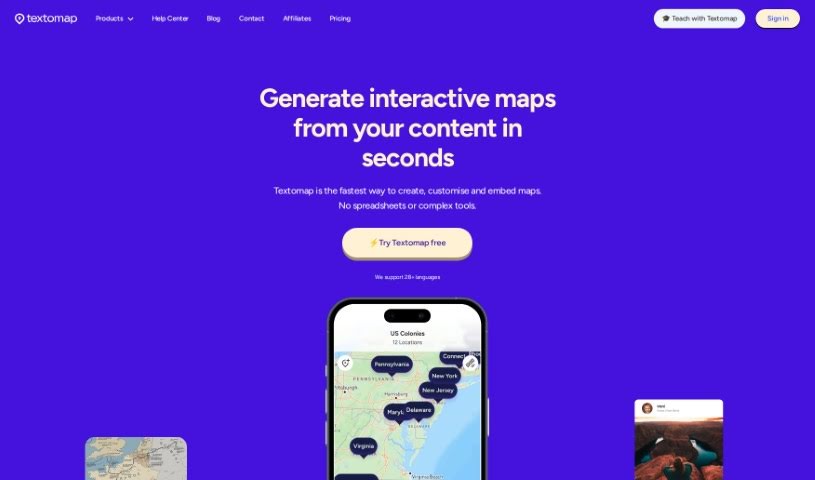
Screenshot of Textomap

Textomap

Discover Textomap in 2025! Learn how to use this powerful tool to create interactive maps from text, explore its features, and see how it stacks up against other productivity tools.

Screenshot

What is Textomap?

Textomap is a really neat platform that lets you turn any text with locations into interactive maps, and it does this in seconds. The best part? You don’t need any coding, spreadsheets, or complicated software to get started. Just type your text, and Textomap does the rest! They offer a few different plans to suit everyone, including a Free option, a Pro plan for more features, and a Custom plan for businesses. It’s also a fantastic tool for education; students can dive into geography, history, and science with interactive tools that use AI. People have found Textomap super efficient for mapping out routes, which really helps save time so they can focus on other important things. The team behind Textomap is a great mix – they love coding and design, but they’re also passionate readers and travelers. Their goal is to blend AI with human creativity to make tools that simplify life and boost productivity.

Who created Textomap?

Dana Raijman and Dario Raijman are the brilliant minds behind Textomap. Dana is the CEO, CTO, and Co-Founder, while Dario is also a Co-Founder. Together, they combine their passion for code and design with a love for reading and travel. They’re all about using Artificial Intelligence alongside human creativity to build tools that make life simpler and more productive.

What is Textomap used for?

  • Teaching with Textomap: It’s a fantastic way to give students an engaging, interactive tool to learn about geography, history, and science, all while exploring the power of AI.
  • Creating Maps with ChatGPT: You can easily generate maps directly from your text.
  • For Educational Institutions: Perfect for schools and universities.
  • For Content Creators & Bloggers: Easily visualize locations mentioned in your articles.
  • For Travel Agents & Operators: Map out itineraries and destinations.
  • For News & Media: Illustrate stories with interactive location maps.
  • Textomap Chrome Extension: Adds extra convenience for on-the-go mapping.
  • Individual Accounts: Every student can have their own account.
  • Customizable Locations: You can add links, images, and more to your map points.
  • Effortless Map Generation: Create interactive maps from any text that includes locations.
  • No Complex Tools Needed: Forget coding, spreadsheets, or complicated software.

Who is Textomap for?

Textomap is a great tool for:

  • Content creators and bloggers
  • Travel agents and tour operators
  • News and media professionals
  • Educational institutions
  • Anyone who wants to easily visualize locations from text!

How to use Textomap?

Getting started with Textomap is pretty straightforward. Here’s how:

  1. First, head over to the Textomap website at www.textomap.com.
  2. You’ll want to pick a plan that suits you best. They have a Free plan, a Basic plan for $8/month, a Pro plan for $19/month, and a Custom plan if you’re an Enterprise user.
  3. You can either sign up for an account or jump right in and start using the tool.
  4. Ready to make a map? Just paste or type your text that has locations in it. Textomap will whip up an interactive map from it in just seconds.
  5. Want to make your map even better? You can customize it by adding links, images, and other cool elements.
  6. Don’t forget to check out all the features, like how you can customize locations using ChatGPT.
  7. For even more convenience, grab the Textomap Chrome Extension.
  8. If you need a little extra help or want to learn more, the Help Center, Blog, and FAQ sections are packed with useful information.
  9. Your feedback is super valuable! Share your thoughts on Textomap to help the community grow.
  10. If you’re looking to teach with Textomap, they have specific solutions tailored for educational institutions, content creators, travel agents, news media, and more.
  11. Got questions or need an enterprise solution? Just reach out to the Textomap team.

By following these steps, you’ll be able to use Textomap easily to create interactive maps from your content. Have fun exploring the world of AI-powered mapping with Textomap!

Related AI Tools

Discover more tools in similar categories that might interest you

Stay Updated with AI Tools

Get weekly updates on the latest AI tools, trends, and insights delivered to your inbox

Join 25,000+ AI enthusiasts. No spam, unsubscribe anytime.