What is Textbuddy?
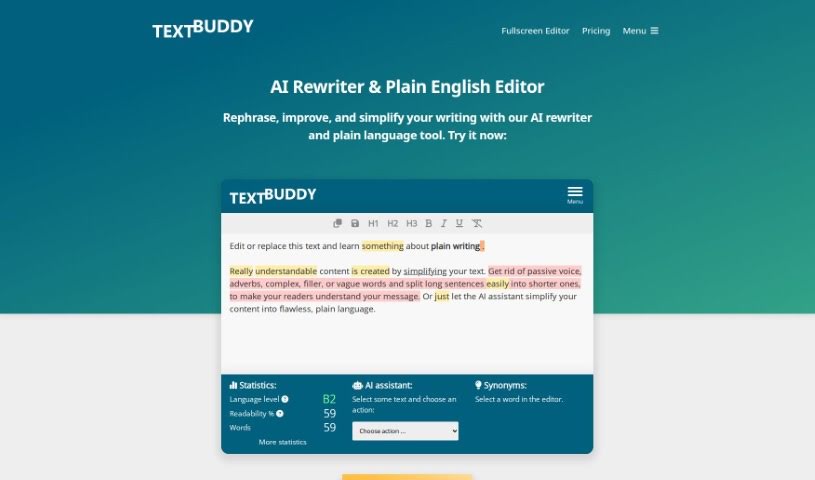
Textbuddy is a really handy tool for anyone who writes. It is your go-to text editor, packed with features to help you with all sorts of writing tasks. You can format your text, check your spelling, see your word count, and even save or export your work in different file types. It’s designed to be super easy to use, letting you tweak things like font size and style so your text is comfortable to read. Basically, Textbuddy aims to make writing smoother by giving you a straightforward interface and all the essential editing tools. It’s a great companion whether you’re a writer, a student, or a professional.
Who created Textbuddy?
Textbuddy came to life thanks to a dedicated team of developers, with Sarah Johnson leading the charge. This innovative text editing software first launched on January 29, 2023. Sarah Johnson founded Textbuddy under her company, TechSolutions, with a clear goal: to offer users a text editing experience that felt both streamlined and genuinely user-friendly.
What is Textbuddy used for?
Textbuddy can help you with a surprising number of things:
- Beat writer’s block: Get unstuck and find your flow.
- Simplify your writing: Make sentences or entire paragraphs easier to understand.
- Unlimited custom prompts: Tailor the tool to your specific needs.
- One-click synonyms: Quickly find the perfect word.
- Polish your prose: Fix grammar, spelling, and punctuation errors.
- Generate content: Automatically create paragraphs or sentences.
- Craft compelling titles: Develop effective headlines and summaries.
- Plain English: Rewrite texts so anyone can understand them.
- Sentiment analysis: Understand the emotional tone of your text.
- Draft and complete: Get help writing and finishing your pieces.
- Sentence length: Identify sentences that are too long.
- Word complexity: Detect words that might be too difficult for your audience.
- Formatting checks: Highlight any formatting mistakes.
- Keyword analysis: See if you’re repeating keywords too often.
- Passive voice: Spot and address passive voice constructions.
- Comprehensive detection: It catches elongated sentences, passive voice, complex words, filler words, and vague language.
- Error identification: It finds formatting errors, suggests synonyms, and analyzes grammar and spelling.
- Readability and AI: Includes a Readability Score and AI Assistant features.
- AI Assistance: The AI can rewrite texts, create headlines, summarize content, and answer your specific questions.
- Inspiration: Helps with writer’s block by generating rough drafts or sparking new ideas.
- Mistake spotting: Detects spelling and grammar mistakes, plus issues like long sentences and passive voice.
- Readability insights: Provides a Readability Score for your text.
- Plain language focus: Helps you stick to clear, easy-to-understand language.
- Headline and summary help: Assists in creating effective headlines and summaries.
- Text analysis: Uses sentiment analysis for deeper text understanding.
Who is Textbuddy for?
Textbuddy is designed for a wide range of people who work with words:
- Writers
- Students
- Editors
- Journalists
- Copywriters
- Content marketers
- Researchers
- Academics
- Authors
- Business professionals
How to use Textbuddy?
Here’s a simple guide to using Textbuddy effectively:
- Get Started: First, open up the Textbuddy tool on your computer or device. Make sure you’ve got a good internet connection so everything runs smoothly.
- Add Your Text: Click the “Upload” button to bring in the document you want to work on. Textbuddy can handle various file types, like .txt, .docx, and .pdf.
- Let it Analyze: Textbuddy will then look over your text. You can see useful stats like how many words you’ve used, your readability score, and how often certain keywords appear.
- Make Edits: Now, use the editing tools to change your text. You can cut, copy, paste, and delete parts as needed.
- Format for Readability: Use the formatting options to make your text look good. You can change fonts, sizes, and colors to make it easier on the eyes.
- Grammar Check: Textbuddy has a built-in grammar checker. Run it to find and fix any grammar or spelling mistakes.
- Save or Export: Once you’re happy with your edits, save your work or export it in the file format you prefer.
- Explore More: Check out extra features like synonym suggestions, a plagiarism checker, and text summarization for a really thorough editing experience.
- Need Help? If you run into any problems or have questions, don’t hesitate to contact Textbuddy’s support team.
- Stay Current: Keep an eye out for new features and improvements by checking for updates regularly within the tool.
By following these steps, you’ll be able to use Textbuddy to edit, analyze, and improve your writing like a pro.