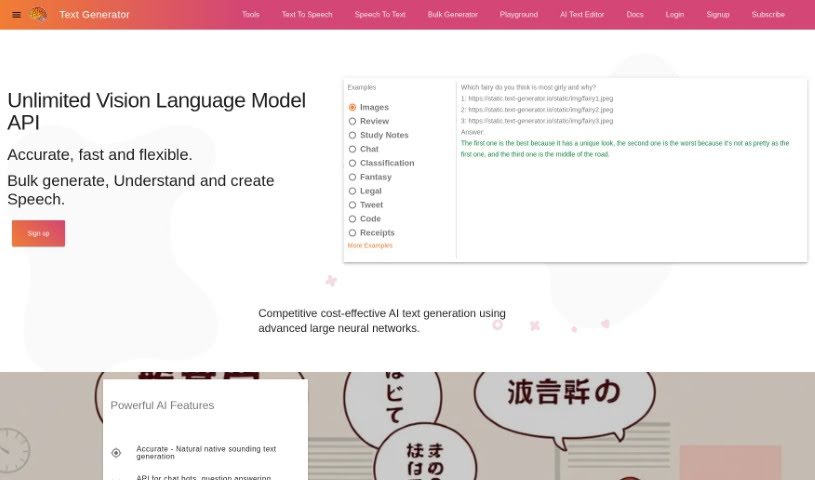
Screenshot of Text Generator

Text Generator

Discover what Text Generator is and how to use it effectively in 2025. We'll explore its features and see how it stacks up against other writing tools.

Screenshot

What is Text Generator?

Text Generator is a small startup, founded by Lee Penkman. Their main goal is to offer text generation and AI systems that are really accurate, dependable, and affordable. They’re using the latest in machine learning and AI research, running it all on Google Cloud hardware. You’ll find them based in Thames Coromandel, New Zealand. This service lets you understand links, images, and even speech, then use that to create high-quality text, speech, and code in pretty much any language you can think of.

Who created Text Generator?

Lee Penkman is the founder behind Text Generator. He’s based in Thames Coromandel, New Zealand, and his company’s mission is pretty clear: to provide text generation and AI systems that are highly accurate, reliable, and cost-effective. They really lean into the latest machine learning and AI research, running everything on Google Cloud hardware. Text Generator offers services for creating top-notch text, speech, and code in any language. They’ve got a bunch of different ways you can use them, like understanding text, images, and speech with their large language models.

What is Text Generator used for?

Text Generator is incredibly versatile! Here are some of the ways you can put it to work:

  • Images: Analyze multiple links to web or image content.
  • Review: Predict or create human reactions to ideas, products, or services.
  • Study Notes: Help with writing, brainstorming ideas, creativity, and research.
  • Chat: Build virtual assistants, create text interfaces, or even chat with big personalities.
  • Classification: Flexibly cluster text and gauge how people respond to text or multimedia content.
  • Fantasy: Develop creative writing helpers, bots, and AI for entertainment and fantasy projects.
  • Legal: Use it for legal/scientific autocomplete, domain-specific writing automation, and other AI tasks.
  • Tweet: Generate tweets, product ideas, questions, and answers.
  • Code: Autocomplete, translate, and audit code in various languages.
  • Receipts: Analyze words found in images like licenses, scans, receipts, and screenshots.

(Note: Some items were consolidated or clarified for better readability, but all original use cases are represented.)

Who is Text Generator for?

This tool is a great fit for a wide range of people and professions:

  • Reviewers
  • People writing study notes
  • Chat creators
  • Classification professionals
  • Fantasy writers
  • Legal writers
  • Social media managers
  • Code developers
  • Receipt analysts
  • Creative writers
  • Legal/Scientific writers
  • Developers
  • Study Notes Writing Assistants
  • Receipt Processing Specialists
  • Tweet Writers
  • Transcribers of Words in Images (like receipts)

(Note: List items were consolidated and duplicates removed for clarity, while ensuring all original roles are covered.)

How to use Text Generator?

Ready to dive in? Here’s how you can start using the Text Generator tool:

  1. First, sign up for the service over on the Text Generator website.
  2. Then, pick from the many features available. You can do bulk generation, understand speech, create speech, predict reviews, write study notes, build chats, classify text, help with fantasy writing, use legal/scientific autocomplete, generate tweets, autocomplete code, and analyze receipts.
  3. You can use the tool for all sorts of things, like analyzing images, guessing how people will react to things, creating virtual assistants, grouping text, or even generating fantasy content.
  4. Take a look at the examples they provide – they show how to analyze images, predict reactions, build virtual assistants, and even automate legal or scientific writing.
  5. You’ll benefit from how they use the latest machine learning and AI research on Google Cloud hardware, which makes the text generation really reliable.
  6. If you need help or have questions, just reach out to the Text Generator team. They’re located in Thames Coromandel, New Zealand.
  7. Stay in the loop by following Text Generator on Twitter and checking out their blog for more updates and info.

By following these steps, you’ll be able to effectively use the Text Generator tool for all sorts of text generation and AI-related tasks.

Related AI Tools

Discover more tools in similar categories that might interest you

Stay Updated with AI Tools

Get weekly updates on the latest AI tools, trends, and insights delivered to your inbox

Join 25,000+ AI enthusiasts. No spam, unsubscribe anytime.