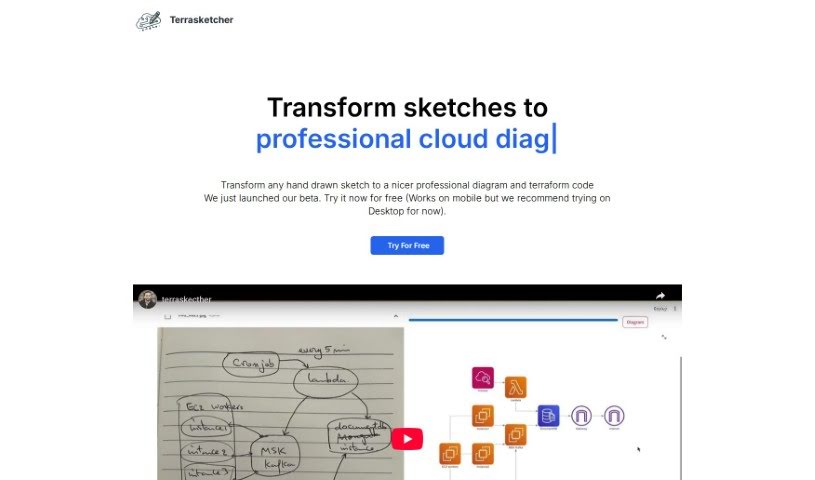
Screenshot of Terrasketcher

Terrasketcher

Discover Terrasketcher in 2025: learn what this AI tool does, how to use it effectively, explore its features, and see how it stacks up against other design generators.

Screenshot

What is Terrasketcher?

Terrasketcher is a smart AI tool that takes your hand-drawn sketches and turns them into digital infrastructure and cloud diagrams. It is a quick and easy way to bring your rough ideas to life digitally. It’s especially good for anything related to cloud infrastructure, making it a real help for people in cloud design, IT, and other technical fields who need to visualize how things are laid out. This tool really speeds things up by quickly translating your sketches into detailed digital drawings. This not only boosts your productivity when designing but also makes your visualizations much more precise. Terrasketcher’s AI is designed to understand your sketches and create accurate digital diagrams, which is perfect for technical areas that frequently need to create formal infrastructure designs.

Who created Terrasketcher?

We don’t actually know who created Terrasketcher – it seems to have been launched by an unknown individual or group. It first appeared on November 17, 2023, offering a pretty unique AI solution. Its main focus is transforming those hand-drawn sketches into digital infrastructure and cloud diagrams. Since it specializes in cloud infrastructure, it provides a straightforward and efficient way to connect your physical sketches with the digital world. It’s particularly handy for technical fields, even offering CAD compatibility. Plus, it automates the process of turning sketches into diagrams, which really saves time and makes design work more productive.

What is Terrasketcher used for?

Terrasketcher is great for a bunch of things:

  • Turning your sketches into polished digital diagrams.
  • It really focuses on cloud infrastructure, so it’s your go-to for that.
  • It helps bridge the gap between drawing by hand and creating digital visuals.
  • It’s super useful if you work in technical fields.
  • You’ll find it makes your diagrams much more precise.
  • It helps you better understand complex cloud infrastructure.
  • It can handle and visualize even complicated cloud setups.
  • It automates the whole process of transforming sketches.
  • This means you get a big boost in design productivity.
  • It’s perfect for creating visual layouts of cloud infrastructures and technical schemes.
  • Basically, it takes your drawings and makes them into clear, digital diagrams.
  • It’s all about cloud infrastructure, making that part of your work smoother.
  • It connects your physical drawing process with digital output.
  • It’s designed to be intuitive and efficient.
  • You’ll save a lot of time when you need to visualize things.
  • The precision it offers for diagrams is a major plus.
  • It really helps you get a clearer picture of cloud infrastructure.
  • It’s built to support even the most complex cloud setups.
  • It automates the sketch-to-diagram conversion.
  • And yes, it’s compatible with CAD, which is handy!

Who is Terrasketcher for?

Terrasketcher is a fantastic tool for:

  • People working in cloud design.
  • Information Technology (IT) professionals.
  • Anyone in technical disciplines.
  • Specifically, cloud designers will find it invaluable.
  • It’s a great asset for Information Technology (IT) departments.
  • And it’s highly beneficial for all technical disciplines.
  • If you’re a Cloud Designer, you’ll likely find this tool a game-changer.

How to use Terrasketcher?

Here’s a straightforward guide to using Terrasketcher:

  1. What is Terrasketcher? Terrasketcher is an AI tool that takes your hand-drawn sketches and turns them into digital infrastructure and cloud diagrams. It’s a really intuitive way to get your analog ideas into detailed digital images.

  2. How does Terrasketcher work? It uses advanced AI technology to look at your hand-drawn sketches and then transforms them into accurate digital diagrams. These diagrams represent your infrastructure and cloud designs.

  3. Sectors that benefit from Terrasketcher Terrasketcher is particularly helpful for sectors like cloud design, IT, and other technical fields. These are areas where visualizing infrastructure and sharing layouts formally is really important.

  4. Main functionality of Terrasketcher At its core, Terrasketcher converts your hand-drawn sketches into comprehensive digital diagrams. These diagrams cover infrastructure and cloud configurations.

  5. Creating diagrams with Terrasketcher You can create all sorts of diagrams with Terrasketcher, but it mainly focuses on cloud diagrams and infrastructure blueprints. The result? Professional digital images that start from your initial analog ideas.

  6. Managing complex cloud infrastructures Terrasketcher is equipped to handle complex cloud infrastructures thanks to its AI. It can interpret hand-drawn sketches, no matter how intricate, and turn them into accurate digital diagrams. This really helps with understanding and presenting them.

  7. Saving time with Terrasketcher By quickly translating your sketches into digital diagrams, Terrasketcher significantly speeds up the process of creating cloud or infrastructure diagrams. You can skip the traditional, time-consuming blueprint creation steps.

  8. Ensuring precision Terrasketcher uses advanced AI technology to make sure your diagrams are precise. It accurately interprets even the most detailed sketch elements and reproduces them reliably in a digital format.

Basically, you can use Terrasketcher to smoothly move from your analog sketches to precise digital diagrams. It’s designed to meet the visualization needs of technical fields with its AI-driven efficiency and accuracy.

Related AI Tools

Discover more tools in similar categories that might interest you

123RF AI Image Generator

Creative Image Generation
Learn More

Stay Updated with AI Tools

Get weekly updates on the latest AI tools, trends, and insights delivered to your inbox

Join 25,000+ AI enthusiasts. No spam, unsubscribe anytime.