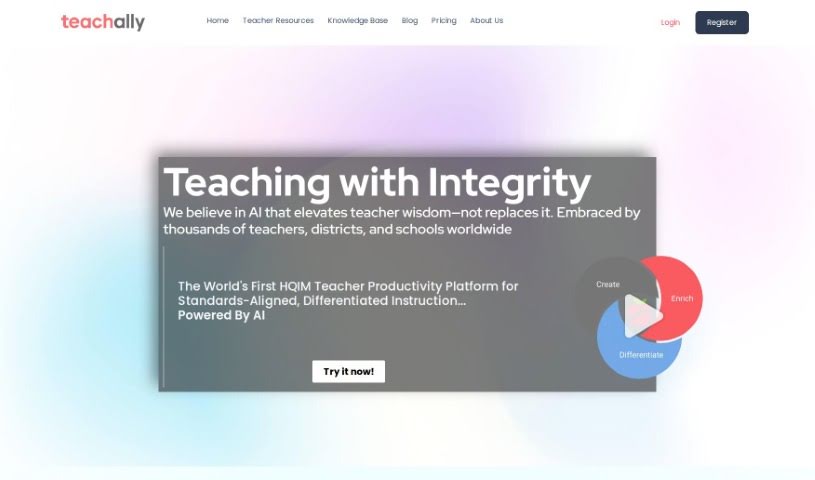
Screenshot of Teachally

Teachally

Discover what Teachally is and how to use it effectively in 2025. We'll explore its features and see how it stacks up against other teacher tools.

Screenshot

What is Teachally?

Teachally is an educational platform designed to help districts with AI-driven solutions that are specifically made for their unique needs. It is a smart assistant for educators. It helps automate lesson planning, makes sure lessons line up with required standards, and supports teaching in ways that work for every student. The goal? To make teachers more efficient, help students learn better, and keep learning going smoothly, no matter what.

What can it actually do? Well, it aligns with your district’s curriculum, teachers can use it as much as they want, and they can even share their work with colleagues. It can also connect with your existing school systems and offers ways to tailor lessons for students with different learning styles and needs. Plus, Teachally takes student data privacy and security seriously, making sure everything is compliant with COPPA and FERPA regulations.

Teachally’s AI-powered tool is a real time-saver for teachers. It helps them create quality lesson plans and assignments quickly. Teachers can also easily connect with students and parents, generate and customize assignments, make sure they meet national standards, and find cool features for classroom activities like presentations and games.

Privacy and security are a big deal for Teachally. They stick to the 2020 Student Privacy Pledge. This means they don’t collect student info without clear parental permission. They only use data to provide their services to teachers and schools, and they never share it with others without consent. They also have strong security measures in place to keep everything safe.

The platform has a variety of resources for everyone – teachers, administrators, and entire schools. You can start with a free plan that includes AI-driven lesson plans, or upgrade for more features. They also have options for districts and larger schools, which often include professional development and custom curriculum alignment.

Ultimately, Teachally aims to make a real difference in education across entire districts, offering smart solutions for educators everywhere.

Who created Teachally?

Daniel, the founder of the company, created Teachally. It first launched on October 25, 2023. The company’s mission is to really change education by providing AI solutions for teachers and schools all over the world. Teachally offers different plans to fit the needs of teachers, administrators, and districts, focusing on personalized learning, meeting educational standards, and helping educators work together. They also make sure student data is private and secure, following COPPA and FERPA rules.

What is Teachally used for?

Teachally is used for a bunch of things to make teaching easier and more effective:

  • District Curricular Alignment: This makes sure everything lines up perfectly with your district’s curriculum and standards, keeping things consistent and compliant.
  • Unlimited Use by Teachers: Educators get to use all the platform’s features without any limits, which really supports trying out new teaching methods and using resources.
  • Teacher Co-Sharing: It makes it easy for teachers to collaborate by sharing lesson plans and even co-teaching, helping to build a more unified teaching approach.
  • Data Integration: Teachally connects with your existing Learning Management Systems (LMS) or Student Information Systems (SIS). This streamlines operations, gives you better analytics, and helps you make decisions based on data.
  • Differentiated Instruction: You get tools to create personalized learning paths and content that’s different for each student, so everyone’s needs are met.
  • Leading COPPA and FERPA Compliance: They follow the highest standards for student data privacy and security, fully complying with COPPA and FERPA regulations.
  • Included In-Person Professional Development: For district solutions, they offer comprehensive professional development sessions to help teachers improve their skills and use the platform effectively.
  • Generating Lesson Plans and Assignments: You can create lesson plans and assignments from any resource, whether it’s online or offline.
  • Alignment with Standards: It aligns with Common Core and SEL skills and standards, making it quick to customize and remix assignments.
  • Effortless Sharing: Easily share your work with co-teachers and other classrooms to encourage collaboration.
  • District Curricular Alignment: (Repeated for emphasis on its importance)
  • Unlimited Use by Teachers: (Repeated for emphasis on its benefit)
  • Teacher Co-Sharing: (Repeated for emphasis on collaboration)
  • Differentiated Instruction: (Repeated for emphasis on personalization)
  • Compliance with COPPA and FERPA regulations: (Repeated for emphasis on security)
  • Professional Development Sessions: (Repeated for emphasis on support)
  • Generative AI for Saving Time in Lesson Planning: This AI helps teachers save hours when creating lesson plans and assignments.
  • Creation of Personalized Lesson Plans and Assignments: You can create lesson plans and assignments that are tailored to individual students.
  • Facilitating Collaboration Among Teachers: The platform makes it easy for teachers to work together.
  • Effortlessly create personalized lesson plans and teaching guides aligned with High Quality Instructional Materials (HQIM) standards: You can easily create custom lesson plans and guides that meet HQIM standards.
  • Effortlessly align educational content to over 400,000 built-in national, state, and specialized standards for quick customization and remixing of assignments: It’s simple to align your content with a vast number of standards, allowing for fast customization and remixing of assignments.
  • Discover enrichments for all learning styles and subjects, including Science of Reading, HQIM self checks, subject-specific toolboxes, and comprehensive taxonomies: Find extra resources for different learning styles and subjects, like Science of Reading materials, HQIM self-checks, specialized toolkits, and detailed taxonomies.
  • Tailor every lesson with differentiation tools designed for every student’s success and provide instant translations in over 100 languages: You can customize every lesson with tools to help every student succeed, and even get instant translations in over 100 languages.
  • Craft and customize dynamic assignments that resonate with every learner and seamlessly integrate into tailored lesson plans: Create engaging assignments that connect with students and fit perfectly into your lesson plans.
  • Generate and customize assignments for any subject instantly, share work with co-teachers, and foster collaboration: Quickly create and customize assignments for any subject, share them with colleagues, and build a collaborative environment.
  • Differentiate assignments, align with national standards, and generate answer keys: You can differentiate assignments, make sure they meet national standards, and even generate answer keys.
  • Enrich classroom activities with features like in-class presentations, activities, games, rubrics, and project-based activities: Make classroom activities more engaging with presentations, games, rubrics, and project-based options.
  • Simplify creation process and provide a centralized hub for all classroom materials: It makes creating materials easier and acts as a central place for everything you need for your classroom.
  • Facilitate communication with parents and students through automated messaging and rewards: Help communication with parents and students by using automated messages and rewards.
  • Generate lesson plans and assignments from any resource, aligned with Common Core and SEL skills and standards, allowing for quick customization and remixing: You can create lesson plans and assignments from any source, align them with Common Core and SEL standards, and easily customize and remix them.
  • Effortlessly share work with co-teachers and other classrooms, fostering collaboration, and generating and customizing assignments for any subject, instantly: Share your work easily with colleagues and other classrooms to promote collaboration, and instantly create and customize assignments for any subject.
  • Enhance teacher efficiency, improve student outcomes, and ensure continuity in learning by providing AI-driven solutions tailored to the unique needs of each district: By offering AI solutions customized for each district’s needs, it boosts teacher efficiency, improves how students learn, and ensures learning continues without interruption.
  • Generative AI Supported Tool: Empowers teachers by saving them hours of work in creating quality lesson plans and assignments: This AI tool helps teachers by saving them many hours when they create good lesson plans and assignments.
  • AI Technology for Lesson Plan Generation: Can generate lesson plans and assignments from any resource, aligning them with Common Core and SEL standards: The AI technology can create lesson plans and assignments from any source, making sure they align with Common Core and SEL standards.
  • Teacher Collaboration and Assignment Customization: Enables effortless sharing and customization of assignments among co-teachers and classrooms: It makes it simple to share and customize assignments among co-teachers and across classrooms.

Who is Teachally for?

Teachally is designed for a variety of people in the education world:

  • Teachers
  • Administrators
  • Educators (a broader term covering many roles)
  • Districts (as a whole organizational unit)
  • Schools (individual institutions)

How to use Teachally?

Teachally is a really useful tool that helps teachers create personalized lesson plans, teaching guides, and assignments without a lot of hassle. Here’s a simple, step-by-step guide to get you started:

  1. Start by Accessing Teachally: First, head over to the Teachally website. If you’re a teacher or administrator, sign up for a free account. It’s a great way to get started.
  2. Navigate to the Dashboard: Once you log in, you’ll land on the dashboard. This is your main hub where you can begin creating all your educational content.
  3. Create Lesson Plans: You can easily put together personalized lesson plans from scratch. Teachally’s AI tools are there to help, and you can make sure these plans line up with High Quality Instructional Materials (HQIM) standards.
  4. Alignment to Standards: It’s important that your teaching materials match over 400,000 national, state, and specialized standards. Teachally makes this alignment seamless.
  5. Enrichment and Differentiation: Explore different resources that cater to various learning styles and subjects. This includes things like Science of Reading materials, HQIM self-checks, subject-specific toolkits, and more. You can also use the tools for differentiation and translation to help every student.
  6. Assignments and Assessment: Create custom, dynamic assignments that fit perfectly into your lesson plans. You can then export these assignments in common formats, making them easy to share.
  7. Utilize AI Technology: Make the most of Teachally’s AI. You can generate lesson plans and assignments from all sorts of resources, whether they’re online or offline. These are automatically aligned with Common Core and SEL skills and standards.
  8. Collaborate and Share: Sharing your work with co-teachers and other classrooms is super easy. This really helps foster collaboration and the sharing of ideas.
  9. Privacy and Security: You can feel confident knowing Teachally is dedicated to student data privacy. They follow strict measures to keep data safe, don’t collect info without explicit consent, and comply with COPPA and FERPA regulations.
  10. Continuous Support: If you ever have questions or need help, their dedicated team is there for you.

By following these steps, teachers can really use Teachally effectively. It helps streamline lesson planning, makes students more engaged, and allows you to tailor education to each student’s needs in an efficient and secure way.

Related AI Tools

Discover more tools in similar categories that might interest you

Academic Help Free Essay Generator

Education Academic Writing
Learn More

Stay Updated with AI Tools

Get weekly updates on the latest AI tools, trends, and insights delivered to your inbox

Join 25,000+ AI enthusiasts. No spam, unsubscribe anytime.