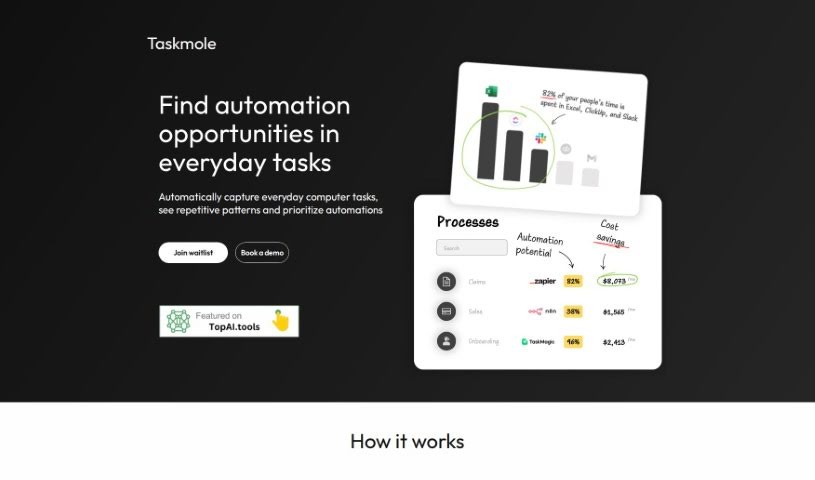
Screenshot of Taskmole

Taskmole

Discover what Taskmole is and how to make the most of it in 2025. We'll dive into its features and see how it stacks up against other data analytics tools.

Screenshot

What is Taskmole?

Taskmole is your business’s personal AI Doctor. It’s designed to make your operations smoother and more automated. How? By bringing together task mining, process mapping, and smart automation suggestions all in one easy-to-use place. What really sets Taskmole apart is its ability to watch and record what you do on your computer every day, in real-time. This makes it super simple to map out your processes and figure out how to make things more efficient. Plus, Taskmole takes data security seriously. It uses encryption and works directly from your desktop, meaning you stay in control of your sensitive information. It also plays nicely with a lot of popular apps you might already use, like Zapier, Make, and n8n, as well as diagramming tools such as MS Visio, Miro, and Lucidchart. This makes it a really well-rounded solution for anyone looking to automate and improve their business processes.

Who created Taskmole?

Taskmole was developed by a company dedicated to making business processes more efficient and automated. They’ve built a comprehensive solution that combines task mining, process mapping, and automation recommendations into a single, user-friendly interface. Security and privacy are clearly a big deal for them; they use data encryption and a desktop-first approach to ensure your data stays safe. The tool also integrates smoothly with popular applications like Zapier, Make, n8n, MS Visio, Miro, and Lucidchart. To fit different needs, the company offers various pricing options for individuals, small to medium-sized businesses, and larger enterprises, even providing custom integrations and dedicated support.

What is Taskmole used for?

  • Automated Task Mining: It automatically keeps track of your computer tasks throughout the day, giving you a clear picture of how your time is spent.
  • Process Mapping: Based on the tasks it records, Taskmole automatically creates process maps, offering valuable insights into how your operations actually work.
  • Automation Recommendations: You’ll get personalized suggestions on how to improve your processes, often recommending popular tools to help you do it.
  • Advanced Security & Privacy: Taskmole uses top-notch data protection methods to keep your information secure.
  • Comprehensive Integration: It connects easily with a wide range of tools and platforms, making your existing workflows even better.
  • Automated Task Mining: It automatically keeps track of your computer tasks throughout the day, giving you a clear picture of how your time is spent.
  • Process Mapping: Based on the tasks it records, Taskmole automatically creates process maps, offering valuable insights into how your operations actually work.
  • Automation Recommendations: You’ll get personalized suggestions on how to improve your processes, often recommending popular tools to help you do it.
  • Advanced Security & Privacy: Taskmole uses top-notch data protection methods to keep your information secure.
  • Comprehensive Integration: It connects easily with a wide range of tools and platforms, making your existing workflows even better.

Who is Taskmole for?

  • People running their own businesses solo
  • Those who specialize in automation
  • Leaders in internal operations and IT departments

How to use Taskmole?

Taskmole is a powerful AI tool designed to help you streamline and automate your business processes. Here’s a simple, step-by-step guide to using it effectively:

  1. Task Mining:

    • Taskmole automatically tracks and records the tasks you do on your computer each day. This helps you see exactly where your time is going.
  2. Process Mapping:

    • After capturing your tasks, the tool creates visual process maps. These maps give you valuable insights into your operational flow.
  3. Automation Recommendations:

    • Taskmole uses AI to provide specific suggestions for automating parts of your work, tailored to your unique processes.
  4. Integration:

    • You can easily connect Taskmole with popular tools like Zapier, Make, n8n, MS Visio, Lucidchart, Miro, and Confluence. This really boosts your workflow efficiency.
  5. Security Measures:

    • Taskmole puts a high priority on data security. Your data is encrypted both when it’s stored and when it’s being sent, ensuring your privacy. You also have control over who can access your data.
  6. User Benefits:

    • By using Taskmole, you can automate tasks up to 20 times faster, keep an eye on whether processes are being followed correctly, and generally optimize how your business runs.
  7. Target Audience:

    • Taskmole is a great fit for solo entrepreneurs, automation experts, and leaders in operations and IT who want to simplify processes and get more done.

By following these steps, you can really make the most of Taskmole’s features to improve how your business operates, automate tasks, and make your workflows more efficient.

Related AI Tools

Discover more tools in similar categories that might interest you

Stay Updated with AI Tools

Get weekly updates on the latest AI tools, trends, and insights delivered to your inbox

Join 25,000+ AI enthusiasts. No spam, unsubscribe anytime.