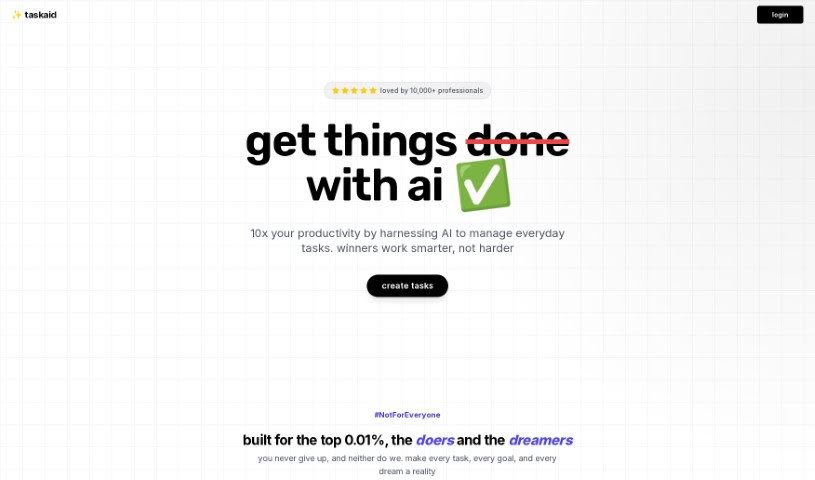
What is Taskaid AI?
Taskaid AI takes an AI-first approach to managing your tasks and to-dos. It’s designed to help you harness the power of AI and Large Language Models (LLMs) to be more efficient. It is a productivity booster that lets you get more done in less time, thanks to technologies like ChatGPT and GPT4. With Taskaid AI, you can actually chat with your to-do lists, strategize your next steps, and make changes on the fly, all while the AI handles the heavy lifting. It’s packed with features like agenda planning, task organization, time management tools, helpful alerts, and integration capabilities, giving you a really complete way to manage your tasks. Plus, it’s super user-friendly and intuitive – you don’t need any special AI knowledge to get started. Taskaid AI also takes your privacy seriously, with strict data protection policies and transparent operations to keep your information safe.
Taskaid AI is really built for high-achievers, the kind of people who want more from their task management tools and are keen to bring AI into their daily workflow. The pricing plans are set to reflect the resources needed to run an AI-driven product, showing their commitment to a sustainable and continuously improving user experience. What really sets Taskaid AI apart is its AI-first philosophy. It uses AI to truly understand the context of your tasks and then offers relevant, actionable suggestions, helping you fine-tune your task management process and become more efficient. Taskaid AI also plays nicely with other tools and platforms, and they’re always working to add more integrations with popular task management software to make your workflow even smoother. They really value user feedback and support, so don’t hesitate to reach out if you need help or have ideas for making the platform even better.
Who created Taskaid AI?
Taskaid was developed by Satria, an individual associated with the company Satria.ai. It first launched on October 7, 2023. Essentially, Taskaid is an AI-first task management tool that uses AI technologies like ChatGPT and GPT-4. Its goal is to help users organize tasks more smoothly and boost their productivity. You’ll find features here like agenda planning, making adjustments to tasks in real-time, getting help with time management, providing feedback, and integrating with other systems to really optimize how you manage tasks and get things done.
What is Taskaid AI used for?
- Taskaid helps you use AI and LLMs to manage your tasks and to-dos more effectively.
- It’s designed for high-performing individuals who expect more from their task management tools.
- Taskaid aims to help you accomplish more in less time by understanding what your tasks are about and offering helpful suggestions.
- You’ll find the platform easy and intuitive to use, with no need for technical AI knowledge.
- Taskaid connects smoothly with a wide variety of tools and platforms.
- You can get support or share your thoughts to help improve the platform.
- Your data privacy is protected with strict policies, and they don’t store any personal or sensitive information.
- Taskaid uses AI to let you chat with your to-do lists, plan strategies, and make changes in real-time, while the AI takes care of other tasks.
- Key features include planning your agenda, organizing tasks, managing your time, setting alerts, getting feedback, and integrating with other systems, all aimed at boosting productivity.
- Taskaid AI offers a user-friendly interface and straightforward pricing, including a free version with basic features and a pro version for more advanced capabilities.
- Taskaid AI helps you manage your daily tasks efficiently by using AI technology.
- You can chat with your to-do lists, strategize, and make real-time changes, letting the AI handle the rest.
- Features include agenda planning, time management, alerts, feedback, and integration capabilities.
- Taskaid AI provides a user-friendly interface with simple pricing plans for both basic and advanced features.
- The tool offers insights into your productivity trends and aims to enhance your overall productivity with AI assistance.
- High-performing individuals looking to use AI for more efficient task management will find Taskaid beneficial.
- Taskaid is built for users who want to focus on getting tasks done efficiently with the help of AI.
- The platform is user-friendly and intuitive, meaning you don’t need any technical AI knowledge to use it.
- You can connect Taskaid with your existing tools and platforms to make your workflow smoother.
- Strict data protection policies are in place to ensure your data remains private when you use Taskaid.
- Taskaid AI helps you manage everyday tasks effectively through features like agenda planning, task organization, time management, and alerts.
- You can strategize, make real-time changes, and chat with your to-do lists while the AI handles other functions.
- The tool offers insights into productivity trends, integrates your tasks into your digital environment, and includes feedback features.
- You can monitor your task completion progress, compare it to past periods, and benefit from a user-friendly interface with simple pricing plans.
- Taskaid AI aims to boost your productivity by using AI for smart task management and overall productivity enhancement.
- Taskaid AI lets you chat with your to-do lists, strategize, and make real-time changes, with the AI managing the rest.
- Its agenda planning features give you quick looks at your daily schedule, weekly summaries, and task priorities.
- You can create, adjust, and organize tasks based on what you need and what’s most important right now.
- Time management and alert features help you allocate your time wisely, pace yourself, and get timely reminders about your responsibilities.
- Taskaid AI includes feedback and integration capabilities, offering insights into productivity trends and helping integrate tasks into your wider digital life.
- There’s a free version with basic features for you to try out, and a pro version with advanced features for maximum productivity.
- Taskaid AI focuses on improving productivity by using AI for smart task management.
- Taskaid is designed for high-performing individuals who want to use the power of AI and LLMs to manage tasks and to-dos efficiently.
- Taskaid ensures your data is private through strict data protection policies and transparent operations.
Who is Taskaid AI for?
- High-performing individuals
How to use Taskaid AI?
To get the most out of Taskaid, just follow these simple steps:
- Sign Up and Payment:
- Head over to the Taskaid website at https://app.taskaid.ai/ and create your account.
- Complete the payment process to get full access to the tool.
- Simple Interface:
- Taskaid is designed to be user-friendly and intuitive, so you won’t need any technical AI knowledge.
- Once you’ve signed up, you can start using Taskaid right away without any extra setup.
- Task Management with AI:
- Taskaid uses AI technologies like ChatGPT and GPT4 to make managing your tasks really efficient.
- You can chat with Taskaid to create, change, and organize your tasks as things happen in real-time.
- Features and Functionality:
- Make use of features like agenda planning to keep track of your daily tasks, get weekly overviews, and see your task priorities.
- Manage your time effectively with helpful alerts and reminders from Taskaid AI.
- Integration and Support:
- Taskaid connects smoothly with various tools and platforms, helping to improve your current workflow.
- If you need any help or have feedback to share for ongoing improvements, just reach out to the support team.
- Data Privacy:
- Taskaid puts user data privacy first, with strong protection policies in place.
- Your personal or sensitive data isn’t stored, which ensures transparency and builds user trust.
- Subscription Plans:
- Taskaid offers a free version with basic features so individuals can explore what it can do.
- You can upgrade to the pro version for advanced features like unlimited tasks, lists, and AI assistance for $10 per month.
By following these steps, you can really tap into Taskaid’s power to organize your tasks, boost your productivity, and stay organized efficiently.