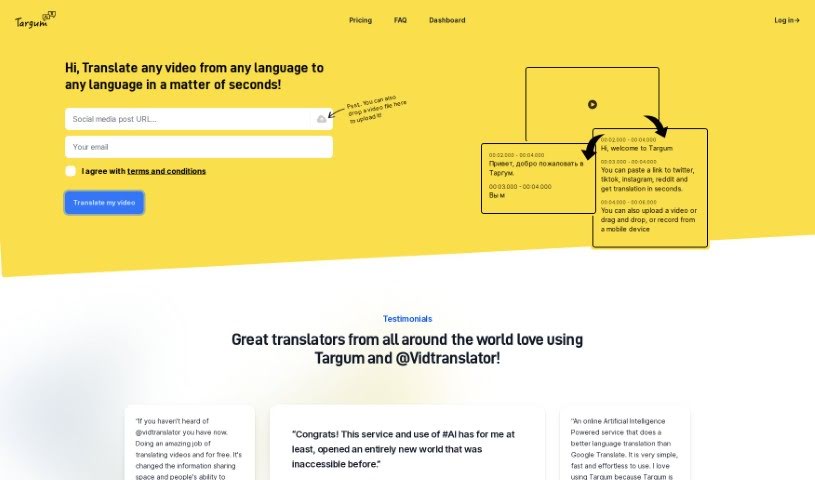
Screenshot of Targum Video

Targum Video

Discover Targum Video, a fast AI-powered video translation and transcription service. Learn its features, how it works, and who can benefit in 2025. We'll also compare it to other translation tools.

Screenshot

What is Targum Video?

Targum Video is a really quick way to translate videos. It uses AI to get your videos into different languages fast and accurately. You can either upload your video file directly or just paste a link to the video. What’s great is that it supports translating from absolutely any language to any other language. Plus, it can also transcribe your videos for you. Once your video is translated, Targum Video makes it super easy to share it on social media right from their platform. It’s designed to be user-friendly and efficient, giving you speedy translations with excellent results. Oh, and they even host the translated videos for you, which is pretty handy.

Who created Targum Video?

Targum Video was developed by a user known as @Vidtranslator. They created it as a super-fast video translation service that really leans into AI technology. It lets users quickly translate and transcribe videos into various languages, either by uploading files or by providing video links. This service first launched on October 8, 2022.

What is Targum Video used for?

Here’s a rundown of what makes Targum Video so useful:

  • Easy to Use: It’s got a really user-friendly interface.
  • Many Languages: It supports a wide range of languages for translation.
  • Super Fast: You get incredibly fast video translation.
  • Translate & Transcribe: It handles both transcribing and translating your videos.
  • Video Hosting: They host your translated videos for you.
  • Trending Videos: You can check out what videos are currently popular.
  • Social Sharing: Sharing on social media is built right in.
  • Efficient & Accurate: Expect translations that are both efficient and high-quality.
  • Social Media Focus: It’s particularly great for social media videos.
  • Instant Translation: Translations often happen in just seconds.
  • Beta Access: You can sign up for beta access to try out extra features.
  • Auto Language Detection: It automatically figures out the video’s original language.
  • Uploads Welcome: You can upload your own video files.
  • Translate to Any Language: It handles translation from any language to any other language.
  • Transcribe Videos: It provides transcription services too.
  • Direct Social Sharing: Share your translated videos directly to social media.
  • Extra Beta Features: Get access to additional functionalities by joining the beta.
  • Automatic Language Detection: It automatically detects the language of the video.
  • Video Hosting Included: They host your translated videos for you.
  • One-Click Login: Use a ‘magic link’ for super simple, one-click login.
  • Flexible Input: You can upload videos or use links for translation.
  • Any-to-Any Language: It supports translation from any language to any language.
  • Account Access: You’ll need to create an account to use all the services.

Who is Targum Video for?

Targum Video is a great tool for:

  • Creators of all kinds
  • Businesses that need to translate or transcribe a lot of video content
  • Businesses in general
  • Translators looking for efficient tools
  • Video creators
  • Content creators
  • Marketers aiming for wider reach
  • Business owners

How to use Targum Video?

Using Targum Video is pretty straightforward. Just follow these steps:

  1. Upload or Link Your Video: Start by either uploading a video file directly or pasting a link to the video you want translated.
  2. Pick Your Languages: Next, select the original language of the video and the language you want it translated into.
  3. Let Targum Translate: Targum Video will then quickly translate and transcribe your video. You’ll also see options to share it on social media during this process.
  4. Consider Beta Access: If you want to try out some extra features before everyone else, think about signing up for their beta program.
  5. Agree to the Rules: Before you dive in, make sure you agree to their terms and conditions – it’s a necessary step.
  6. Create Your Account: Head over to the website and click ‘Create Account’ to get your own Targum Video account set up.
  7. Log In: Once your account is ready, log in to start using all the services.
  8. Watch the Demo: If you want to see it in action, there’s a demo available on their website at a specific link.
  9. Magic Link Login: For a really quick login, use the ‘magic link’ they send to your email – it’s a one-click process.
  10. Video Hosting Convenience: Remember, Targum Video hosts the translated video for you, making it super convenient.

Following these steps should help you use Targum Video effectively for all your video translation and transcription needs, including sharing and exploring those extra beta features. It’s a solid way to get your content out there in more languages.

Related AI Tools

Discover more tools in similar categories that might interest you

Stay Updated with AI Tools

Get weekly updates on the latest AI tools, trends, and insights delivered to your inbox

Join 25,000+ AI enthusiasts. No spam, unsubscribe anytime.