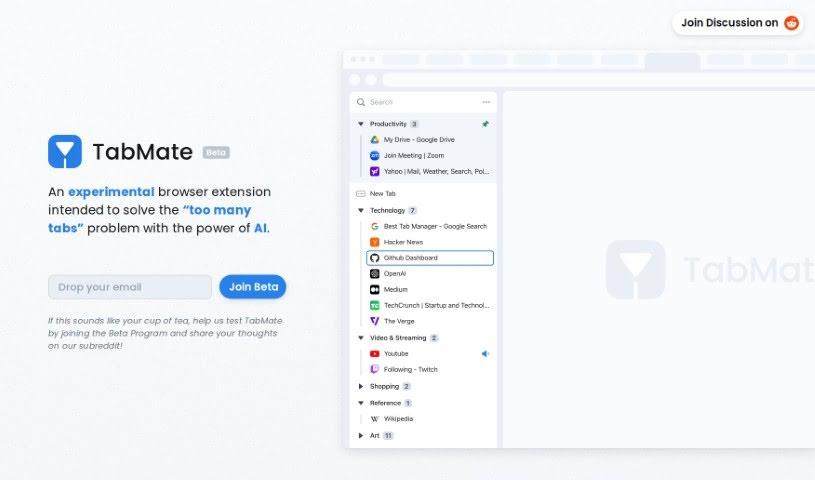
Screenshot of Tabmate

Tabmate

Discover what Tabmate is and how to use it effectively in 2025. We'll explore its features and see how it stacks up against other automation tools.

Screenshot

What is Tabmate?

TabMate is a smart browser extension that uses AI to help you manage lots of browser tabs more easily. As you browse, it automatically sorts and organizes your tabs, and you can customize how it works to keep your browser tidy. It’s built for Google Chrome and other browsers based on Chromium, running on both macOS and Windows. You can create custom tab groups, pin tabs or entire groups, use handy keyboard shortcuts, switch to a dark mode, group tabs by date or website, and even add text or color labels to them. Plus, you can tweak the settings to your liking. While TabMate is great for boosting your productivity by simplifying tab management, it’s worth noting it doesn’t support Firefox or mobile devices, and some advanced customization options aren’t available yet.

Who created Tabmate?

Tabmate was developed by TabMate Labs and first came out on January 19, 2024. The idea behind this AI-powered browser extension was to give people a better way to handle their browser tabs, especially when using Chromium-based browsers like Google Chrome, Edge, Brave, Vivaldi, and others. Tabmate comes with features like custom groups, the ability to pin tabs and groups, keyboard shortcuts, a dark mode option, and ways to group tabs by date or domain, along with text and color labels. All these features are designed to make your experience smoother and help you get more done.

What is Tabmate used for?

Tabmate is designed to help you:

  • Manage your browser tabs efficiently.
  • Automatically categorize and organize all your open tabs.
  • Create a more personalized and organized browser environment.
  • Work seamlessly with Chromium-based browsers.
  • Function across different platforms, including macOS and Windows.
  • Set up custom tab groups for better organization.
  • Pin important tabs or groups so they don’t get lost.
  • Navigate your tabs quickly using keyboard shortcuts.
  • Use a dark or black mode to reduce eye strain.
  • Group tabs based on when you opened them or the website they belong to.
  • Keep your browser decluttered automatically.
  • Use keyboard shortcuts for smooth tab switching.
  • Choose between dark and black mode options.
  • Label your tabs with custom text and colors for easy identification.
  • Improve your overall user experience.
  • Boost your productivity.
  • Categorize and organize your tabs effectively.
  • Enhance your user experience with unique features like custom groups, pinned tabs, keyboard shortcuts, and dark/black mode.
  • Group tabs by date and domain.
  • Customize user controls to fit your workflow.
  • Declutter your browser tabs automatically.

Who is Tabmate for?

Tabmate is a great tool for:

  • Web Developers
  • Digital Marketers
  • Project Managers
  • Researchers
  • Software Developers
  • Data Analysts
  • Students
  • Content Creators
  • Designers
  • Anyone focused on improving productivity
  • Professionals who deal with large amounts of data

How to use Tabmate?

TabMate is an AI-powered browser extension that really helps with managing your tabs efficiently. Here’s a straightforward guide to get you started:

  1. Get it installed: First, add TabMate to your Chrome browser or any other Chromium-based browser you use.
  2. Just browse: Go ahead and open as many tabs as you need while you’re browsing the web as usual.
  3. Let it organize: TabMate will automatically start categorizing and organizing your tabs for you.
  4. Make it yours: You can organize your tabs however you like, or just let TabMate’s automatic categorization do the work.
  5. Explore the features: Take advantage of custom tab groups, pin the tabs or groups you use most often, use keyboard shortcuts to navigate faster, and switch to dark/black mode if you want to reduce eye strain.
  6. Dig into advanced options: Try grouping your tabs by date or by the website they’re from, and add text or color labels to make them super easy to spot.
  7. Platform support: TabMate works on macOS and Windows, and it’s compatible with browsers like Chrome, Edge, Brave, and Vivaldi.
  8. What’s good about it: It offers efficient tab management, a customizable browser setup, works across different platforms, and helps boost your productivity.
  9. What could be better: It doesn’t work with Firefox, it’s limited to Chromium browsers, and there might be some privacy considerations to keep in mind.
  10. Making your experience better: TabMate really improves how you use your browser by giving you control over how your tabs are organized, offering lots of customization, and making the user interface nicer to use.

Remember, you can make your browsing even better with TabMate by using its automation features, all the customization options, and its handy productivity tools. Enjoy decluttering and organizing your browser tabs without any hassle!

Related AI Tools

Discover more tools in similar categories that might interest you

Stay Updated with AI Tools

Get weekly updates on the latest AI tools, trends, and insights delivered to your inbox

Join 25,000+ AI enthusiasts. No spam, unsubscribe anytime.