What Exactly is Swell AI?
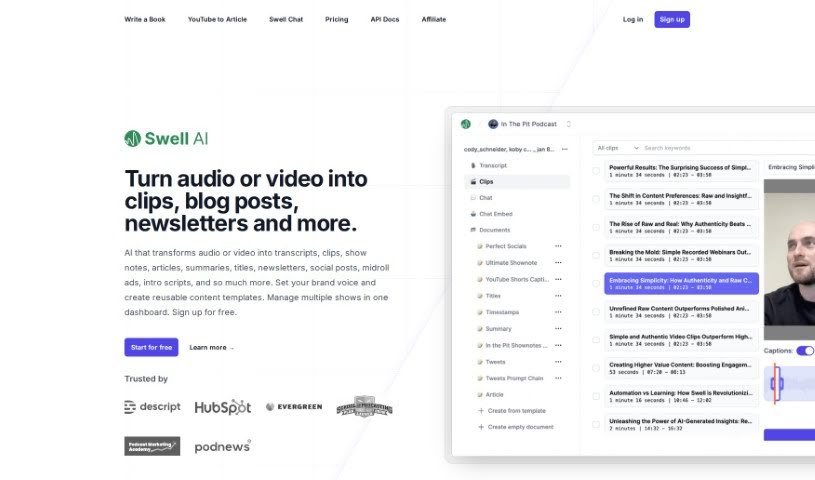
Swell AI is a super handy tool that takes your audio or video and turns it into all sorts of useful content. You can get transcripts, short clips, show notes, articles, summaries, catchy titles, newsletters, and even social media posts from it. What’s really neat is that you can set your own brand voice, create templates you’ll use again and again, and manage all your different shows right from one dashboard. Swell AI makes it easy to upload your media, generate content, and then send it wherever you need it. It’s got a transcript editor that lets you highlight and clip parts you like, AI that suggests engaging bits, speaker labels so you know who’s talking, and options to share your transcripts publicly.
So, Who’s Behind Swell AI?
Swell AI was started by Max Altman and Cody McGuffie. From what people say, they’re really hands-on, always trying to fix problems themselves and genuinely keen to make content creation smoother for everyone, whether you’re just starting out or you’re a seasoned pro. Users have actually praised Swell AI for how well it works and how much time it saves.
What Can You Actually Do with Swell AI?
Here’s a breakdown of what Swell AI is great for:
- Transforming Media: Turn audio or video into clips, blog posts, newsletters, and much more.
- Editing with Ease: Use the Transcript Editor to highlight and clip specific sections.
- Smart Suggestions: Get AI-powered ideas for identifying the most engaging parts of your content.
- Clear Speaker Labels: Automatically identify and label speakers within your transcripts.
- Easy Sharing: Share your transcripts publicly with a simple link.
- Podcast Chatbots: Build chatbots based on your podcast episodes.
- Social Media Content: Create posts for platforms like Twitter (threads!) and LinkedIn, all related to your podcast episodes.
- Catchy Titles: Generate great titles for your content.
- Content Creation: Produce articles, summaries, show notes, and blog posts directly from your podcast episodes.
- Podcast SEO: Boost your podcast’s searchability with detailed summaries, timestamps, and key topic identification.
- All-in-One Content Generation: Transform audio or video into transcripts, clips, show notes, articles, summaries, titles, newsletters, social posts, midroll ads, intro scripts, and beyond.
- Multi-Show Management: Keep track of multiple shows easily within a single dashboard.
- Highlighting & Clipping: Easily select and save specific parts of your transcripts.
- AI Engagement Prompts: Get AI suggestions for the most engaging segments in your transcripts.
- Automatic Speaker ID: Speakers are automatically identified and labeled in your transcripts.
- Public Transcript Sharing: Share your transcripts with anyone.
- Detailed Podcast Assets: Generate comprehensive show notes, transcripts, blog posts, and articles.
- Keyword-Rich Summaries: Create podcast summaries that include important keywords.
- Social Media Snippets: Craft detailed LinkedIn posts and Twitter threads for your episodes.
- Engaging Chatbots: Build chatbots that interact with your uploaded episodes.
- Comprehensive AI Transformation: AI that turns audio or video into transcripts, clips, show notes, articles, summaries, titles, newsletters, social posts, midroll ads, intro scripts, and more.
- Brand Consistency: Set your brand voice and create content templates you can reuse.
- Dashboard Management: Manage all your shows from one central place.
- Transcript Editor Features: Includes highlighting and clipping sections, AI suggestions, and speaker labels.
- Engaging Content Cues: AI suggests the best content to select.
- Speaker Recognition: Automatic identification and labeling of speakers in transcripts.
- Platform Integrations: Connects with popular tools like Dropbox, Google Drive, and RSS feeds.
- Workflow Integration: The Transcript Editor offers highlighting, clipping, AI suggestions, and speaker labels.
- Twitter Threads: Create threads with key ideas to help boost episode listens.
- Social Media Posts: Generate posts for LinkedIn, Twitter, and Instagram.
- Title Generation: Create titles specifically for your podcast episodes.
- Workflow Support: Integrations designed for various podcast production workflows.
Who is Swell AI Designed For?
Swell AI is a great fit for:
- Podcast Producers: Streamline your workflow and create more content.
- Agencies: Efficiently manage content for multiple clients.
- Networks: Organize and repurpose content across your network.
- Content Creators: Save time and expand your content output.
How Do I Use Swell AI?
Here’s a straightforward guide to using Swell AI:
- Get Started: First, sign up for an account on the Swell AI platform.
- Add Your Media: Upload your audio or video files directly into the platform.
- Create Content: Let Swell AI work its magic to transform your media into various formats like transcripts, clips, show notes, articles, social media posts, newsletters, and more.
- Refine Transcripts: Use the built-in transcript editor. You can highlight and clip sections, save these clips for later, and get helpful suggestions for engaging content.
- Know Who’s Talking: Benefit from automatic speaker labeling in your transcripts, making it easy to follow conversations.
- Teamwork Made Easy: Share your transcripts with your team using a simple link, which is perfect for collaborative editing and getting feedback.
- Connect Your Tools: Swell AI integrates smoothly with platforms like Dropbox, Google Drive, RSS feeds, and social media, helping your workflow run efficiently.
- Choose Your Plan: Select from different pricing plans that match your production needs, whether you’re a hobbyist or a large agency.
- Get Support: If you’re on specific plans, you can access premium customer support.
- Share Your Work: Easily share your content with the world or specific groups through Swell AI’s user-friendly interface.
Swell AI really helps content creators smooth out their podcast production process. It offers handy features like transcript editing, AI suggestions, speaker identification, and connects easily with popular tools. By following these steps, you can use Swell AI effectively to improve how you create content and manage your podcasting projects more efficiently.