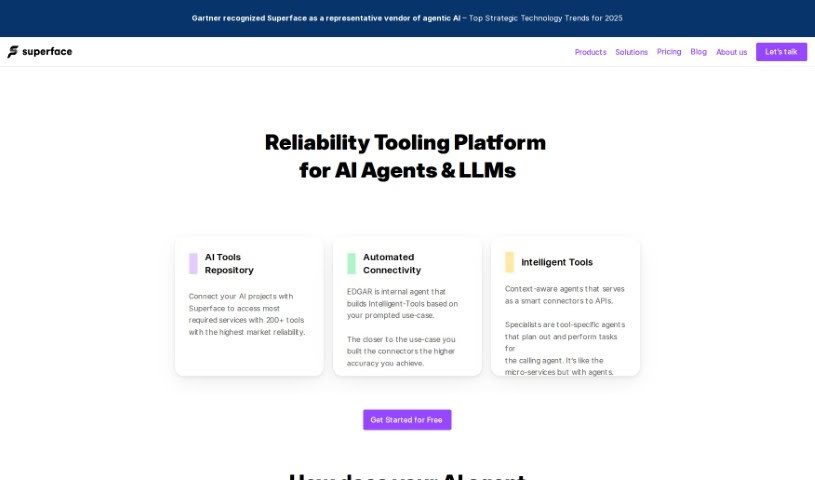
What is Superface?
Superface is an AI-powered automation agent that makes connecting different platforms much easier. It is a smart way to handle SaaS integrations. It lets you automate tasks just by using natural language. What’s cool about it are features like getting metrics whenever you need them, creating your own custom tools, strong data governance, and security measures specifically designed for AI integrations. Superface means you can connect GPT models to all sorts of APIs really quickly, without needing to write any code. It makes sure your API connections are secure and provides specific actions for your GPT tasks. Basically, it’s built to make your workflows smoother, manage your data well, and boost what your AI agents can do.
Who created Superface?
Superface was brought to life by Patrik Simek and Jan Smitka. Their company offers an automation agent powered by LLMs, which really simplifies how you connect different SaaS products. With Superface, you can automate tasks simply by speaking or typing in natural language, and it makes connecting to various systems a breeze. The platform really focuses on making API connections smooth, designing interactions for AI agents with systems specifically for APIs, making sure a wide range of tools work together, managing APIs securely, and offering actions tailored to specific use cases for GPT models.
What is Superface used for?
- You can automate tasks just by using natural language.
- It lets you build automations exactly how you want them.
- Get quick access to information without needing to know which specific data sources hold it.
- Automate and schedule tasks to run on their own.
- Make faster decisions with on-demand metrics and AI-driven insights.
- Connect, link, and analyze data from all sorts of different platforms.
- Build and connect to any SaaS services and APIs you need, all using AI.
- Keep your data safe with access controls and SSO authentication.
- Make your LLM-powered automation more reliable using the Superface Situation Protocol.
- It makes automation accessible to everyone, with a low barrier to entry.
- Enjoy seamless API connectivity, making it easy to integrate APIs.
- It’s a platform designed with AI agents in mind, helping them interact with systems via API.
- You get diverse tool compatibility, letting you connect to a wide range of APIs and choose the tools that work best for you.
- Secure API management gives you complete control over your credentials, preventing misuse and leaks.
- There are specific actions for GPT models, helping them perform tasks efficiently.
- Integration is no-code, meaning you can connect AI models to various APIs without writing code.
- Connections are security-focused to prevent abuse and leaks of your secrets.
- You can connect GPT to APIs even if they don’t have an Open API Specification, offering more integration flexibility.
- Workflow automation is available to everyone, with a low barrier to entry.
- Data protection and governance are handled with tailored access and SSO authentication.
- It enhances AI agents’ capabilities by connecting them to a wide array of APIs in seconds, no coding required.
- It enables smooth interactions with popular tools like Google services, HubSpot, Microsoft, Slack, Salesforce, and many more.
- Secure API connections are ensured to prevent abuse and secret leaks.
- You can manage data, streamline workflows, and unlock new functionalities for your AI.
- Actions can be tailored for GPT to perform specific tasks through a single, unified interface.
- Automate tasks using natural language and AI-powered automation agents.
- Facilitate agile decision-making with on-demand metrics and AI-powered insights.
- Connect, correlate, and analyze data across diverse platforms, APIs, and data warehouses.
- Build and connect to any SaaS services and APIs you need using AI.
- Improve the reliability of LLM-powered automation and ensure compliance with data governance and security measures.
Who is Superface for?
- People building AI applications
- Those developing with GPT
- AI Agents themselves
How to use Superface?
To get the most out of Superface, just follow these simple steps:
- Installation: First, you’ll want to install Superface. You can do this easily using npm or yarn by running a quick command in your terminal. Just pick the package manager you prefer.
- Create a Profile: Next, build a profile. You do this by creating a
.superface folder right in the main directory of your project. Inside that folder, you’ll define a JSON file that outlines how you want to interact with the services.
- Choose a Provider: Pick a provider to connect with based on what you need – maybe it’s weather data, currency exchange rates, or something else entirely. Superface makes it effortless to access multiple providers.
- Initialize Client: Now, initialize a Superface client within your code. This lets you access the profile you created and the provider you chose, allowing your application to communicate with the external service.
- Invoke Use Cases: Start using Superface by calling specific use cases that you’ve defined in your profile. This means you can interact with external services using a single, consistent interface, which really simplifies the whole integration process.
- Handle Responses: When you make a request, you’ll get a response back from Superface. You’ll need to handle this response in a way that makes sense for your application’s logic. Superface helps streamline this response handling for a more efficient workflow.
- Error Handling: It’s always a good idea to set up error handling. This helps you manage any unexpected situations effectively. Superface provides error codes and messages to help you figure out and fix issues efficiently.
- Update Profiles: Make sure to update your profiles regularly. This keeps you current with any changes or new features available in the services, ensuring your integration stays seamless and your application keeps running smoothly.
By following these steps, you can really make Superface work for you, boosting your application’s capabilities and making interactions with external services much smoother.