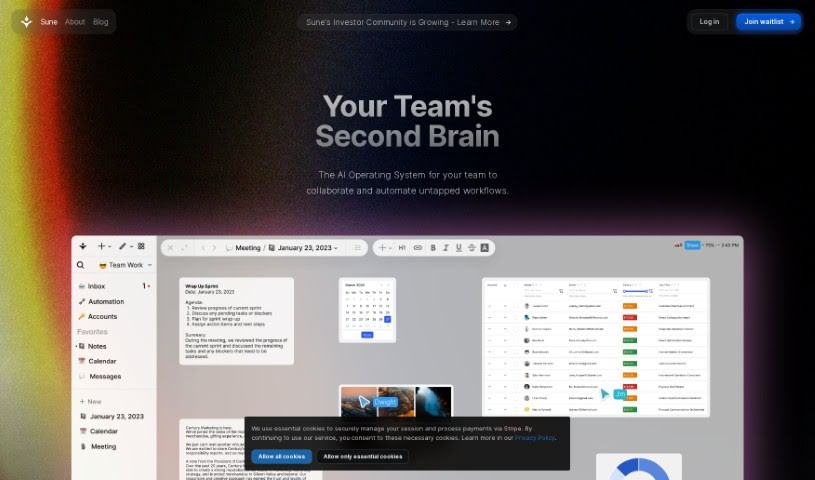
Screenshot of Sune AI

Sune AI

Discover what Sune AI is and how to use it effectively in 2025. We'll explore its features and how it stacks up against other Project Management Tools.

Screenshot

What is Sune AI?

Sune AI is a groundbreaking Collaborative AI Operating System. It’s designed to completely change how teams work together and automate their workflows. It is the perfect solution for teams looking to seriously boost their productivity. It brings all your documents, spreadsheets, projects, and tasks together into one smart AI OS. With Sune AI, you can collaborate in real-time, adding text, tables, images, kanban boards, calendars, and much more directly into shared documents and projects. Plus, it gives you a central place to store important files and makes sharing workspace resources super easy. The platform also packs some advanced AI features, like finding hidden details across many documents and letting AI agents handle tasks for you. It comes with built-in tools for analysis, creating content, and digging into data. You can even build your own custom tools! Sune AI really simplifies your workflows, making them more efficient without sacrificing intelligence or flexibility. It uses contextual awareness and a unique node-based editing system that’s really solid, which helps boost team efficiency a lot. Get on board with Sune AI now and be part of the future of how teams collaborate and get things done!

Who created Sune AI?

Sune AI was brought to life by a founding team led by Jarren and Ian. They’re the minds behind this AI Operating System. The company, Sune Ai, is all about creating this revolutionary Collaborative AI Operating System to make team collaboration and workflow automation much better. Sune Ai offers some really cool features, like working together in real-time across different workspaces, connecting with other services, and using AI for automation, like creating content and assigning tasks. It also has these smart automations that understand the context of your work. Essentially, Sune Ai wants to change how we use computers by really understanding and simplifying knowledge work, making us all more efficient and productive.

What is Sune AI used for?

  • Real-time Collaboration: Work together instantly on documents, spreadsheets, projects, and even connected services.
  • Content Creation & Management: Easily create and organize content using text, tables, images, kanban boards, calendars, and sketches.
  • Service Integration: Connect to a wide range of services with strong, enterprise-level compliance.
  • AI-Powered Tasks: Use AI agents for things like research, creating content, and analyzing data.
  • Custom Automations: Build and tailor multistep automations that truly understand your workspace’s context.
  • Context-Aware Automations: Automate tasks that usually need human insight and knowledge work.
  • Detail Analysis: Spot connections and hidden details within images, documents, spreadsheets, and across multiple files.
  • Background Task Execution: Let AI agents handle tasks like research, content creation, and data analysis behind the scenes.
  • Quick Actions: Turn complex, multistep workflows into simple, quick actions using powerful tool builders.
  • Workflow Automation: Easily automate your workflows, even those that need a good understanding of context.
  • Contextual Understanding: Perform automations that grasp the nuances of tasks typically requiring human knowledge.
  • Latent Detail Analysis: Analyze subtle details in images, documents, spreadsheets, and across various files.
  • AI Agent Tasks: Utilize AI agents for background tasks like research, content creation, and data analysis.
  • Tool Builder Efficiency: Convert multistep workflows into quick actions with the user-friendly tool builder.
  • Workflow Speed-Up: Build multistep automations to accelerate any workflow, especially those needing contextual understanding.

Who is Sune AI for?

  • Artists
  • Writers
  • Managers
  • Executives
  • Teachers
  • Marketers

How to use Sune AI?

Getting started with Sune AI is pretty straightforward. Just follow these steps:

  1. Sign Up: Head over to the Sune AI website and sign up for early access. That’s your first step to using the platform!
  2. Collaborate in Real-Time: Jump in with your team! Work together seamlessly across documents, spreadsheets, projects, and any integrated services within your collaborative workspace.
  3. Create and Manage Content: Use the tools available, like text, tables, images, kanban boards, calendars, and sketches, to build and organize your content in docs and projects.
  4. Integrate Services: Connect various services you use. Sune AI offers enterprise-grade compliance, which helps streamline your workflows and boost productivity.
  5. AI-Powered Automation: Let the AI agents do the heavy lifting for tasks like research, content creation, and data analysis right within the platform.
  6. Customize Automations: Build your own multistep automations. These can be tailored to understand your specific workspace context, making workflow automation smooth.
  7. Utilize Next-Gen AI Functions: Take advantage of the integrated AI to find hidden details in documents, assign tasks to AI agents, and even build your own custom tools.
  8. Work with Analysis Features: Use the AI functions to connect the dots and understand latent details in documents, spreadsheets, and images.
  9. Node Editor: Create complex automations using simple natural language. You can then fine-tune them with the node editor for precise control.
  10. Uninterrupted Automations: Enjoy automations that work reliably. You can make modifications without worrying about service interruptions.
  11. Storage and Sharing: Upload your important files to a central storage location. It’s also easy to share links to documents or your entire workspace.

By following these steps, you’ll be able to really harness the power of Sune AI for better team collaboration and workflow automation.

Related AI Tools

Discover more tools in similar categories that might interest you

Stay Updated with AI Tools

Get weekly updates on the latest AI tools, trends, and insights delivered to your inbox

Join 25,000+ AI enthusiasts. No spam, unsubscribe anytime.