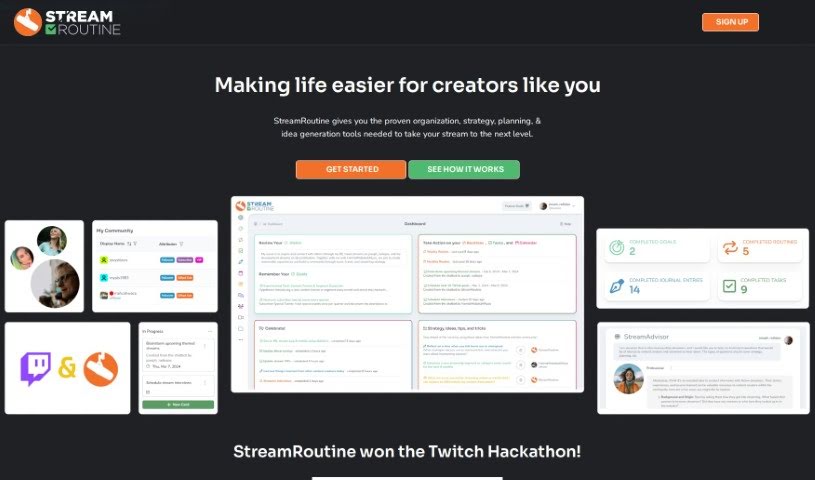
Screenshot of StreamRoutine

StreamRoutine

Discover what StreamRoutine is and how to use it effectively in 2025. We'll explore its features and see how it stacks up against other project management tools for streamers.

Screenshot

What is StreamRoutine?

StreamRoutine is a really handy tool built to help Twitch streamers keep their streaming activities organized. It’s packed with features like routine planning, goal setting, journaling, task management, a community view, calendar integration, and even a chatbot that uses ChatGPT-4. The folks who created it wanted to tackle the unique challenges streamers and content creators face, giving them the tools they need to be more organized, connect better with their viewers, and just make their streams shine. Basically, StreamRoutine aims to simplify the whole streaming process, helping creators do their best work and really connect with their audience.

The team behind StreamRoutine, including Joseph O and Hannah Rebekah, have brought project management and team collaboration principles into this platform, all tailored specifically for streamers. Joseph got the idea when he saw his wife Hannah’s own Twitch journey and talked to other streamers. He realized there wasn’t a central hub designed to help streamers manage everything and improve their experience. With a focus on smart tech and new ideas, the StreamRoutine team wants to give streamers the tools they need to be more efficient, organized, and to help them grow within the streaming world.

StreamRoutine also features a ChatGPT Twitch ChatBot that can really liven things up. It’s designed to interact with viewers through fun commands, help brainstorm ideas, even do rap battles, and offers a bunch of customizable options to make each stream feel unique. This language model, powered by ChatGPT, allows for really nuanced conversations that boost audience engagement. It gives streamers a cool new way to connect with their viewers. By using smart technology and focusing on what users need, StreamRoutine aims to be a complete solution for streamers looking to manage and improve how they stream.

Who created StreamRoutine?

Overview:

StreamRoutine was actually created by Joseph O, who’s an IRL and travel streamer himself. He was inspired by the challenges he saw in streaming and by his wife, HannahRebekahMusic’s, own experiences on Twitch. The company got started in late 2022 with the goal of solving the specific problems streamers face by blending project management ideas with team dynamics, all customized for the streaming world. Joseph, Hannah, and their team are working hard to offer streamers a dedicated place to manage things and some really innovative tools to make their streaming experience better.

Joseph O, who’s the Founder and Lead Developer, really drew from his own experiences and conversations with other streamers to build StreamRoutine. He’s had support from his wife, colleagues, and friends, and his main goal was to give streamers a management hub that truly addresses their unique needs.

StreamRoutine is all about helping streamers get more organized and efficient. They offer tools like routines, goals, journals, task management, and more, all designed to help streamers stay focused and perform better. The company’s big aim is to provide a complete platform that streamers can count on to reach their streaming goals.

As a group of streamers and web developers based in Seattle, StreamRoutine is committed to helping streamers succeed. They provide the essential tools to really boost the streaming experience. Plus, they’ve added a ChatGPT-powered Twitch chatbot as an extra feature to keep viewers engaged and make interactions on the platform even better.

What is StreamRoutine used for?

  • Getting streams ready and planning them out
  • Organizing tasks and new ideas
  • Keeping viewers involved with interactive fun
  • Offering personalized suggestions
  • Boosting how much viewers engage
  • Taming the general chaos that comes with streaming
  • Helping out with managing tasks and staying organized
  • Keeping tabs on your community and other streamers
  • Encouraging community collaboration and sparking inspiration
  • Tracking trends, goals, and how you’re progressing as a streamer
  • Organizing your tasks and sticking to your routines as a streamer
  • Setting clear goals and monitoring your progress towards them
  • Journaling for personal growth and as a streamer
  • Managing interactions with your community and keeping track of viewership
  • Engaging viewers with a special ChatGPT Twitch ChatBot
  • Making brainstorming sessions and generating ideas easier
  • Creating unique, personalized experiences for your viewers
  • Improving audience engagement by using ChatGPT integration
  • Making streamers more efficient and organized
  • Providing tailored advice for creating content

Who is StreamRoutine for?

  • UX/UI Designer
  • Developer
  • Project Manager
  • QA & Events
  • Twitch Streamer
  • Musician
  • QA Specialist

How to use StreamRoutine?

If you’re a Twitch streamer looking to use StreamRoutine, here’s a simple guide:

  1. Sign Up: First, register on the StreamRoutine website. It’ll automatically pull in your Twitch information, so you don’t have to do it manually.
  2. Get Organized and Plan: Use StreamRoutine to manage all your tasks, schedules, journals, stats, and calendars in one convenient spot. This really helps you stay focused and organized.
  3. Connect with Your Community: Keep in touch with your community by tracking viewers and other streamers using StreamRoutine. You can share routines, tips, and ideas to make your streaming experience even better.
  4. Get Personalized Advice: Take advantage of the personality-driven ChatGPT integration. It’s great for brainstorming practical ideas and improving the quality of your content.
  5. Boost Viewer Engagement: Make your viewers feel more involved! You can use customizable responses, generate ideas, have rap battles, and create interactive experiences with the ChatGPT Twitch ChatBot feature right within StreamRoutine.
  6. Subscription Details: StreamRoutine costs $9.99 per month. You get a 10-day free trial, which includes Twitch integration, routines, goals, a journal, task management, community view, calendar integration, an activity feed, the chatbot, and much more.
  7. Accessing the ChatGPT Twitch ChatBot: To start using the ChatGPT module, just sign up for free on the StreamRoutine website. You’ll find personalized and engaging features there to really enrich your Twitch streams.

By following these steps, you can really make the most of StreamRoutine’s features to improve your streaming experience, connect better with your community, and refine your content creation process.

Related AI Tools

Discover more tools in similar categories that might interest you

Stay Updated with AI Tools

Get weekly updates on the latest AI tools, trends, and insights delivered to your inbox

Join 25,000+ AI enthusiasts. No spam, unsubscribe anytime.