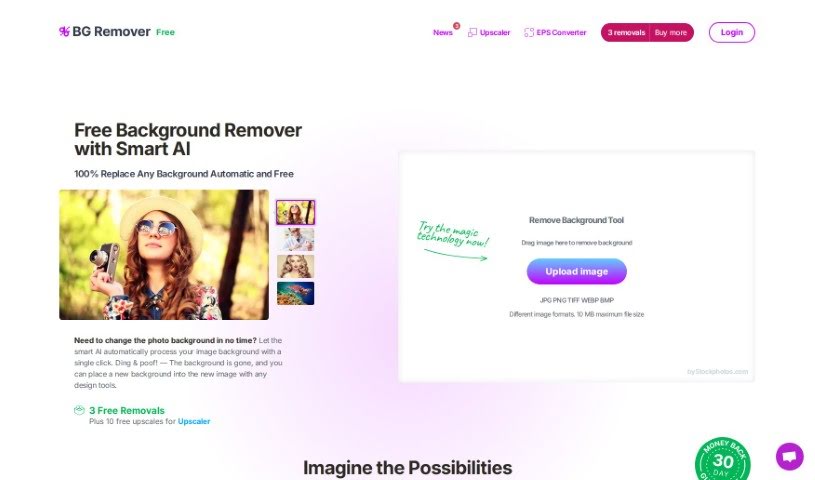
What is Stockphotos Bg Remover?
The Background Remover is a smart tool that uses Artificial Intelligence to automatically take backgrounds out of pictures. This AI-powered tool is really good at spotting objects, making edges look smooth, and getting rid of backgrounds quickly. You can use it with common image types like JPG, PNG (which keeps transparency), and BMP. If you need to handle lots of images, it even has an API connector. This lets you adjust how the tool works, like changing input and output settings, right from your own app or website. It works best when your images are clear and have well-defined edges, like logos or cartoons. It also does a great job with photos of nature. Just keep in mind, it might not handle really blurry or pixelated images as well. Plus, you can choose to add new backgrounds to your images. There’s a free version that has limits on how big the images can be, but you can get higher limits if you upgrade to a premium plan.
Who created Stockphotos Bg Remover?
Bria AI is the company behind the Background Remover. They create AI tools designed to make making videos and images easier, offering solutions to help with creative production. The Background Remover itself uses self-learning Artificial Intelligence to identify objects, smooth out edges, and remove backgrounds from your photos. It supports popular formats like JPG, PNG, and BMP. Bria AI also provides an API connector for when you need to process a lot of images, and their pricing depends on how many times you use it and the resolution of the images.
What is Stockphotos Bg Remover used for?
- Effortlessly remove backgrounds from any image.
- Quickly take the background out of photos featuring people.
- Swap out existing backgrounds with your product photos or company logos.
- Instantly create eye-catching banners and bold graphics.
- Save time by avoiding manual background removal.
- Give your images a clean white background or a custom look.
- Make your images transparent, perfect for design work.
- Streamline your workflow with easy API integration.
- Works with common formats: JPG, PNG, and BMP.
- Achieve the best results with clear, structured images that have sharp edges.
- Handles high-volume applications with ease.
- Easily replace backgrounds with product shots, logos, or any other foreground element.
- Get transparent images or add custom backgrounds.
- Speed up your process with instantly downloadable PNG files.
- Integrates smoothly with plugins, design software, mobile apps, and eCommerce tools.
- Eliminate the need for manual background removal when working with many images.
- Get great results with logos, cartoons, and other graphic elements.
- Create banners and graphics in a flash.
- Make backgrounds transparent for versatile use.
- Add custom backgrounds or opt for a simple white one.
- Speed up your workflow and get your final images as PNG files.
- Impress your audience with professional-looking PNG images.
- Integrate the API for a seamless workflow.
- Supports plugins, design software, mobile apps, and eCommerce tools for broad compatibility.
- Offers image upscaling and can convert EPS files to bitmap formats.
- Make image backgrounds transparent for flexible design.
- Speed up your workflow by automating background removal.
- Remove backgrounds from multiple images without manual effort.
- Customize backgrounds or set them to white.
- Be impressed by the final image file delivered in PNG format.
- Integrate with plugins, design software, mobile apps, and eCommerce tools for maximum convenience.
- Provides an API for easy integration into your apps or websites.
- Replace backgrounds with product photos or logos.
- Isolate objects and place them on any background you choose.
- Speed up your workflow with images ready to download in PNG format.
- Integrate the API for more efficient workflows.
- Create transparent backgrounds easily.
- Enhance image quality by ensuring sharp edges and clear structure.
- Replace background images with product photos or logos.
- Isolate objects from images and place them on new backgrounds.
- Speed up your workflow by removing the need for manual background removal.
- Add new backgrounds to your images.
- Supports API integration for handling large volumes of images.
- Control input and output parameters directly from your app or website.
- Streamline your workflows by integrating the Background Remover into your products via its API.
Who is Stockphotos Bg Remover for?
- Graphic designers looking for quick background removal.
- Product photographers needing clean shots for catalogs.
- Artists wanting to isolate elements for digital art.
- Ecommerce entrepreneurs aiming to create professional product listings.
- Mobile app developers integrating image editing features.
- Photographers seeking to enhance their images.
- Ecommerce businesses needing to optimize product visuals.
How to use Stockphotos Bg Remover?
Using the Background Remover tool is straightforward. Just follow these simple steps:
- Upload Your Image: Start by uploading the image you wish to edit into the Background Remover tool. It accepts JPG, PNG (with transparency), and BMP files.
- Background Removal Process: The tool uses advanced, self-learning Artificial Intelligence, powered by the latest GPUs, to automatically detect objects, smooth edges, and remove the background from your image.
- Image Format Outputs: You’ll get a JPG file if you uploaded a JPG. For other formats like PNG or BMP, the output will be a PNG file.
- Maximum Image Size: The free version lets you remove backgrounds from images up to 2000 pixels on the longest side. If you upgrade to a premium version, you can handle larger images, with output files going up to 8000 pixels.
- API Integration: For applications that require processing many images, the Background Remover offers an API connector. You can control input and output parameters directly from your app or website. Pricing is based on usage and image resolution.
- Tips for Best Results: To get the best outcomes, use images that have clear structures and sharp edges. The tool is especially effective with logos, cartoons, and artificial images, and it also works well with natural scenes. Try to avoid very blurry or pixelated photos.
- Finalize and Download: Once the background has been removed, you can customize your image further by adding new backgrounds or keeping it transparent. Then, simply download your edited image, which will be in PNG format.
- API for Integration: You can integrate the Background Remover tool into your own products using its API to make your workflows much smoother. This API works with various applications, including plugins, design software, mobile apps, and eCommerce tools, making background replacement seamless.
By following these steps, you can efficiently remove backgrounds from your images using the Background Remover tool. Enjoy creating stunning visuals with ease and speed!