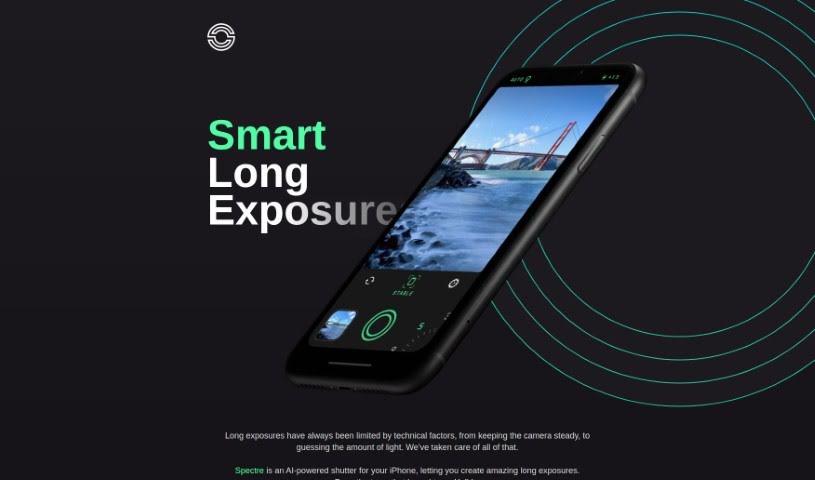
Screenshot of Spectre

Spectre

Discover Spectre, the AI-powered iPhone app for stunning long exposure photos. Learn its features, how to use it, and why it's great for photographers and creatives in 2025.

Screenshot

What is Spectre?

Spectre is a really neat AI-powered photography app that makes taking long exposure photos on your iPhone super simple. It uses some pretty advanced computational photography tricks, like AI that figures out what’s in the scene and automatically stabilizes your shot. This really helps with the tricky parts of long exposure photography. You might know Spectre for its cool features, like creating magical light trails when you shoot at night, or its ability to remove crowds from busy places so you get a clear shot. Plus, it can save the whole process as a Live Photo, letting you replay it later. The app comes from the same team that made Halide, and they’ve designed it with a thoughtful dark interface, which is perfect for shooting in low light. It’s also really easy to use, even on those bigger iPhones.

Who created Spectre?

Spectre, the AI photography app that’s great for long exposures, was actually made by the same team behind Halide. The founders and specific company details aren’t something I have right now, but it’s good to know it comes from a team with a solid reputation in photography apps.

What is Spectre used for?

Spectre is fantastic for a few key things:

  • Smart Long Exposures: It helps you get past the usual technical headaches of long exposure photography, all thanks to AI.
  • Crowd Eraser: Want a clear shot of a famous landmark without a million people in it? This feature can remove them for you.
  • Light Trail Magic: When it’s dark, the AI can spot nighttime scenes and automatically create beautiful light trails.
  • Live Photo Replay: You can actually record the whole long exposure process as a Live Photo, so you can watch it unfold again.
  • Advanced Tech: It uses things like machine learning and computer vision to get the best possible results.
  • Better Photos of Busy Places: It’s really helpful for taking pictures in crowded, touristy spots, giving you those unobstructed views you want.
  • Nighttime City Shots: It automatically switches modes to create gorgeous light trails, perfect for cityscapes or light painting.
  • Relive the Moment: You can capture the long exposure as a Live Photo, letting you replay the exposure as it happened.
  • Stunning Night Trails: The AI scene detection is great for creating those amazing light trails when shooting at night.
  • Cutting-Edge Photography: It’s built with the latest computational photography tech to help you get the best images.

Who is Spectre for?

Spectre is a great tool for:

  • Photographers
  • Designers
  • Artists
  • Tourists
  • Creatives
  • Anyone interested in AI photography
  • Professionals in computational photography

How to use Spectre?

Want to take amazing long exposure photos easily with Spectre on your iPhone? Here’s how:

  1. Grab Spectre: First, download the app from the App Store. Remember, it’s from the Halide team, who are known for their advanced computational photography.
  2. Capture Awesome Shots:
    • Smart Long Exposures: Let the AI handle the tricky parts of traditional long exposure photography.
    • Crowd Eraser: Easily get rid of people in busy scenes for a clear, unobstructed view.
    • Light Trail Magic: The AI automatically finds nighttime scenes and creates beautiful light trails for you.
  3. Cool Features to Know:
    • Live Photo Replay: Spectre saves the whole exposure process as a Live Photo, so you can replay it whenever you like.
    • Advanced Technology: It uses machine learning, computer vision, and more to ensure the best results.
  4. Shooting at Night:
    • AI Scene Detection: When it’s dark, the app automatically switches modes to create stunning light trails or just make your night scenes look better.
  5. Easy Design:
    • Dark UI: It’s designed with a dark interface, which is much easier on your eyes when shooting at night.
    • One-Handed Use: You can easily use it with just one hand, even if you have one of the larger iPhones.
  6. Share Your Work:
    • Sharing Options: You can share your photos as still images, videos, or both, giving you lots of flexibility.
  7. Enjoy Effortless Photography: Spectre really simplifies long exposure photography. It handles things like keeping the camera steady and managing light using its advanced computational photography tech.

By following these steps, you can easily use Spectre’s AI features to create really captivating long exposure photos right on your iPhone.

Related AI Tools

Discover more tools in similar categories that might interest you

123RF AI Image Generator

Creative Image Generation
Learn More

Stay Updated with AI Tools

Get weekly updates on the latest AI tools, trends, and insights delivered to your inbox

Join 25,000+ AI enthusiasts. No spam, unsubscribe anytime.