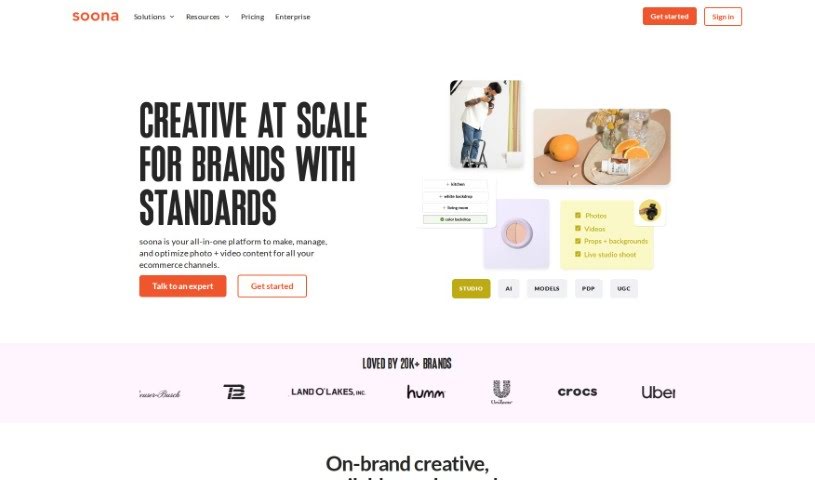
Screenshot of Soona

Soona

Discover what Soona is and how to use it effectively in 2025. We'll explore its features and see how it stacks up against other Product Description Generators.

Screenshot

What is Soona?

Soona is a platform designed to help with content creation. It’s built by Liz Giorgi and Hayley Anderson and uses AI to help e-commerce brands, especially those on Amazon and Shopify, with their content. It is a toolkit for creating, managing, and analyzing content. Soona offers a range of features, including ways to create both professional-looking content and content that feels more like what customers share (user-generated content, or UGC). It also helps you manage all your content, provides analytics powered by AI, offers tools for editing images, and includes a system for organizing your digital assets. The main idea behind Soona is to make it simpler and more affordable for brands to produce high-quality, custom content that really makes their presence stand out, compared to the usual ways of doing things.

Who created Soona?

Soona was actually started by Liz Giorgi and Hayley Anderson. They’re a really dynamic duo, and they share a vision for using technology to make life easier for creative people. Their goal is to give more brands access to great custom content. Plus, they’re committed to creating good job opportunities and making sure that quality content is within reach for businesses of any size. Together, Liz and Hayley also developed the Candor Clause, which is an open-source legal disclosure aimed at tackling the gender gap often seen in venture capital funding. Liz and Hayley first met when they were working together at Liz’s earlier company, Mighteor. Mighteor specialized in online video strategy for big brands, and it was later acquired by Standard.tv back in 2020.

What is Soona used for?

Soona can help with quite a few things, especially for e-commerce brands:

  • Managing your digital assets: Keep all your images and videos organized.
  • Content management: A central place to handle all your brand’s content.
  • AI-powered analytics: Get insights into how your visual content is performing.
  • Background removal: Easily take out backgrounds from photos.
  • Image resizing: Adjust image dimensions as needed.
  • Creating content: Both professional-looking images and user-generated content (UGC).
  • Editing and transforming images: Make changes to your photos.
  • Digital Asset Management (DAM): Specifically designed for brands on Amazon & Shopify to keep content organized and ready to publish.
  • Improving visual merchandising: Make your product displays on e-commerce sites look better.
  • Photo editing: Change colors, add text, and remove backgrounds from your product photos.
  • Organizing and publishing content: Streamline how you manage and share content for Amazon & Shopify brands.
  • Product photography: Help create great images for your products.
  • UGC for ads and listings: Generate content that looks like it comes from customers for your ads and product pages.
  • Editing content and getting insights: Improve content and understand performance on smaller websites too.
  • AI studio: Create up to 250 pieces of content each month using AI.
  • Unlimited media editor: Edit as many media files as you need.
  • Listing insights: Get specific feedback on your product listings.
  • Competitive analysis: See how your products stack up against up to 50 competitors.
  • Digital storage: Options range from 1 GB to 500 GB for your files.
  • Connecting with platforms: Easily link up with Amazon & Shopify.
  • Enhancing brand presence: Create professional and user-generated content to make your brand look better.
  • Organizing product creativity: Manage your content by keeping it organized around specific products or ASINs.
  • Measuring visual performance: Use AI analytics to see how well your visuals are doing.
  • AI Tools for Image Editing: A suite of tools to help with tasks like resizing, changing backgrounds, and adding text to images.
  • Comparing Visual Content: See how your product images compare to those of your competitors.
  • Product Touch-up: Make small improvements to your product photos.
  • Transparent Background Creation: Easily create images with transparent backgrounds.

Who is Soona for?

Soona is particularly helpful for:

  • People working in e-commerce.
  • Brands that sell directly to consumers (DTC).
  • E-commerce brands in general.
  • Direct-to-consumer brands that operate on Amazon and Shopify.
  • Professional content creators.

How to use Soona?

Here’s a straightforward guide to using Soona effectively:

  1. Sign Up: The first step is to head over to the Soona website. You can either sign up for a free trial to test it out or choose a plan that best suits your needs.
  2. Content Creation: Dive into creating your content using Soona’s AI-powered tools. You can do things like remove backgrounds, change colors, add text to your images, and much more. This helps make your visual content really pop.
  3. Content Management: Keep your product content organized and easy to manage. Soona offers specialized tools to help you handle all your product creativity efficiently.
  4. Analytics: Take advantage of the AI-powered analytics. These tools help you understand how your visual content is performing, so you can adjust your strategy accordingly.
  5. Image Editing: Make use of the various AI tools for image editing. Whether you need to resize images, change backgrounds, or add text, Soona has you covered.
  6. Digital Asset Management (DAM): If you’re a direct-to-consumer brand on platforms like Amazon or Shopify, Soona’s DAM system is designed to help you organize and publish your content smoothly.
  7. Connectivity: Soona connects easily with Amazon and Shopify. This means you can import your product catalog instantly and publish content with just one click.
  8. Competitive Analysis: Want to see how you compare? You can analyze your Amazon and Shopify product listings against those of your competitors.
  9. Custom Packages: For larger companies, Soona can create custom packages. This ensures you get the best possible pricing for all the services you need.
  10. Feedback and Reviews: You’ll find that Soona is well-regarded, with ratings around 4.5 stars from over 150 reviews. People often mention its fast content delivery, cost-effectiveness, and how easy the platform is to use.

By following these steps, you can really make the most of Soona’s tools. You’ll be able to create, manage, and analyze your content effectively, which should help boost your brand’s visual presence and overall performance.

Related AI Tools

Discover more tools in similar categories that might interest you

Stay Updated with AI Tools

Get weekly updates on the latest AI tools, trends, and insights delivered to your inbox

Join 25,000+ AI enthusiasts. No spam, unsubscribe anytime.