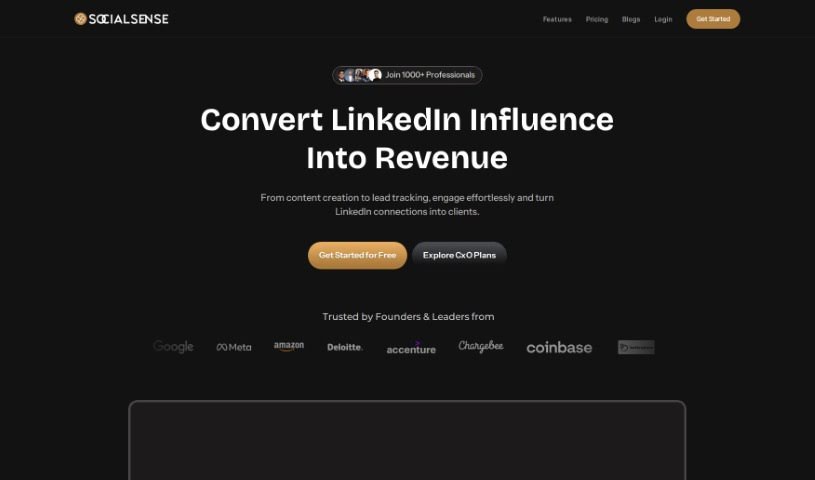
Screenshot of SocialSense

SocialSense

Discover what SocialSense is and how to use it effectively in 2025. Dive into its features, compare it with other LinkedIn tools, and learn how it can boost your personal brand.

Screenshot

What is SocialSense?

SocialSense is a really neat personal branding platform built specifically for folks using LinkedIn. It’s designed to help you take your unique experiences and turn them into compelling content for your LinkedIn profile. What makes it stand out is how it helps you beat procrastination, really boost your online presence, and ultimately, open doors to valuable connections and new opportunities. The interface is super user-friendly, making it easy to create all sorts of content, like posts and carousels. Plus, it offers AI-powered personalized content calendars, which are fantastic for keeping your audience engaged consistently. Over 500 professionals and founders already trust SocialSense to make their content creation smoother, ensuring everything they post is high-quality and relevant, often in just 30 minutes. They also have affordable pricing options that work for just about anyone, whether you’re a student, an entrepreneur, a freelancer, or run an agency.

Who created SocialSense?

While the exact founder or founders behind SocialSense remain undisclosed, it’s clear they’ve built an innovative personal branding tool tailored for LinkedIn users. This platform offers some great features, including AI that helps create content, personalized content calendars to keep you on track, and even automated carousel creation. With over 500 professionals already relying on it, SocialSense really aims to simplify content creation, help you build a stronger online presence, and provide a wealth of resources for people in all sorts of professional roles.

What is SocialSense used for?

SocialSense is incredibly versatile, helping you with a wide range of tasks to improve your LinkedIn presence:

  • Flexible pricing options that fit different budgets.
  • AI-driven content creation to turn your ideas into posts.
  • Enhancing your online presence to stand out.
  • AI writing assistance to polish your messages.
  • Improving content quality so your posts always look professional.
  • Personalized Content Calendar to map out your strategy.
  • Carousel Creation Tool for visually engaging presentations.
  • Content Ideation Library to banish writer’s block.
  • Saving time and resources by automating tasks.
  • Integration with LinkedIn Profiles for seamless posting.
  • Content Planning and Scheduling to stay organized.
  • Quality Assurance in Content Creation to ensure everything is top-notch.
  • Accelerating the content creation process so you can do more, faster.
  • Creating personalized posts that resonate with your audience.
  • Enhancing your LinkedIn presence overall.
  • Building a strong professional reputation.
  • Maintaining consistency in your posting schedule.
  • Improving professional networking by being more visible.
  • Creating engaging LinkedIn posts that get noticed.
  • Planning your content strategy effectively.
  • Enhancing your online presence specifically on LinkedIn.
  • Minimizing procrastination when it comes to content.
  • Ensuring consistent engagement with your audience.
  • Making sure your content is always high-quality and relevant.

Who is SocialSense for?

SocialSense is a fantastic tool for a wide variety of professionals:

  • Students looking to build a professional profile early on.
  • Entrepreneurs who need to market their ventures.
  • Freelancers aiming to attract more clients.
  • Agency owners wanting to showcase their expertise.
  • Founders who need to establish thought leadership.
  • Marketing professionals looking to streamline their efforts.
  • Job seekers wanting to make a strong impression.
  • Content creators who need efficient tools.
  • Consultants aiming to share their insights.

How to use SocialSense?

Getting started with SocialSense is pretty straightforward. Just follow these simple steps:

  1. Sign Up: First, you’ll need to create an account on the SocialSense website. It’s a quick process.
  2. Access Features: Once you’re in, you can explore all the great tools available:
    • AI-Driven Content Creation: This is where you can really transform your experiences into engaging LinkedIn posts with the help of AI.
    • Personalized Content Calendar: You can plan out your entire month’s content strategy, all tailored specifically to your needs and goals.
    • Carousel Creation Tool: Need to make a visual impact? This drag-and-drop tool lets you design really appealing carousels for LinkedIn.
    • AI Writing Assistance: If you want to make your LinkedIn content even better, this AI support can really enhance its quality.
    • Content Ideation Library: Never stare at a blank page again! This library gives you endless content ideas to keep writer’s block at bay.
  3. Content Creation: The process is simple:
    • Share your thoughts and experiences with SocialSense.
    • Let the platform do the heavy lifting and craft your content.
    • Always take a moment to review and edit your content before you upload it to LinkedIn, ensuring it’s just right.
  4. Free Trial: Want to test the waters? SocialSense offers a 7-day free trial, so you can really experience everything the platform has to offer before committing.
  5. Pricing: They’ve made it affordable:
    • You can start with a monthly starter plan for just $9, or go for the premium plan at $19.
    • If you’re part of a team, they also offer custom plans.
  6. Upload and Engage: Once your content is polished and ready, you can upload it directly to LinkedIn through SocialSense. Then, you can focus on engaging with your audience effectively.

By following these steps, you’ll be well on your way to using SocialSense to create fantastic content and really boost your brand on LinkedIn.

Related AI Tools

Discover more tools in similar categories that might interest you

Stay Updated with AI Tools

Get weekly updates on the latest AI tools, trends, and insights delivered to your inbox

Join 25,000+ AI enthusiasts. No spam, unsubscribe anytime.