What is SnapCall?
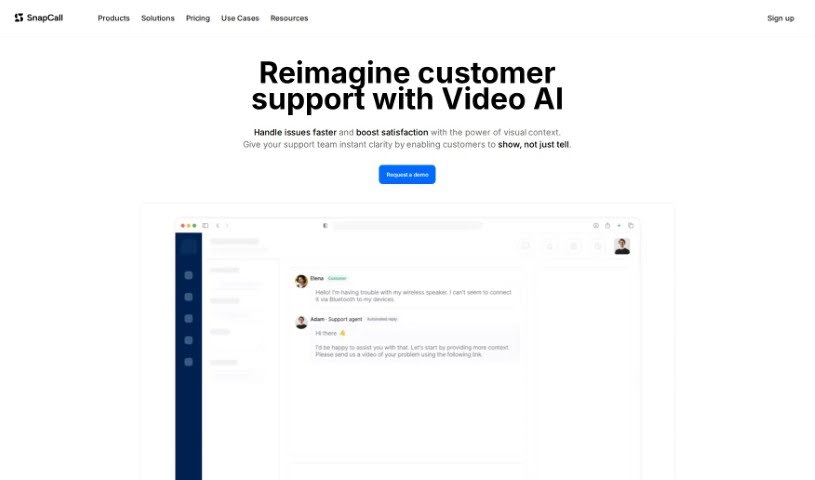
SnapCall is a customer engagement tool designed to really boost how customers interact with support teams, mainly through video. It is a way to make understanding and solving customer issues much smoother. It lets customers send in short video clips explaining what’s going on, which helps support folks get a clearer picture of the problem right away. Plus, it offers live video calls for those times when you need to sort things out in real-time. SnapCall also comes with some neat features like AI that can analyze those videos to give you useful insights, and it plays nicely with platforms you might already be using, like Zendesk and Salesforce. You’ll also find tools like SnapCall Assist, which is great for handling issues when you can’t talk live, and SnapCall Instant for those immediate customer interactions. And don’t worry about privacy; the platform keeps everything secure with encrypted video and data storage. So, in a nutshell, SnapCall’s main features are video clips, live video calls, AI analysis, and easy integration with popular platforms like Zendesk and Salesforce.
Who created SnapCall?
Snapcall was started by a dedicated team, with its founder leading the way. The company officially launched on November 28, 2023, with a clear mission: to make customer support better using video. The idea behind Snapcall is to simplify how customers and businesses connect. It gives customers tools to explain problems in detail using video clips or through live video calls. The platform also uses AI to analyze these videos, making sure issues are resolved quickly and effectively. You can use features like SnapCall Clips for support that relies on video, or SnapCall Calls for real-time customer chats. It also integrates smoothly with popular platforms like Zendesk and Salesforce.
What is SnapCall used for?
SnapCall is really versatile and can help with a bunch of things:
- Easy CRM Integration: It connects smoothly with your CRM platforms.
- Screen Sharing: You can share your screen to show what you mean.
- Real-time Customer Chat: Engage with customers instantly through audio or video calls.
- Video Support: Offer customer support where issues are explained using video clips.
- AI Summaries: Get AI-generated summaries of customer issues to quickly grasp the main points.
- Top-Notch Privacy: It ensures enhanced data protection and client privacy.
- Asynchronous Help: Resolve problems without needing to be on a live call, using video clips.
- Scheduled Calls: Set up calls for specific times to ensure timely interactions.
- AI Insights: Get actionable insights from analysis powered by AI.
- Smart Automation: Streamline your support workflows with intelligent automation.
- Visual Problem Solving: Use visual representations to solve problems more efficiently.
- Video-Based Resolution: Tackle issues effectively using video.
- Flexible Engagement: Connect with customers both asynchronously and in real-time.
- Easy Call Scheduling: The scheduling feature makes setting up calls a breeze.
- Quick Setup: Get calls started with minimal setup.
- Clear Visuals: See detailed visualizations of customer issues.
- Less Back-and-Forth: It cuts down on the need for endless emails or messages.
- Visual Insights: Gain actionable insights directly from visual information.
- Platform Compatibility: Integrates seamlessly with popular platforms.
- Data Security: Offers enhanced data protection.
- Encrypted Storage: Keeps your video and data securely stored and encrypted.
- Client Video Clips: Capture video clips of client issues.
- Manual Recording: You can manually record video calls.
- Auto Call Recording: Audio calls are recorded automatically.
- Snapshot Capture: Take snapshots during calls.
- Video Recording: Record your video sessions.
- Screen Recording: Record your screen activity.
- Voice Recording: Capture voice recordings.
- AI Transcripts: Get transcripts of your calls generated by AI.
- AI Summaries: Receive summaries of conversations created by AI.
- Contextual Summaries: The summaries are tailored to provide context.
Who is SnapCall for?
SnapCall is a great tool for a variety of roles focused on customer interaction and support:
- Customer Support Representatives
- Technical Support Specialists
- Sales Representatives
- Customer Support Specialists (again, it’s that important!)
- Client Service Managers
- CRM Integration Specialists
- Technical Support Teams
- Client Engagement Professionals
- Customer Success Managers
- Help Desk Support Staff
- Call Center Agents
- Service Agents
- Sales teams
- Customer Support Agents
- Technical Support Agents
- And generally, all customer service representatives!
How to use SnapCall?
To get the most out of SnapCall, here’s a simple guide:
- Get to Know SnapCall: First off, SnapCall is all about making customer interactions better through video. It helps improve how you connect and solve problems.
- Boost Customer Experience: Customers can use video clips to show you exactly what issues they’re facing. This makes it much easier for support teams to understand and fix things quickly.
- Key Features to Use: You’ve got video clips and live video calls for clear explanations. Plus, SnapCall’s AI can analyze videos to give you helpful insights, and it integrates smoothly with platforms like Zendesk, Salesforce, and ServiceNow.
- Try SnapCall Assist: For issues that don’t need an immediate live call, SnapCall Assist is perfect. You can record and send videos that detail the problem, which helps speed things up and makes your responses more efficient.
- Engage in Real-Time: With SnapCall Instant, you can jump on live video calls with customers right away, offering immediate support when it’s needed most.
- Schedule Your Calls: Use SnapCall Booking to set up calls between customers and your support team. This helps keep interactions structured and timely.
- Fit It Into Your Workflow: SnapCall integrates easily into how you already work. By allowing video clips and live calls, it transforms how you handle issues by using visual information.
- Leverage AI Video Analysis: The AI analyzes visual data from videos to pull out key insights. This means faster problem-solving and more efficient support.
- Stay Protected & Private: SnapCall takes data protection and client privacy seriously. It uses encrypted video and data storage to keep sensitive information safe.
- Start with a Free Trial: You can try SnapCall for 14 days for free – no credit card needed! It’s a great way to see firsthand how it can benefit your customer engagement.
By following these steps, you’ll be able to use SnapCall effectively to improve how you engage with customers, resolve issues efficiently, and integrate it smoothly into your support processes.