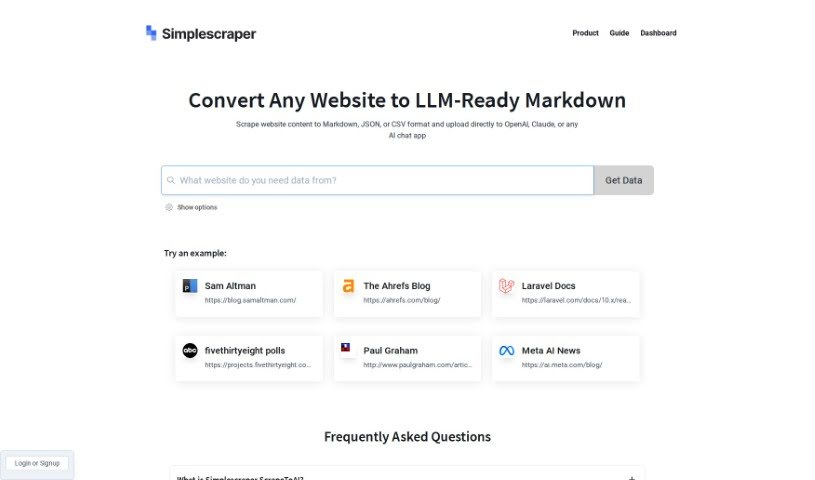
Screenshot of Simplescraper ScrapetoAI

Simplescraper ScrapetoAI

Discover what Simplescraper ScrapetoAI is and how to use it effectively in 2025. We'll explore its features and see how it stacks up against other automation tools.

Screenshot

What is Simplescraper ScrapetoAI?

Simplescraper’s ScrapetoAI is a handy web scraping tool built to pull data from websites really efficiently. It’s got a super easy-to-use interface, meaning you can create your own web scraping agents without needing to write a single line of code. You just tell it what data you’re after by clicking on the website elements you want, and it handles the rest. ScrapetoAI makes data extraction a breeze with features like automatic pagination handling, letting you schedule scraping tasks, and exporting your data in all sorts of formats. Basically, it’s designed to simplify web scraping and make it accessible to everyone, even if you’re not a programmer.

Who created Simplescraper ScrapetoAI?

ScrapetoAI comes from Simplescraper. While the founder’s details and specific company information aren’t readily available in the documents I have, Simplescraper itself offers a tool for pulling data from websites for custom GPTs. This means you can grab data in formats like Markdown, JSON, or CSV, which is perfect for integrating with platforms like OpenAI and Claude.

What is Simplescraper ScrapetoAI used for?

  • Web scraping made simple: Whether you’re a developer or prefer a no-code approach, scraping web data is as easy as clicking, running, and extracting. No configuration, parsing, or code needed!
  • Get structured data fast: Simplescraper lets you extract structured data quickly, without any setup or coding.
  • Actionable data delivery: You can pull data via API or push it straight to your favorite web apps, making it instantly usable.
  • Automation capabilities: You’re able to automate your scraping tasks, either running them locally or scaling them up in the cloud.
  • API integration: Websites you scrape with Simplescraper essentially become APIs, giving you access to fresh data whenever you need it.
  • Insights from website data with AI: The tool helps you summarize, analyze, format, and really understand the data you’ve extracted.
  • Enhanced data extraction: Simplescraper can even help you review scraped business listings using SWOT analysis and generate due diligence questions, all thanks to its AI capabilities.
  • Web scraping toolkit: It’s a complete data extraction solution, offering things like proxy rotation, no concurrency limits, reCaptcha solving, and automatic retries.
  • Scrape recipes: Simplescraper provides ready-made scrape recipes, making it super easy to get started and apply them.
  • Positive user feedback: People really love this tool, giving it a perfect 5-star rating on the Chrome Store!
  • Extract data from any website in seconds.
  • Get structured data fast with no configuration, parsing, or code needed.
  • Pull data via API or push it directly to web apps for instant availability.
  • Automate scraping locally or at scale in the cloud.
  • Summarize, analyze, format, and understand extracted data.
  • Enhance data extraction with AI.
  • Review scraped business listings data using SWOT analysis.
  • Generate a list of questions for due diligence based on scraped data.
  • Send results to Zapier via webhook.
  • Pull insights from website data using AI.

Who is Simplescraper ScrapetoAI for?

  • Data Analysts
  • Digital marketers
  • Researchers
  • E-commerce Managers
  • Journalists
  • Business analysts
  • SEO specialists
  • Product Managers
  • Financial Analysts
  • Real Estate Agents

How to use Simplescraper ScrapetoAI?

Ready to start using ScrapetoAI? It’s pretty straightforward. Just follow these steps:

  1. Access the Tool: First, head over to the ScrapetoAI website or the platform where the tool is hosted.
  2. Create Your Account: You’ll need to sign up for an account. Just use your email address and create a password.
  3. Log In: Once you’ve signed up, enter your login details to access your account.
  4. Explore the Interface: Take a moment to get familiar with the ScrapetoAI tool’s interface. See what features and options are available.
  5. Input Your Data: Now, upload or input the data you want to work with. This could be text, images, or website URLs.
  6. Choose Your Functions: Select the specific functions or tools within ScrapetoAI that you want to use for your data analysis or processing.
  7. Run the Analysis: Start the process by clicking the relevant buttons to run the functions you’ve chosen on your data.
  8. Review the Results: After the analysis is done, take a look at the results ScrapetoAI provides. This might be summarized data, helpful insights, or processed files.
  9. Save or Export: You can save your results right there on the ScrapetoAI platform, or export them to your device for later use or deeper analysis.
  10. Feedback and Support: If you have any thoughts on the tool, feel free to share your feedback. And if you run into any questions or issues, check out the support options available.

Following these steps should help you make the most of ScrapetoAI for all your data analysis and processing needs.

Related AI Tools

Discover more tools in similar categories that might interest you

Stay Updated with AI Tools

Get weekly updates on the latest AI tools, trends, and insights delivered to your inbox

Join 25,000+ AI enthusiasts. No spam, unsubscribe anytime.