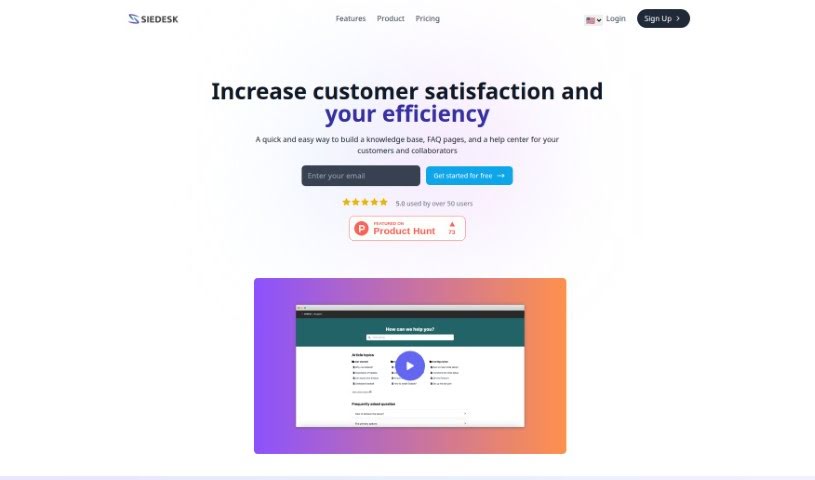
Screenshot of Siedesk

Siedesk

Discover what Siedesk is and how to use it effectively in 2025. We'll explore its features and see how it stacks up against other customer service tools.

Screenshot

What is Siedesk?

Siedesk is a smart tool that uses AI to help you build your own internal and external knowledge bases, create handy FAQ pages, and set up customer support centers. It’s packed with features designed to make your life easier. Think GPT-assisted writing for your articles, a help center you can really make your own with custom design options, and even custom domain names with SSL certificates for that professional touch. Plus, it helps you with SEO optimization and keeps you in the loop with real-time performance tracking. Essentially, Siedesk wants to boost your business’s efficiency, save you precious time, and make your customers happier by giving you a straightforward platform to create and manage all your support resources. It’s already being used by over 50 people, and they seem to really like it, giving it a top rating for its services.

Who created Siedesk?

While the specific founder’s name isn’t mentioned in the details we have, we know Siedesk is an AI-powered tool focused on knowledge management. It’s designed to help businesses create both internal and external knowledge bases, FAQ pages, and support centers. What’s cool is that it includes features like GPT-assisted writing for articles, customizable help center designs, and even custom domain names with SSL certificates. You also get SEO optimization and real-time performance tracking for your help centers. The main goal here is to make businesses more efficient and boost customer satisfaction. It’s already got over 50 users who’ve given it a perfect 5.0 rating, which speaks volumes about its service.

What is Siedesk used for?

Siedesk is a versatile tool that helps you with a bunch of things:

  • Building a knowledge base: Create and manage both internal and external knowledge bases with ease.
  • Creating FAQ pages: Set up a dedicated FAQ page to quickly answer your customers’ most common questions.
  • Building a help center: Develop a comprehensive help center for your customers and collaborators.
  • Writing clear articles: Craft concise and easy-to-understand articles for your frequently asked questions.
  • Customizing your help center’s look: Personalize the appearance of your help center to match your brand’s style.
  • Publishing with a custom domain: Make your help center look professional by publishing it with your own custom domain name.
  • Tracking performance: Keep an eye on how your help center is doing with real-time statistics.
  • Using AI for writing: Take advantage of AI, specifically GPT, to help you write quality articles.
  • Optimizing for SEO: Make sure your help center is search engine friendly so more people can find it online.
  • Monitoring engagement: Keep track of article views, likes, and dislikes to see what resonates with your audience.
  • Continuous assistance: Get ongoing help with building your help center.
  • Internal and External Knowledge Bases: Effortlessly create and manage both types of knowledge bases.
  • AI-Powered Assistance: Use GPT to help you write clear and relevant knowledge base articles and FAQs.
  • Customizable Help Center: Make your help center look exactly how you want, matching your brand.
  • Custom Domain with SSL: Publish your help center using your own domain, complete with a free SSL certificate for security.
  • Search Optimization: Fine-tune your help center for SEO to improve its online visibility.
  • Performance Tracking: Keep tabs on real-time analytics for your content, including views, likes, and dislikes.
  • Track Article Performance: Monitor searches, views, likes, and dislikes for every article you publish.
  • Effortless Knowledge Base Management: Create and manage internal and external knowledge bases without a hassle.
  • Easy FAQ Setup: Quickly set up a FAQ page to address common customer questions.
  • Quality Article Writing with AI: Use AI (Artificial Intelligence) and GPT to write high-quality articles.
  • Secure Data with SSL: Get a free SSL certificate to protect data and build customer trust.
  • Improve Online Visibility: Optimize your help center for SEO to get found more easily online.
  • Personalize Your Help Center: Customize the look and feel to align with your brand.
  • Enhance Brand Image: Boost your brand image and customer trust with a customizable domain and SSL certificate.
  • Improve Customer Satisfaction: Increase customer satisfaction and productivity with the features provided for customer service and collaboration.
  • Offer Quality Support: Provide excellent support using a customizable domain and SSL certificate.
  • Monitor Content Performance: Keep track of real-time analytics for your content.

Who is Siedesk for?

Siedesk is a great tool for a variety of roles, including:

  • Customer Support Representatives
  • Knowledge Managers
  • Content Writers
  • SEO Specialists
  • Customer Service Representatives
  • Technical Support Specialists
  • Customer Support teams
  • Content Management professionals
  • Knowledge Management specialists
  • Customer Service Managers
  • Technical Writers
  • Customer Success Managers
  • Product Managers
  • Content Creation teams

How to use Siedesk?

Here’s a straightforward guide to using Siedesk effectively:

  1. Create Your Knowledge Base: Start by using Siedesk to build your internal and external knowledge bases. You can easily create and manage articles, and the GPT feature helps ensure your content is clear and relevant.
  2. Develop Your FAQ Page: Set up a FAQ page quickly to handle common customer questions. Using GPT to write these articles can really speed up the process and make your help center more efficient.
  3. Secure with SSL and Optimize for SEO: Take advantage of a free SSL certificate to keep customer data secure and build trust. Also, optimize your help center for SEO so it ranks better and more people can find it online.
  4. Customize with Your Domain and Branding: Make your help center stand out by customizing it with your own domain name. You’ll also get a free SSL certificate for added security. This personalization helps strengthen your brand image and builds customer trust.
  5. Track Performance in Real-Time: Keep an eye on how your help center is performing. You can monitor customer searches, how many views articles get, and their likes and dislikes. This data helps you refine your content and make popular articles even better.
  6. Choose Your Pricing Plan: Siedesk offers flexible pricing plans to fit different budgets. You can find a plan that suits your needs and start enjoying quality support.

By following these steps, you can efficiently use Siedesk to build a comprehensive and user-friendly help center that perfectly meets the needs of both your customers and your internal teams.

Related AI Tools

Discover more tools in similar categories that might interest you

Stay Updated with AI Tools

Get weekly updates on the latest AI tools, trends, and insights delivered to your inbox

Join 25,000+ AI enthusiasts. No spam, unsubscribe anytime.